EasyManua.ls Logo

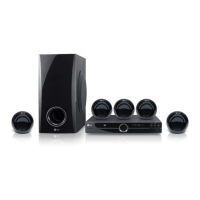
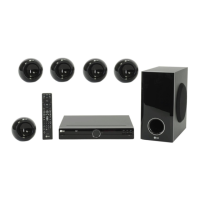
LG HT304SL - User Manual

LG HT304SL
20 pages
Print Icon
To Next Page IconTo Next Page
Loading...
Model : HT304SU (HT304SU-AM, SH34SU-S/W)
HT304SL (HT304SL-AM, SH34SL-S/W)
HT304SQ (HT304SQ-AM, SH34SQ-S/W)
P/NO : MFL61944523
As an ENERGY STAR
®
Partner,
LG has determined that this
product or product models meet
the E
NERGY STAR
®
guidelines for
energy efficiency.
ENERGY
STAR
®
is a U.S. registered mark.
Before connecting, operating or adjusting this product,
please read this instruction booklet carefully and completely.
Full HD up-scaling (1080p)
(Go to page 6)
Portable In
(Go to page 15)
USB Direct Recording
(Go to page 16)
HOME THEATER SYSTEM
HT304SL-AM_DCHLLLK_ENG_4523 3/2/09 7:20 PM Page 1

Other manuals for LG HT304SL

Questions and Answers

  • T
    Thomas MccoyAug 18, 2025
    How to fix no picture on LG Home Theater System?
    • C
      Chelsea LeonardAug 19, 2025
      If your LG Home Theater System shows no picture, ensure the TV is set to the correct video input mode to receive the DVD signal. Also, check that the video cables are securely connected to both the TV and the DVD receiver.
  • C
    clarkjenniferAug 21, 2025
    How to fix no picture on my LG Home Theater System?
    • C
      Christopher BrownAug 21, 2025
      If your LG Home Theater System shows no picture, it might be because the TV is not set to receive the DVD signal. Select the appropriate video input mode on the TV so the picture from the DVD Receiver appears on the TV screen. Also, ensure the video cables are securely connected to both the TV and DVD Receiver.
  • H
    hernandezcynthiaAug 23, 2025
    Why is there no sound from my LG HT304SL?
    • R
      Rebecca LyonsAug 23, 2025
      If you experience little or no sound from your LG Home Theater System, verify that the connected equipment is set to receive the DVD signal output. Ensure the audio cables are correctly and securely connected to both the speakers and the receiver. If the issue persists, try replacing the audio cables, as they might be damaged.
  • S
    sancheznicholasAug 26, 2025
    Why is there little or no sound coming from my LG HT304SL Home Theater System?
    • S
      Sheila WigginsAug 26, 2025
      If you experience little or no sound with your LG Home Theater System, check that the equipment connected via the audio cable is set to receive DVD signal output. Select the correct input mode of the audio receiver. Also, ensure the audio cables are correctly connected to the speakers or receiver. If the problem persists, the audio cables may be damaged; consider replacing them.
  • D
    Deanna SheltonAug 28, 2025
    How to fix no picture on my LG Dvd receiver?
    • K
      Kristen JonesAug 28, 2025
      If your LG Dvd receiver is not displaying a picture, ensure that your TV is set to the correct video input mode to receive the DVD signal. Also, verify that the video cables are securely connected to both the TV and the DVD receiver.
  • J
    Jenny OnealAug 30, 2025
    What to do if my LG Dvd receiver won't play a DVD/CD?
    • S
      Savannah MorrisAug 30, 2025
      If your LG Dvd receiver won't play a DVD/CD, make sure a disc is inserted correctly with the label side facing up. Ensure that the disc is playable by checking the disc type, color system, and regional code. Also, close any open menus on the screen by pressing the SETUP button. If a parental lock is enabled, enter your password or change the rating level.
  • R
    Rachel WheelerSep 1, 2025
    Why is there no sound coming from my LG Dvd receiver?
    • J
      Jonathan QuinnSep 1, 2025
      If you experience little or no sound from your LG Dvd receiver, check that the equipment connected via the audio cable is set to receive the DVD signal output. Also, ensure the audio cables are correctly connected to the speakers or receiver. If the problem persists, the audio cables may be damaged and need replacement with a new one.
  • B
    Brian JensenSep 3, 2025
    What to do if DVD/CD will not play on LG Home Theater System?
    • T
      Tyler CunninghamSep 4, 2025
      If your LG Home Theater System is not playing a DVD/CD, first, make sure a disc is inserted correctly with the label side facing up. Ensure it is a playable disc and that the menu is closed by pressing the SETUP button. If a parental lock is enabled, enter your password or adjust the rating level.
  • R
    Rachel SmithSep 6, 2025
    What to do if radio stations can't be tuned in properly on LG Home Theater System?
    • S
      Sara SalazarSep 6, 2025
      To resolve issues with tuning into radio stations on your LG Home Theater System, check the antenna connection and adjust its position. If the signal is weak, manually tune to the station.
  • M
    Molly MoralesSep 8, 2025
    What to do if my LG HT304SL won't play DVDs or CDs?
    • M
      Matthew WaltersSep 8, 2025
      If your LG Home Theater System isn't playing DVDs or CDs, first, make sure a disc is inserted correctly with the label or printed side facing upwards. If a disc is already inserted, ensure it is a playable disc, compatible with the system's disc type, color system, and regional code. Also, check if the menu is open on the screen and press SETUP to close it. Finally, check if a parental lock is preventing playback and enter your password or change the rating level if necessary.

Summary

Safety Precaution

General Safety Warnings

Summary of electrical shock, water exposure, and laser system warnings.

Power Cord Safety

Guidelines for safe use and maintenance of the power cord.

Setting Up Your DVD Receiver

Connecting Speakers

Guide to connecting the six speakers to the DVD receiver and their placement.

Connecting Your System

Video and Audio Connections

Instructions for connecting video and audio cables to your TV.

Video Output and Input Settings

Resolution Settings

How to adjust video output resolution for component and HDMI.

Remote Control Operations

Remote Control Button Functions

Explanation of key buttons and their functions on the remote control.

Initial Setup Procedures

Language Settings

Steps to set the initial display language for the unit.

Area Code Setup

Guide to setting the geographical area code for proper playback.

Display and Audio Settings

Audio Settings and Speaker Configuration

Adjusting audio features like HD AV Sync and setting up 5.1 surround sound speakers.

External Device Connectivity

Troubleshooting Common Issues

No Power or Picture Issues

Solutions for problems related to power and video display.

Sound and Disc Playback Problems

Troubleshooting steps for audio issues and disc playback failures.

LG HT304SL Specifications

General IconGeneral
TypeHome Theater System
Speaker Configuration5.1 Channel
Disc PlaybackDVD, CD
DVD PlayerYes
HDMI OutputYes
USB PlaybackYes
BluetoothNo
Audio FormatsMP3, WMA, AAC
RadioFM
ConnectivityHDMI, USB

Related product manuals