OPTICAL In connection
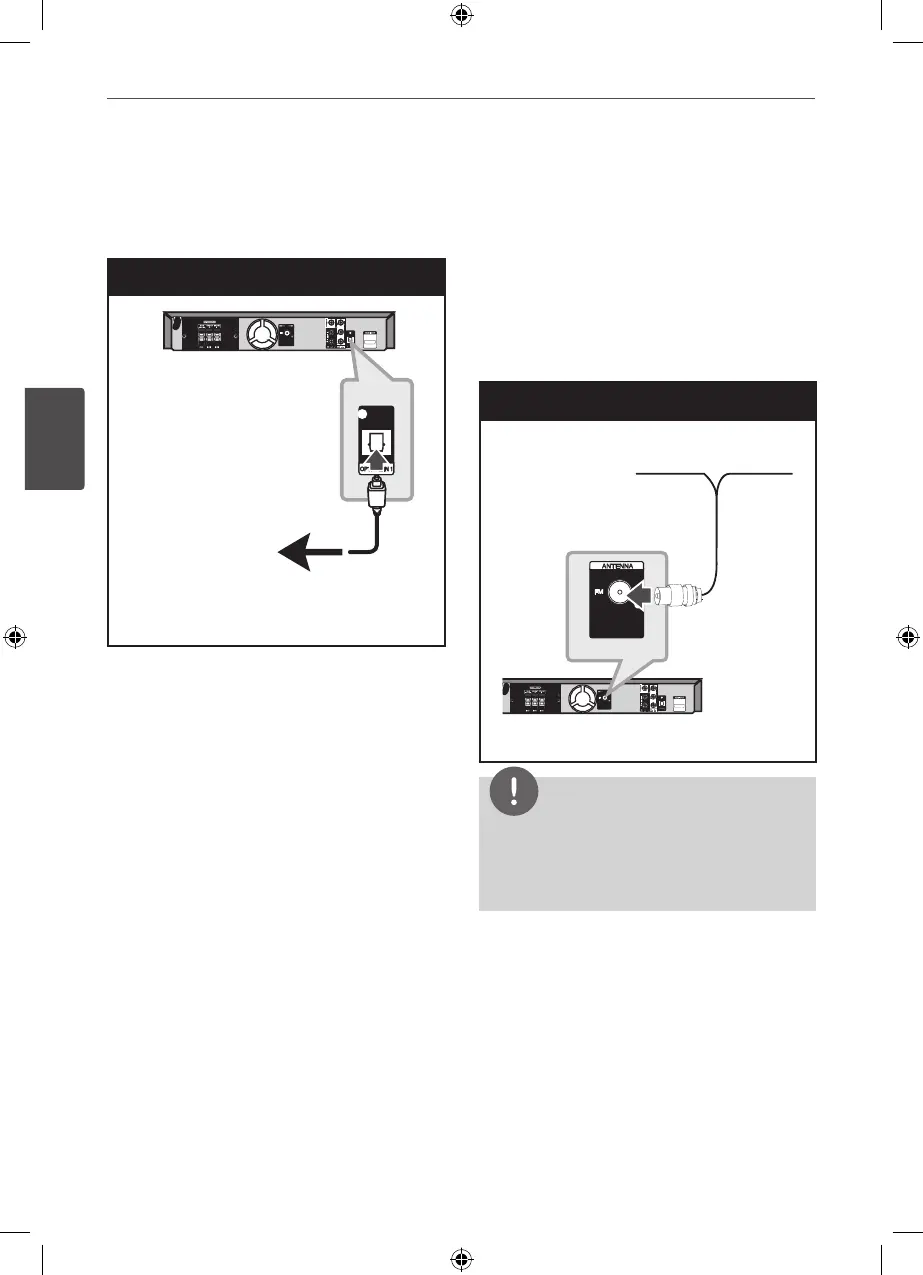
Connect an optical output of Unit (or Digital
Device etc) to the OPTICAL IN connector.
OPTICAL IN Connection
To the digital
optical output jack
of your component
Home theater speaker ez setup
Listen to sound from TV, DVD and Digital
Device with 2.1 or 2ch mode. Even in power o
mode, if you press OPTICAL, then power is on
and automatically changed to AUX OPT mode.
1. Connect the unit’s OPTICAL IN jack to jack
on optical out of your TV (or Digital Device
etc.).
2. Select the AUX OPT by using the OPTICAL.
To select the AUX OPT directly
3. Listen sound with 2.1 or 2ch speaker.
4. To escape from AUX OPT by using the
OPTICAL.
Function is retuned to previous one.
Antenna Connection
Connect the supplied FM antenna for listening
to the radio.
Connect the FM Wire antenna to the FM
antenna connector.
Antenna Connection
NOTE
Be sure to fully extend the FM wire antenna.
After connecting the FM wire antenna, keep it as
horizontal as possible.


 To Next Page