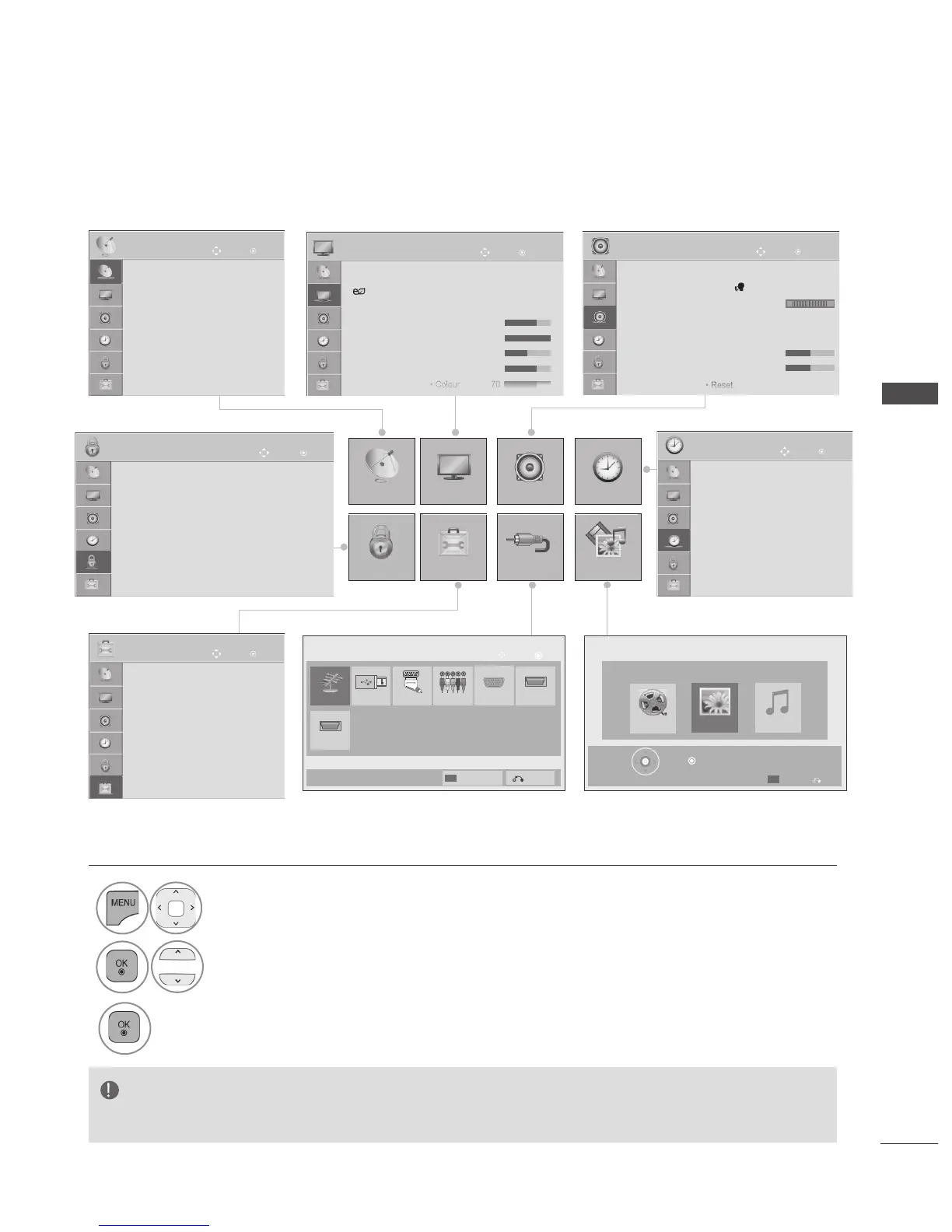
WATCHING TV / PROGRAMME CONTROL
Your TV's OSD (On Screen Display) may differ slightly from that shown in this manual.
OK
Move
● Auto Tuning
● Manual Tuning
● Programme Edit
● CI Information
SETUP
• Press the button to return to normal
TV viewing.
• Press the or button to
move to the previous menu screen.
► It is not possible to use in Analogue mode.
OK
Move
● Clock
● Off Time : Off
● On Time : Off
● Sleep Timer : Off
● Alarm : Off
TIME
OK
Move
● Set Password
● Lock System : Off
● Block Programme
● Parental Guidance : Blocking Off
● Input Block
● Key Lock : Off
LOCK
● Demo Mode : Off
● Language(Language)
● Country : UK
● Disability Assistance
● Power Indicator
● Factory Reset
● Set ID : 1
OK
Move
OPTION
OK
Move
● Aspect Ratio : 16:9
● Energy Saving : Off
● Picture Mode : Standard
• Backlight 70
• Contrast 100
• Brightness 50
• Sharpness 70
• Colour 70
PICTURE
OK
Move
● Auto Volume : Off
● Clear Voice II : Off 3
● Balance 0
● Sound Mode : Standard
• Infinite Sound : Off
• Treble 50
• Bass 50
• Reset
AUDIO
L R
SETUP PICTURE
LOCK
OPTION
AUDIO
INPUT
TIME
MY MEDIA
Antenna USB
HDMI2
HDMI1
AV
Component
RGB
OK
Move
Input List
Input Label
Exit
MY MEDIA
Press OK( ) to see photos from the USB.
Exit
Option
Photo List Music List
Movie List
1
Display each menu.
2
Select a menu item.
3
Move to the pop up menu.






 To Next Page