- 9 -
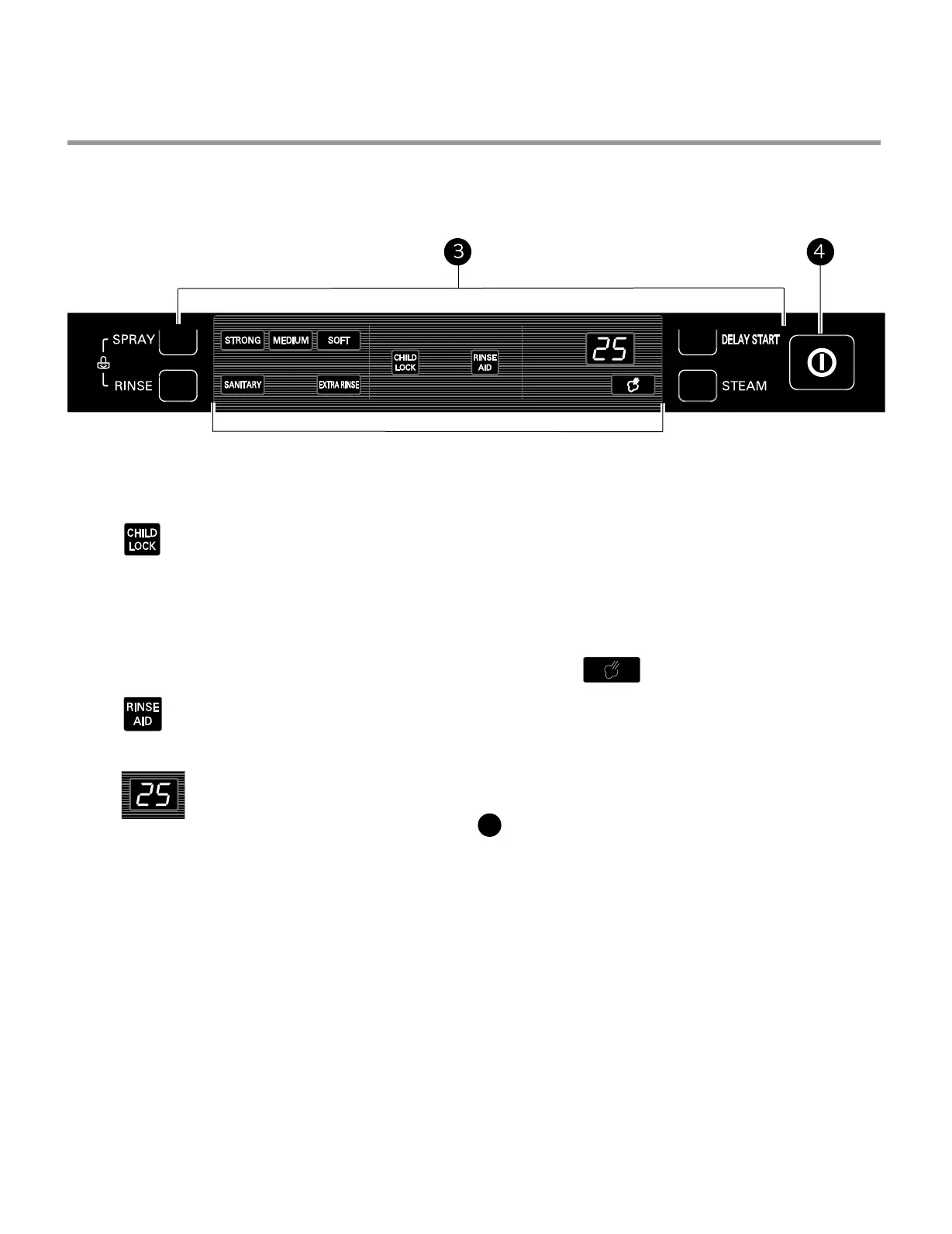
CHILD LOCK
Lamp will turn on when Child Lock
setting is on.
• To lock/unlock the buttons, press SPRAY
and RINSE simultaneously for 3 seconds
with the door open.
• Lock the control buttons during cycle operation
to prevent settings from being changed.
RINSE AID
Refill with rinse aid when the lamp
turns on.
DIGITAL DISPLAY
The Digital Display on the control panel
shows the estimated cycle and option
times in a two-digit display.
When the dishwasher is powered up, the display
will be blank. When the cycle and options are
selected, the display will show the total estimated
time to complete those selections. During
operation, the display shows the remaining
estimated operating time.
NOTES:
• The estimated time shown in the display does
not include delay times for heating water, etc.
• If total time exceeds 99 minutes, the display
shows times in whole hours. (2H, 3H, etc.)
• If Delay Wash is selected,
DELAY START
• To delay the start of a selected cycle, press
the Delay Start button.
• Each time Delay Start is pressed will delay
the start of the cycle by one additional hour.
• The delay start time can be set from 1 to 12
hours in one-hour increments.
STEAM
• Press the Steam button to add steam to a
selected cycle.
• The Steam symbol light will stay on when the
STEAM option has been selected.
• The symbol light will blink while steam is being
injected into the dishwasher.
POWER
• Pressing the Power button turns on power
to the controls.
• After the cycle is complete, the power
automatically turns off for safety and economy.
• If there is a power surge, power outage,
or disruption of any kind, the power will be
automatically turned off for safety, and the
cycle will need to be restarted.
DISPLAY AREA
4



 To Next Page