3. CIC AND SERVICE CENTER
- 40 -
Copyright © 2012 LG Electronics. Inc. All right reserved.
Only for training and service purposes
LGE Internal Use Only
No FAQ Q&A
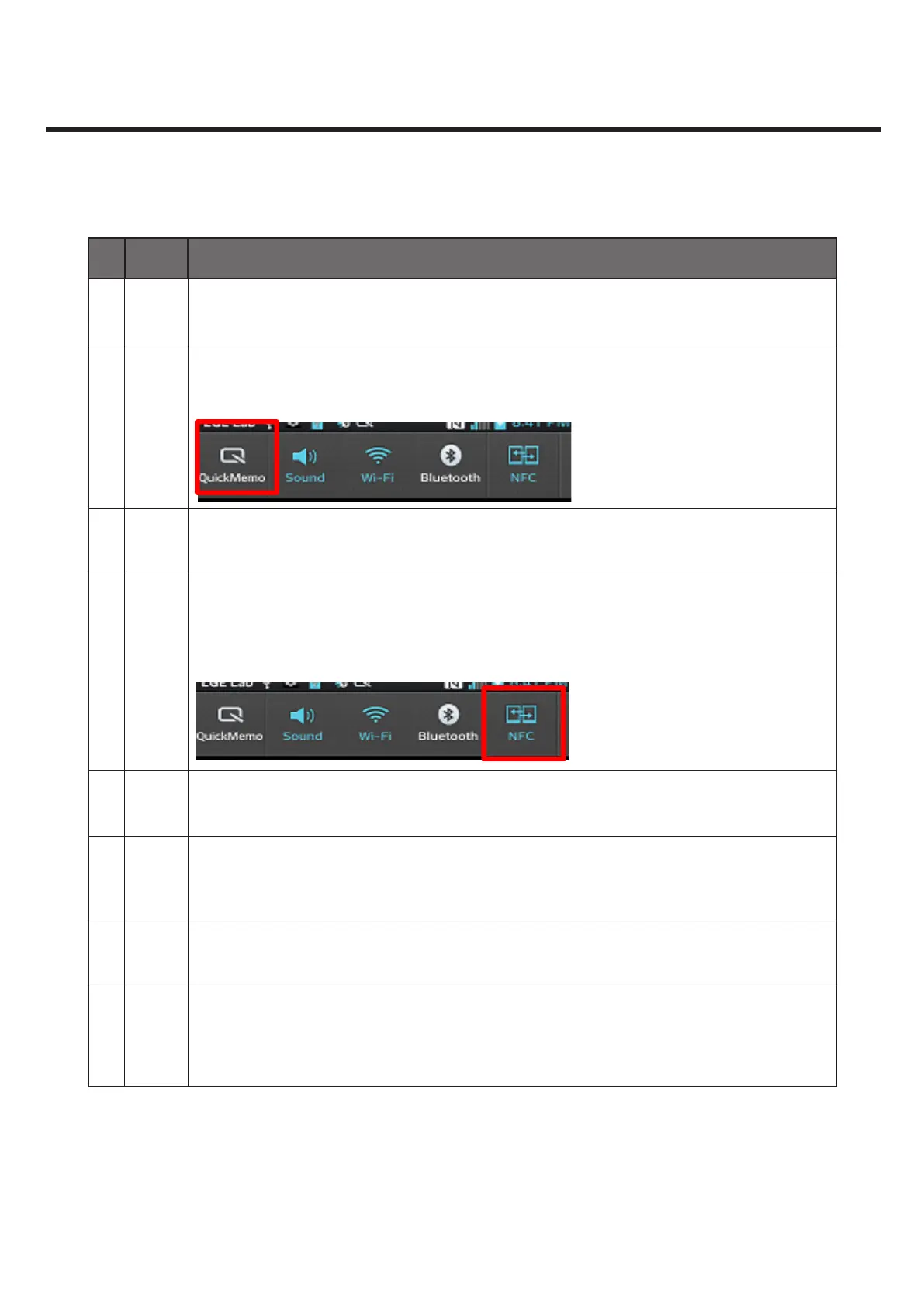
29 Q What should I do to run Quick Memo?
A
Press Volume Up + Down at the same time.
Go to Quick Setting and select Quick Memo.
30 Q What should I do to use Android NFC Beam?
A
Go to Quick Setting and see if Beam feature is active. Then, get the back side of
your phone together with that of the other’s and touch any information you want
to share, e.g. Browser Pages, YouTube video, Pepple contacts etc. And you’ll see the
touched information move to the other Phone.
31 Q The screen won’t work. What should I do?
A
Press the Power button for 10 sec. Then, it will be rebooted forcefully, and the
screen will work normally.
32 Q The phone is too hot.
A
The phone gets hot when you use it for a long time for calling, playing games and
surng the internet. This won’t cause any problem to the phone’s performance or
product quality.



 To Next Page