Non LCD FHD-HD DASHCAM
21
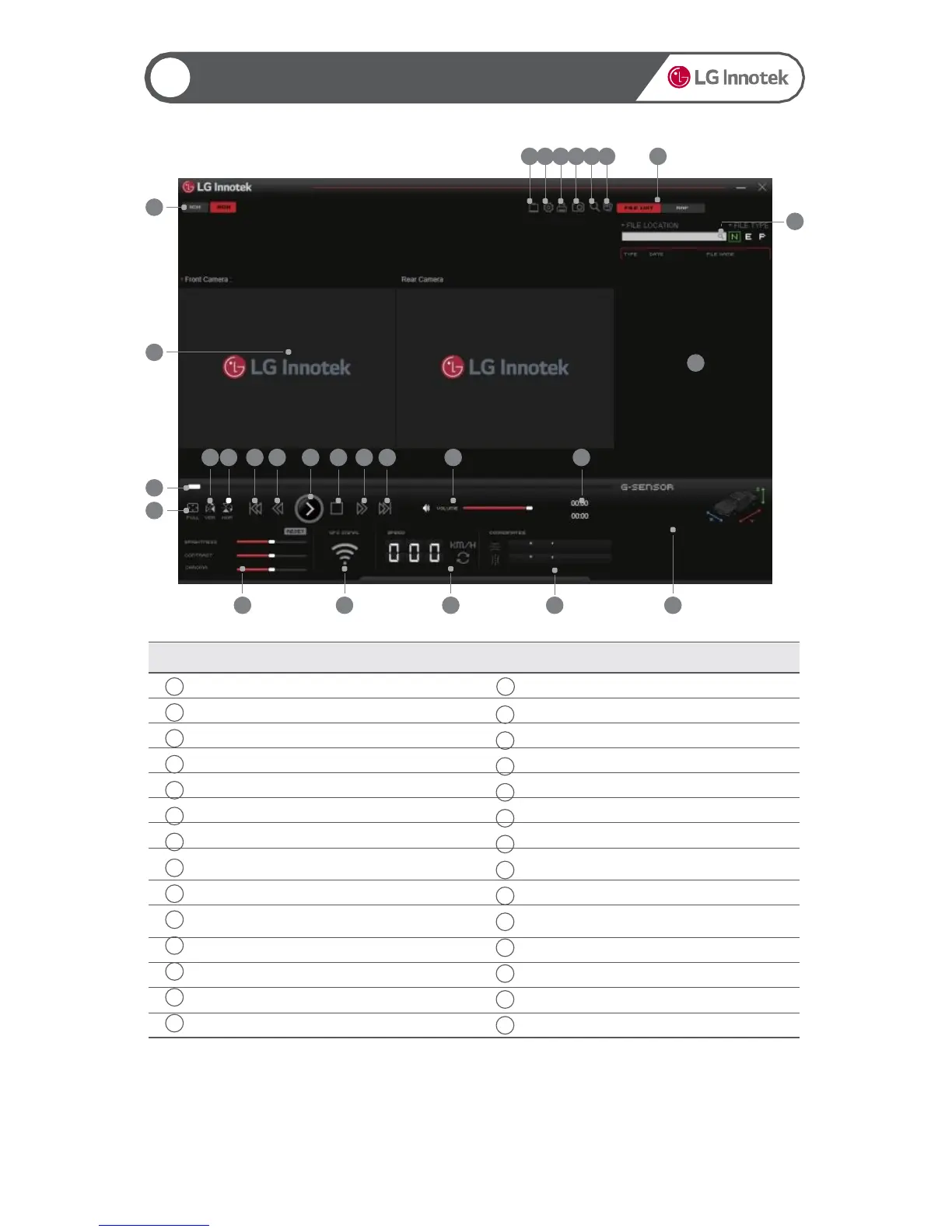
Using the PC Viewer
▶Screen Organization
<Windows PC Viewer>
- LG Innotek recommends above
Windows7(32/64bit)/Intel core i3/RAM 2GB/Display 1920x1080
< MAC PC Viewer>
- LG Innotek recommends above OSX : 10.11.x (OS X El Capitan)
19
8
2 3 4 5 6 7
10
1
9
28
13 14 15 16 17 18 19 20 21 22
23 24 25 26 27
11
12
Item Description Item Description
1
Front channel/Front&rear channels
15
Play the previous file
2
Viewer settings
16
Move 5 seconds backward
3
Black box settings
17
Play or pause
4
Print the video
18
Stop
5
Capture the video
19
Move 5 seconds forward
6
Zoom
20
Play the next file
7
Separate the files
21
Adjust voice volume
8


 To Next Page