Non LCD FHD-HD DASHCAM
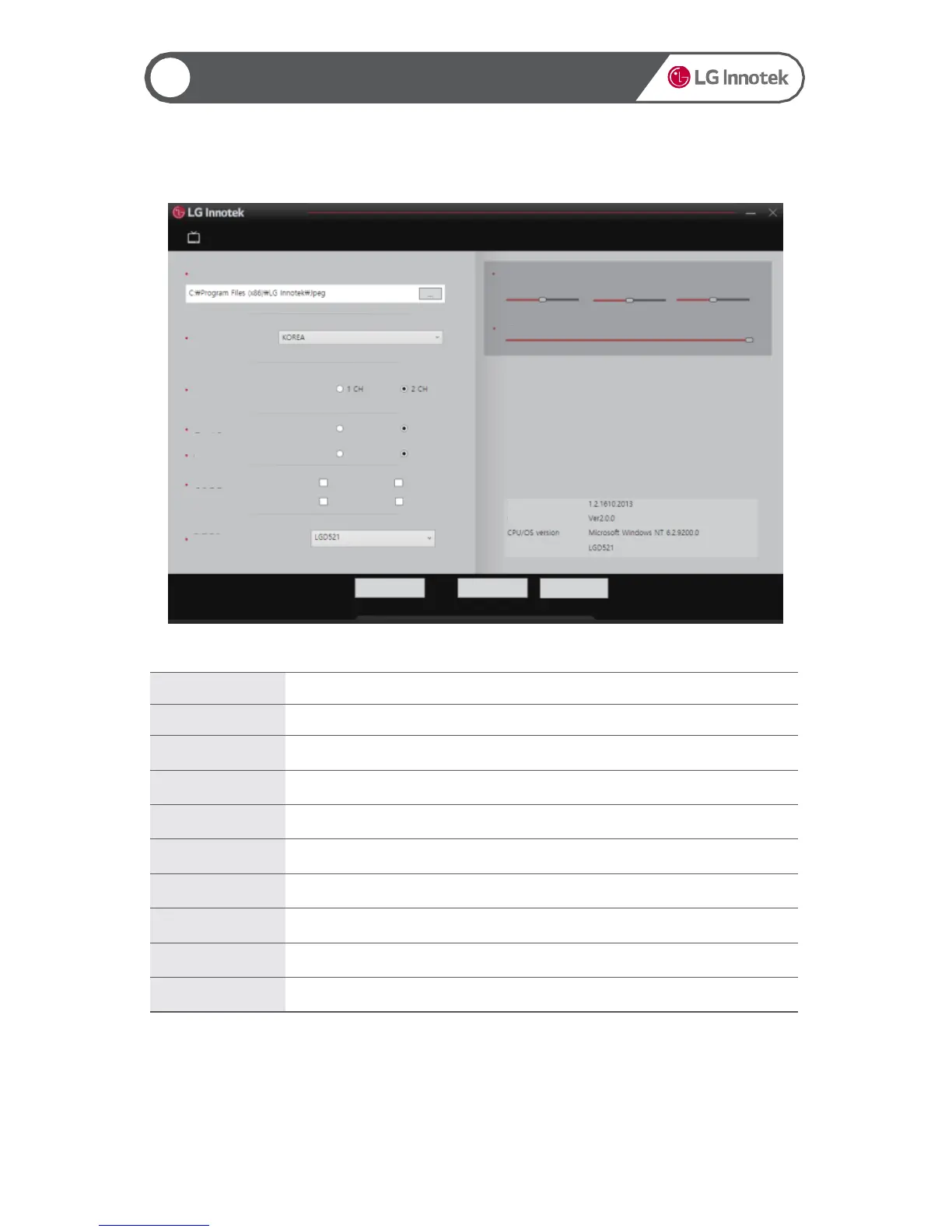
Item Description
JPEG Storage Path Set the storage path of captured screen image files.
Select Language Select user language.
Play Mode Set the number of channels.
Repeated Play Set whether to play the video repeatedly.
Always at the Top Set whether to display the viewer window always at the top.
Flip Video Set the vertical/horizontal flip of a video.
Product Model Select the product model.
Video Adjustment Show the brightness/contrast/saturation of the Viewer play screen.
Volume Show the video volume of the Viewer play screen.
▶ Viewer Settings
20
21
Using the PC Viewer
Video Adjustment
Brightness Contrast Saturation
Volume
JPEG Storage Path
Select Language
Play Mode
Repeated Play
Always at the Top
Yes
Yes
No
No
Flip Vertically
Flip Horizontally
Flip Horizontally
Flip Vertically
Rear Camera
Front Camera
Flip Video
Product Model
Version/Build Date
Device Information
DLL Version
Reset OK Cancel


 To Next Page