Need help?
Do you have a question about the LG LHB655NW and is the answer not in the manual?
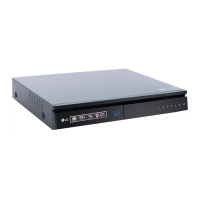
Describes the input/output ports and controls on the front and rear of the system.
Step-by-step guide for physically putting the speakers together.
Visual guide for connecting speakers to the main unit and wireless receiver.
Instructions for pairing the wireless receiver with the main player for surround sound.
Explains how to connect the system to a TV using HDMI ARC and HDMI/Optical cables.
Overview of the main menu and its functions displayed on the TV after setup.
Information on using the LG AV Remote App and other features like LG Sound Sync.
Details on power requirements, dimensions, and amplifier output.
Instructions on how to replace the battery in a component, likely a remote.
Information on obtaining software updates and contacting customer support.
Details about the power supply, plug, and wiring safety precautions.
Information regarding open source licenses and obtaining source code.
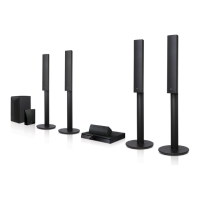
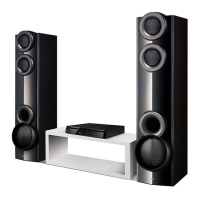
This document serves as a simple manual for an LG 3D Blu-ray™ / DVD Home Theater System, model LHB655NW, providing essential information for setup and basic operation. For advanced features and a comprehensive understanding, users are directed to download the full Owner's Manual from the LG website.
The LG Home Theater System is designed to deliver an immersive audio-visual experience, combining the capabilities of a 3D Blu-ray™ and DVD player with a multi-channel speaker system. It allows users to enjoy movies, music, and photos from various sources, including optical discs (Blu-ray, DVD, CD), USB devices, and network-connected services. The system supports 3D content playback, enhancing the viewing experience with compatible televisions.
At its core, the system functions as a central hub for home entertainment. It decodes and plays back audio and video signals from discs, providing high-quality sound through its array of speakers. The "Home Menu" acts as a user-friendly interface, appearing on the TV screen after initial setup, offering access to various functions such as Movie, Music, Photo, Premium content, Input selection, and Settings. This menu is designed to be intuitive, allowing users to navigate and select their desired entertainment options with ease.
The system incorporates several connectivity options to integrate with other devices in a home entertainment setup. It features HDMI ARC (Audio Return Channel) for simplified audio connection with compatible TVs, allowing audio from the TV to be sent back to the home theater system through a single HDMI cable. Additionally, it supports HDMI and Optical connections for broader compatibility with various TV models. USB ports are provided for playing media files directly from USB storage devices. For audio input, an optical input is available, and an AUX (L/R) input allows connection to analogue devices. A microphone input is also included, suggesting potential karaoke or voice-related functionalities.
Beyond physical media, the system is equipped for network connectivity, enabling access to online services and content. This requires the player to be connected to the internet, either through a wired Ethernet connection or wirelessly. The "Premium" section in the Home Menu likely provides access to streaming services and other online entertainment platforms.
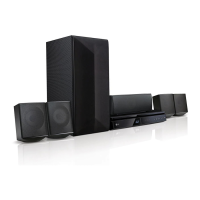
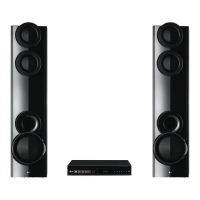
The audio output is managed through a speaker assembly that includes multiple speakers, typically a subwoofer, center speaker, surround speakers (left and right), and front speakers (left and right). The system is designed to create a surround sound environment, enhancing the realism and depth of audio playback for movies and music.
Setting up the LG Home Theater System involves several key steps, starting with speaker assembly and connection, followed by TV connection, and finally, network setup for online features.
Speaker Assembly and Connection: The manual provides a visual guide for assembling the speakers, which typically involves attaching the speaker stands or bases. Once assembled, the speakers need to be connected to the main unit. The system features a "Wireless Receiver" for the rear speakers, simplifying cable management and offering more flexibility in speaker placement. To pair the wireless receiver with the main player, users need to connect the rear speakers to the wireless receiver and then connect the power cord of the wireless receiver to an outlet. The player and wireless receiver will automatically connect, indicated by a yellow-green LED on the wireless receiver. If pairing issues occur, specific instructions are provided, including adjusting the volume level of the player to minimum, pressing and holding the MUTE button on the remote control, and then pressing and holding the PAIRING button on the rear of the wireless receiver.
TV Connection: Two primary methods for connecting the player to a TV are outlined:
Home Menu Navigation: After the initial setup, the "Home Menu" becomes the central point of interaction. Users can navigate through options like Movie, Music, Photo, Premium, Input, and Settings to access various functionalities. The menu is designed for ease of use, allowing quick access to different entertainment categories.
Online Services: To fully utilize the system's capabilities, especially online streaming and content, an internet connection is crucial. The manual advises connecting the player to the internet via a wired or wireless connection. This enables access to "Premium" content and other online features.
Remote Control: The system is operated primarily via a remote control, which includes buttons for power on/off, volume adjustment, input selection, disc tray open/close, playback controls (start/pause, stop, skip), and menu navigation.
Mobile App Integration: The system supports the "LG AV Remote App," available for iOS devices. Users can download this app to their smartphone or tablet, transforming it into a remote control for the home theater system, offering an alternative and potentially more convenient way to control the device.
LG Sound Sync (Wireless) and Private Sound Mode: These features suggest advanced audio functionalities. LG Sound Sync (Wireless) likely allows for wireless audio streaming or synchronization with compatible LG TVs. Private Sound Mode could enable users to listen to audio through headphones or a connected mobile device, without disturbing others.
Software Updates: The player's software can be updated to enhance its operation and add new features. Users are encouraged to visit the LG website or contact customer support for the latest software updates.
The manual provides basic information regarding maintenance, primarily focusing on battery replacement for the remote control and the optional use of a ferrite core.
Battery Replacement: The remote control requires AAA (R03) batteries. The manual includes a simple diagram showing how to replace the batteries, indicating the correct orientation. This is a routine maintenance task to ensure the remote control remains functional.
Ferrite Core (Optional): The manual mentions "About Ferrite Core (Optional)" with a diagram showing how to attach a ferrite core to a cable, specifically by wrapping the cable twice around the core. Ferrite cores are typically used to reduce electromagnetic interference (EMI) in electronic devices, improving signal quality and preventing interference from external sources. While optional, its inclusion suggests a potential solution for users experiencing signal noise or interference, particularly with certain cables. The instruction to keep the core within 5 cm of the connection point indicates its specific placement for optimal effectiveness.
Customer Support: For any issues, questions, or to obtain the latest software updates, users are directed to visit http://www.lg.com or contact LG Electronics customer care center. This ensures that users have access to professional assistance and resources for troubleshooting and maintaining their device.
In summary, the LG 3D Blu-ray™ / DVD Home Theater System is a versatile entertainment unit designed for ease of use and a rich audio-visual experience. Its features range from disc playback and surround sound to online streaming and smart device integration, all supported by clear setup instructions and accessible maintenance guidelines.
 General
| Type | Home audio tower system |
|---|---|
| Cassette deck | - |
| Product color | Black |
| Optical disc player | Yes |
| AirPlay | No |
| Rear speaker height | 1100 mm |
| Center speaker impedance | 3 Ω |
| Analog signal format system | NTSC, PAL |
| Audio decoders | DTS, DTS-HD Master Audio, Dolby Digital, Dolby Digital Plus, Dolby TrueHD |
| Subwoofer type | Passive subwoofer |
| RMS rated power | 1000 W |
| Number of speakers | 7 |
| Power source | AC |
| Input voltage | 220-240 V |
| Input frequency | 50 - 60 Hz |
| AC input voltage | 200-240 V |
| Power consumption (typical) | 135 W |
| RDS features | CT, PS, PTY, RT |
| Supported radio bands | FM |
| Preset stations quantity | 50 |
| Display type | FLD |
| USB version | 2.0 |
| HDMI version | 1.4 |
| Audio (L/R) in | 1 |
| USB 2.0 ports quantity | 2 |
| Disc types supported | BD-R, BD-RE, BD-ROM, DVD, DVD+R, DVD+RW |
| Audio formats supported | AAC, FLAC, LPCM, MP3, WMA |
| Video formats supported | 3GP, AVCHD, FLV, M4V, MKV, MOV, MP4, MPEG1, MPEG2, MPEG4, VOB, WMV |
| Audio output channels | 5.1 channels |
| Subwoofer driver diameter (imperial) | 3 \ |
| Optical disc player type | Blu-Ray player |
| Center speaker sensitivity | 81 dB |
| Front speakers RMS power | 332 W |
 Weight and Dimensions
| Package type | Box |
|---|---|
| Main unit dimensions (WxDxH) | 360 x 299 x 60.5 mm |
| Subwoofer dimensions (WxDxH) | 172 x 261 x 391 mm |
| Front speaker dimensions (WxDxH) | 290 x 290 x 110 mm |
| Center speaker dimensions (WxDxH) | 220 x 97.2 x 98.5 mm |

 To Next Page