EasyManua.ls Logo

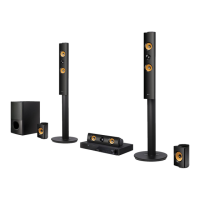
LG LHB755W - User Manual

LG LHB755W
78 pages
Print Icon
To Next Page IconTo Next Page
Loading...
Please read this manual carefully before operating
your set and retain it for future reference.
LHB755W (LHB755W, S75T1-S/W, S74T1-C, W4-2)
LHA855W (LHA855W, S75T1-S/W, S74T1-C, W4-2)
OWNER’S MANUAL
3D Blu-ray™ /
DVD Home
Cinema System

Table of Contents

Questions and Answers

  • H
    Hannah AllenSep 16, 2025
    Why my LG LHB755W Home Theater System cannot play video, photo or audio files?
    • A
      Andrew TaylorSep 16, 2025
      Your LG Home Theater System might not be able to play certain video, photo, or audio files if the files are not recorded in a format that the unit can play. Also, the unit may not support the codec of the video file.
  • D
    daniel36Aug 25, 2025
    Why is my LG LHB755W remote control not working?
    • D
      Debra NewtonAug 25, 2025
      If the remote control for your LG Home Theater System isn't working, make sure it's pointed directly at the unit's remote sensor and that you're not too far away. Check for any obstacles blocking the path between the remote and the unit. Also, ensure the batteries in the remote control are not exhausted.
  • T
    tammy53Aug 26, 2025
    What to do if my LG Home Theater System does not work properly?
    • S
      Steven HartAug 26, 2025
      If your LG Home Theater System isn't working correctly, try turning off the power to both the unit and any connected external devices like your TV, Woofer, DVD player, or Amplifier, and then turn them back on. If that doesn't work, disconnect the power cord of the unit and the connected devices, and then reconnect them. It's also possible that previous settings were not saved when the device was shut off.
  • J
    Julian WilliamsAug 26, 2025
    Why is the LG LHB755W Home Theater System remote control not working?
    • D
      Danielle HicksAug 26, 2025
      If your LG Home Theater System remote control isn't working, make sure it's pointed directly at the unit's remote sensor and is not too far away. Also, check for any obstacles between the remote and the unit. Finally, verify that the batteries in the remote control are not exhausted.
  • M
    Michael DavenportSep 18, 2025
    Why is my USB storage device not recognized by LG LHB755W?
    • D
      David LeeSep 18, 2025
      If your LG Home Theater System isn't recognizing the connected USB storage device: * Try a different USB cable, as some cables may not provide enough current. * Avoid using USB extension cables or USB hubs, as they may prevent recognition. * Note that USB devices requiring additional program installation on a computer are not supported. * Ensure your device is a USB Flash Drive or USB External HDD formatted with FAT32 or NTFS.
  • M
    Megan JohnsonSep 23, 2025
    What to do if my LG LHB755W does not recognize the USB storage device?
    • M
      Mr. Jay PetersSep 23, 2025
      If your LG Home Theater System isn't recognizing the connected USB storage device, try using a different USB cable, as some cables may not provide enough current. Avoid using USB extension cables or USB hubs, as they can prevent recognition. Note that the unit doesn't support USB devices requiring additional program installation on a computer. The unit supports only USB Flash Drives and USB External HDDs with FAT32 or NTFS format.
  • S
    Shawn RodriguezSep 8, 2025
    What to do if LG LHB755W Home Theater System cannot play video, photo or audio files?
    • E
      Erika BrooksSep 8, 2025
      Your LG Home Theater System may not be able to play the files because they are not recorded in a compatible format or the unit does not support the video file's codec.
  • B
    Brian LynchSep 9, 2025
    Why is my USB storage device not recognized by my LG LHB755W?
    • K
      Keith CruzSep 10, 2025
      Try using a different USB cable, as some cables may not provide enough current. Avoid using a USB extension cable or USB hub, as these can prevent recognition. Note that the LG Home Theater System does not support USB devices requiring additional program installation on a computer. This unit supports only USB Flash Drive and USB External HDD with FAT32 or NTFS format.
  • R
    ryangonzalezSep 2, 2025
    What to do if my LG LHB755W Home Theater System won't turn on or off?
    • K
      Kendra PetersenSep 3, 2025
      Unplug the power cord, wait at least five seconds, and then plug it in again.
  • R
    Ray MullinsSep 1, 2025
    What to do if my LG LHB755W does not start playback?
    • J
      Jacqueline FarmerSep 1, 2025
      Make sure you insert a playable disc, checking its type, color system, and regional code. Place the disc with the playback side down, correctly inside the guide on the disc tray. If the disc is dirty, clean it. Also, cancel the Rating function or change the rating level.

Summary

Safety Information

Electric Shock and Electrical Hazards

Warnings about opening the unit, water exposure, and electrical hazards.

Power Cord Safety

Guidelines for safe use and handling of the power cord.

Laser System Safety

Information regarding the laser system and precautions for safe operation.

Remote Control Guide

Remote Control Buttons and Functions

Explains the function of each button on the remote control.

Connecting the System

Speaker Connection

Wireless Speakers Setup

Connecting to Your TV

HDMI Connection Guide

Instructions for connecting the player to a TV via HDMI.

Home Network Connectivity

Wired Network Connection

Details how to connect the player to a network using a LAN cable.

Network Setup Procedures

Wired Network Setup

Step-by-step guide for configuring wired network settings.

Advanced Network Settings

How to manually configure IP address and DNS server settings.

Wireless Network Setup

Wireless Network Connection Steps

Guide to connecting the player wirelessly to a network.

Advanced Wireless Network Setup

Manual Wireless Configuration

Steps for manually configuring wireless network settings via advanced options.

Initial Setup Wizard

Setting Display Language

How to select the desired language for menus and on-screen display.

Network Connection Setup

Steps to configure network settings during initial setup.

Adjusting System Settings

TV Sound Connecting Options

How to set up the unit for automatic TV sound output.

[NETWORK] Menu Settings

Connection Status and BD-LIVE

How to check network status and manage BD-LIVE internet access.

[DISPLAY] Menu Options

HDMI Resolution Settings

How to select the video output resolution for HDMI.

[AUDIO] Menu Configuration

Digital Output Options (Auto, PCM, DTS Re-Encode)

Configuring digital audio output format for HDMI.

Speaker Setup and AV Sync

Speaker Volume and Distance Adjustment

Optimizing sound by adjusting speaker volume and distance.

HD AV Sync Adjustment

Compensating for audio delay to synchronize with video.

[LOCK] Menu and Parental Controls

Password Management

Creating, changing, and recovering the security password.

DVD and Blu-ray Disc Rating Controls

Blocking playback based on DVD/Blu-ray ratings and age limits.

Sound Effect Modes

Selecting Sound Modes (Standard, Music, Cinema, etc.)

Choosing various sound modes for different content types.

User EQ for Sound Adjustment

Adjusting sound by raising or lowering specific frequency levels.

Home Menu and Device Playback

Playing Discs (BD, DVD, AVCHD, Audio CD)

Steps for inserting and playing various types of discs.

Playing Media Files

Playing Blu-ray 3 D Discs

Requirements and steps for playing 3D Blu-ray discs.

Playing Files from Disc or USB

How to play video, audio, and photo files from discs or USB devices.

Playing Files from Android Devices

Connecting and Playing Android Files

How to connect an Android device and play its media files.

Playing Files from Network Servers

Connecting to DLNA Media Servers

How to access and play media files from DLNA-compatible servers.

Setting up SmartShare for PC

Installing SmartShare PC Software

Steps to install the SmartShare software on a PC.

Sharing Files and Folders

Procedure to share folders containing media files for playback.

Advanced Playback Functions

Repeat Playback Modes (All, Chapter, A-B)

Options for repeating playback of titles, chapters, or specific portions.

Repeating a Specific Portion (A-B)

How to set a start and end point for repeating a section.

Advanced Features

Enjoying BD-Live Content

Connecting to the internet for additional BD-ROM features.

LG Multi-room Audio (Music Flow)

BLUETOOTH Wireless Technology

About BLUETOOTH Technology

Overview of Bluetooth technology for short-range wireless communication.

Pairing Your Unit and BLUETOOTH Device

Step-by-step guide to pair the player with a Bluetooth device.

LG Sound Sync

LG Sound Sync Setup

Troubleshooting - General Issues

Unit Not Working Properly

Solutions for common problems like unit not responding or powering on.

Playback and Disc Recognition Issues

Troubleshooting steps for discs not playing or not being recognized.

USB Device Recognition Problems

Solutions for when USB storage devices are not recognized.

Remote Control and Operation Issues

Troubleshooting for remote control malfunctions and unit operation errors.

Troubleshooting - Network Issues

BD-Live and Streaming Service Problems

Solutions for issues with BD-Live and streaming video services.

Media Server and Network Connection Problems

Troubleshooting connection issues with media servers and access points.

Troubleshooting - Picture and Sound

No Picture or Picture Noise Issues

Solutions for problems like no picture or distorted picture quality.

Blu-ray 3 D Playback Issues

Troubleshooting for Blu-ray 3D discs not outputting 3D views.

No Sound or Distorted Sound Issues

Solutions for problems related to audio output or sound quality.

Network Software Update

Network Update Notification Process

How the player notifies about available software updates.

Software Update Procedure

Step-by-step guide to update the player's software.

Software Update Process Details

Downloading and Installing Updates

Steps for downloading and installing new software versions.

Software Update Precautions

Important warnings and notes during the software update process.

LG LHB755W Specifications

General IconGeneral
Disc types supportedBD, BD-R, BD-RE, CD, CD-R, CD-RW, DVD, DVD+R, DVD+RW, DVD-R, DVD-RW
Playback disc formatsBlu-Ray audio, Blu-Ray video, CD audio, CD video
Number of optical discs1 discs
Optical disc player typeBlu-Ray player
Built-in HDDNo
x.v.Color supportYes
Image formats supportedGIF, JPG, JPS, MPO, PNG
Apple docking compatibilityNot supported
Video formats supportedAVI, DIVX HD, FLV, H.264, MKV, MOV, MP4, MPEG2, TS, VOB, WMV
Audio decodersDolby Digital, Dolby Digital Plus, Dolby TrueHD, DTS, DTS-HD HR, DTS-HD Master Audio
RMS rated power1200 W
Audio output channels5.1 channels
Audio formats supportedAAC, FLAC, MP3
Front speaker type2-way
Front speakers RMS power388 W
Center speaker RMS power194 W
Product colorBlack
Cables includedHDMI
HDMI in2
USB version2.0
SCART ports quantity0
Number of HDMI outputs1
Weight and Dimensions IconWeight and Dimensions
Main unit dimensions (WxDxH)410 x 260 x 55 mm
Subwoofer dimensions (WxDxH)191 x 318 x 389 mm
Front speaker dimensions (WxDxH)290 x 290 x 1150 mm
Center speaker dimensions (WxDxH)344 x 87 x 86 mm

Related product manuals