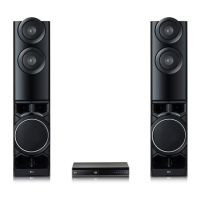
This document serves as a simple manual for the LG DVD Home Theater System, model LHD457. It provides essential information for setting up and operating the device, along with safety precautions and contact details for service centers.
The DVD Home Theater System is designed to enhance your home entertainment experience by providing immersive audio and video playback. It supports DVD playback, allowing you to enjoy your movie collection with improved sound quality through its speaker system. The system also features various input options for connecting external devices, expanding its versatility.
Function Description
The core function of this system is to play DVDs and deliver a home theater audio experience. It includes a main unit, a set of speakers, and a remote control for convenient operation.
- DVD Playback: The system features a disc tray for inserting DVDs. Once a disc is loaded, you can play, pause, and stop playback using the controls on the front panel or the remote control.
- Audio Output: The system connects to a set of speakers to provide surround sound. The speaker configuration typically includes front left and right, surround left and right, a center speaker, and a subwoofer, creating a rich audio environment for movies and music.
- Video Output: The system connects to your TV via an HDMI OUT port, allowing you to view DVD content on a larger screen with high-definition quality. An additional VIDEO OUT port is also available for connecting to TVs using an analogue connection.
- External Device Connectivity:
- MIC 1/2: Two microphone inputs are available, suggesting potential karaoke or public address functionalities.
- PORT. IN: This port allows you to connect a portable device, likely for audio playback.
- USB Port: A USB port enables the connection of USB devices, which can be used for playing media files stored on them.
- AUX (L/R) INPUT: This analogue input allows you to connect other audio devices, such as CD players or older media players, to utilize the home theater system's speakers.
- Radio Functionality: An FM antenna connection indicates that the system can receive and play FM radio broadcasts.
- Home Menu: Upon connecting to a TV, the system displays a Home Menu, providing access to various functions such as Music, Movie, Photo, and Setup, allowing for easy navigation and selection of desired media or settings.
- Volume Control: A dedicated volume control on the front panel allows for easy adjustment of the system's audio output.
- Input Source/Function Change: A function button on the front panel allows you to cycle through different input sources or functions, such as DVD, USB, AUX, or FM radio.
- Power On/Off: The system can be powered on or off using the designated button.
Usage Features
The system is designed for straightforward setup and operation.
- Speaker Assembly and Connection: The manual provides clear diagrams for assembling the speakers and connecting them to the main unit. This typically involves connecting color-coded wires from each speaker to the corresponding terminals on the back of the main unit. The speaker design and connection method may vary slightly between models.
- TV Connection: Connecting the system to your TV is primarily done via an HDMI cable for optimal video quality. You simply connect the HDMI OUT port on the system to an HDMI IN port on your TV. After connection, you need to select the correct HDMI input on your TV and follow the on-screen instructions using the remote control to complete the setup. An alternative analogue video connection is also available.
- Remote Control: While not explicitly detailed in this simple manual, the presence of a Home Menu and on-screen instructions implies that a remote control is the primary interface for navigating menus, selecting functions, and controlling playback.
- User-Friendly Interface: The Home Menu, with its clear categories for Music, Movie, Photo, and Setup, aims to provide an intuitive user experience, making it easy to access different media types and configure system settings.
- Advanced Features: For more detailed instructions and advanced features, users are directed to download the comprehensive Owner's Manual from the LG website, indicating that the system offers a range of customizable options beyond basic playback.
Maintenance Features
Maintaining the DVD Home Theater System involves simple care and adherence to safety guidelines to ensure its longevity and optimal performance.
- Battery Replacement: The manual includes a diagram illustrating how to replace the batteries in the remote control, typically using AAA (R03) batteries. This is a routine maintenance task to ensure the remote control remains functional.
- General Care:
- Environmental Considerations: Users are advised to avoid exposing the unit to extreme heat, cold, moisture, and dust, as these can negatively impact its performance and lifespan.
- Magnetic Fields: It is recommended to avoid placing the unit near magnetic fields, which can interfere with its operation.
- Cleaning: When cleaning the surface of the case, users should be cautious. Volatile agents like benzene, alcohol, or thinner, as well as chemically processed cloths, should be avoided as they can damage the surface finish or cause the coating to peel. A soft, dry cloth is generally recommended.
- Placement: The unit should always be placed in a horizontal position, and no heavy objects should be placed on top of it to prevent damage.
- Liquid Spills: To prevent serious damage, liquids should be kept away from the unit. In case of a spill, users are advised to consult qualified service personnel.
- Ventilation: It is crucial not to obstruct the ventilation holes, as these are essential for preventing overheating. Soft materials like paper or cloth should not cover these holes.
- Safety Precautions:
- Power Disconnection: The equipment must be disconnected from the mains power supply when not in use.
- Moisture Exposure: The unit should not be exposed to rain or moisture.
- Electric Shock Prevention: To prevent electric shock, users are warned not to remove the cover, as there are no user-serviceable parts inside. All servicing should be referred to qualified personnel.
- Power Cord Safety: The cord grip for the plug is integrated into the power cord. If the cord needs to be shortened for any reason, the original plug should not be re-used. A new plug must be used, ensuring it is secured to the power cord in accordance with Plug & Socket Regulations 1994, to maintain safety.
- Service and Support: The manual provides contact information for LG service centers in Saudi Arabia (Jeddah Main Service Center, Jeddah Quick Service Center, Riyadh Branch Service Center, and Al Khobar Branch Service Center), indicating that professional support is available for any issues or repairs. Users are advised to contact their service center for any non-serviceable parts or issues.

 Need help?
 General

 To Next Page