Useful Apps 55
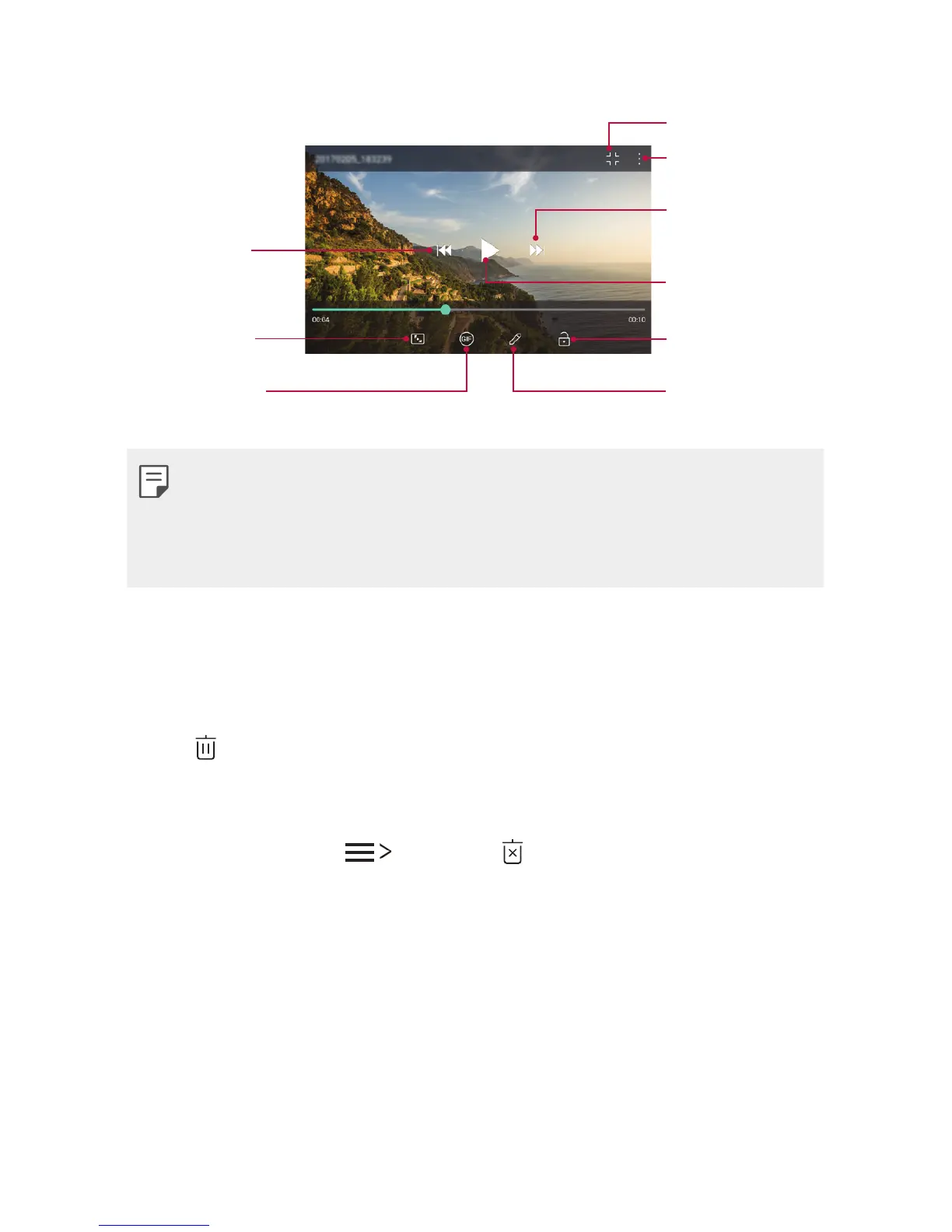
Playing a video
Go to previous
video. Press and
hold to rewind.
Choose screen
ratio.
Create a GIF file.
Access additional
options.
Lock or unlock
the screen.
Edit the video.
Open with QSlide.
Pause or play
the video.
Go to next video.
Press and hold
to fast-forward.
• To adjust the sound volume, drag the right side of the video screen
up or down.
• To adjust the screen brightness, drag the left side of the video
screen up or down.
Deleting files
You can delete files by using one of the following options:
• Touch and hold a file from the file list, then tap Delete.
• Tap
from the file list and delete the desired files.
• Deleted files are automatically moved to Trash and they can be
restored to the Gallery within 7 days.
• On the Gallery, tap
Trash. Tap to completely delete the files.
In this case, the files cannot be restored.


 To Next Page
 Loading...