EasyManua.ls Logo

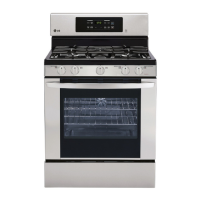
LG LRG3093SB - User Manual

LG LRG3093SB
39 pages
Print Icon
To Next Page IconTo Next Page
Loading...
ENGLISHENGLISH
P/ No.: MFL330 29603
www.lg.com
ENGLISH
ESPAÑOL
USERS GUIDE
GAS RANGE
Please read this manual carefully before operating
your range and retain it for future reference.
LRG30 93ST
LRG30 93SB
LRG30 93SW
LR
Printed on 100% Recycled Paper

Other manuals for LG LRG3093SB

Questions and Answers

  • E
    Elizabeth SmithSep 9, 2025
    Why doesn't broil or self-clean work on my LG LRG3093SB Ranges?
    • J
      Joe GillSep 9, 2025
      If broil or self-clean isn’t working on your LG Ranges, it could be because the oven temperature is too high. Allow the oven to cool below the locking temperature, which can take up to 1 hour after the cycle is complete.
  • W
    wmartinAug 23, 2025
    Why is my LG Ranges clock and timer not working?
    • E
      emily39Aug 23, 2025
      If the clock and timer on your LG Ranges are not working, consider these possible causes: * Ensure the range is fully plugged into a live, properly grounded electrical outlet. * Check for a blown fuse or tripped circuit breaker in your home and replace the fuse or reset the circuit breaker if necessary. * Improper settings could be the problem. Refer to the “USING THE CLOCK AND TIMER” section for instructions.
  • P
    Paula SchmidtAug 25, 2025
    What to do after a power outage with my LG LRG3093SB Ranges so the clock stops flashing?
    • F
      fpetersonAug 25, 2025
      After a power outage or surge, if the clock on your LG Ranges is flashing, reset the clock. If the oven was in use, you'll need to clear it by touching the “CLEAR OFF” pad, setting the clock, and then resetting any cooking functions.
  • A
    Austin CarrollAug 27, 2025
    Why is the “DOOR LOCKED” light on when I want to cook with my LG LRG3093SB?
    • P
      Penny ZamoraAug 27, 2025
      If the “DOOR LOCKED” light is on when you want to cook with your LG Ranges, it means the oven door is locked because the temperature inside hasn't dropped below the locking temperature. Touch the “CLEAR OFF” pad and allow the oven to cool down.
  • G
    Grace MitchellAug 27, 2025
    What does it mean when my LG Ranges oven control beeps and displays an F code error?
    • L
      leejamieAug 27, 2025
      If your LG Ranges oven control beeps and displays an F code error: * For an “F3” error, touch the “CLEAR OFF” pad and let the oven cool for one hour before putting it back into operation. * For an “F11” error, check the main gas shut-off valve or the oven gas shut-off valve. See the “Surface burners light but oven burner does not” section. * If the error code repeats, disconnect power to the range for 5 minutes, then reconnect it. If the error persists, call for service.
  • D
    Deborah MillerAug 29, 2025
    LG Ranges oven will not self-clean, what to do?
    • I
      ismithAug 29, 2025
      If your LG Ranges oven won't self-clean, it might be due to these reasons: * The oven temperature might be too high. Allow the range to cool to room temperature before resetting the controls. * The oven controls may not be set correctly. Consult the “USING THE SELF-CLEANING OVEN” section.
  • L
    Lori PhillipsSep 17, 2025
    Why is the warming drawer not working on my LG Ranges?
    • G
      garrettaverySep 18, 2025
      If the warming drawer on your LG Ranges isn't working: * Check for a blown fuse or tripped circuit breaker in your home and replace the fuse or reset the circuit breaker if necessary. * If the oven is self-cleaning, wait for the cycle to finish and the oven to cool down. * Ensure the controls are properly set. See the Using the Electric Warming Drawer section.
  • A
    Adrienne PrattSep 18, 2025
    Why is there excessive condensation in the drawer of my LG Ranges?
    • D
      Dillon MorseSep 22, 2025
      If you notice excessive condensation in the drawer of your LG Ranges: * Remove any liquid present in the drawer. * Cover any uncovered foods with a lid or aluminum foil. * Reduce the temperature setting of the drawer.
  • T
    Thomas JamesSep 8, 2025
    Why are the burner flames on my LG Ranges very large or yellow?
    • M
      morseclaudiaSep 8, 2025
      If the burner flames on your LG Ranges are very large or yellow, it indicates an improper air to gas proportion. If your range is connected to LP gas, contact the technician who installed it or made the conversion.
  • H
    heather54Sep 4, 2025
    How to adjust oven temperature on LG LRG3093SB because it is too hot or cold?
    • K
      Kevin SchmidtSep 5, 2025
      If your LG Ranges oven temperature is too hot or too cold, the oven thermostat may need adjustment. Refer to the “HOW TO ADJUST THE OVEN THERMOSTAT” section for instructions.

Summary

Introduction to LG Gas Range Manual

Safety Information Overview

Provides an overview of important safety instructions and precautions for the gas range.

Operating Instructions Guide

Details on how to operate the LG gas range, including parts, features, and functions.

LG Gas Range Critical Safety Warnings

General Safety Instructions

Read and follow all instructions before using the oven to prevent risks.

Gas Leak Safety Procedures

Actions to take if you smell gas to prevent fire, explosion, or injury.

Anti-Tip Device Installation

Instructions and warnings regarding the proper installation of the anti-tip device.

LG Gas Range Operation Guide

Using the Gas Surface Burners

Instructions on how to use and light the gas surface burners safely and effectively.

Control Panel and Oven Functions

Explanation of the control panel layout and features like clock, timer, and baking options.

Using the Oven: Before You Begin

Covers initial oven setup, ventilation, power outages, oven light, and foil usage.

Using the Oven: Baking and Roasting

How to set the oven for baking and roasting, including tips and pan placement.

Using the Oven: Broiling Guide

Step-by-step guide for setting up broiling operations and the broiling guide.

Self-Cleaning Oven Operation

Guide to setting up and running the self-cleaning cycle safely, including delay start.

LG Gas Range Care and Cleaning

LG Gas Range Troubleshooting Guide

Top Burner Troubleshooting

Solutions for top burners not lighting or burning unevenly or with large/yellow flames.

Baking and Roasting Performance Issues

Troubleshooting problems with baking or roasting results due to controls or thermostat.

LG LRG3093SB Specifications

General IconGeneral
TypeFreestanding
ColorStainless Steel
Number of Burners5
Convection OvenYes
Self-CleaningYes
Fuel TypeGas
Width30 inches
Cooktop SurfacePorcelain

Related product manuals