F
0
8
Forced Operation
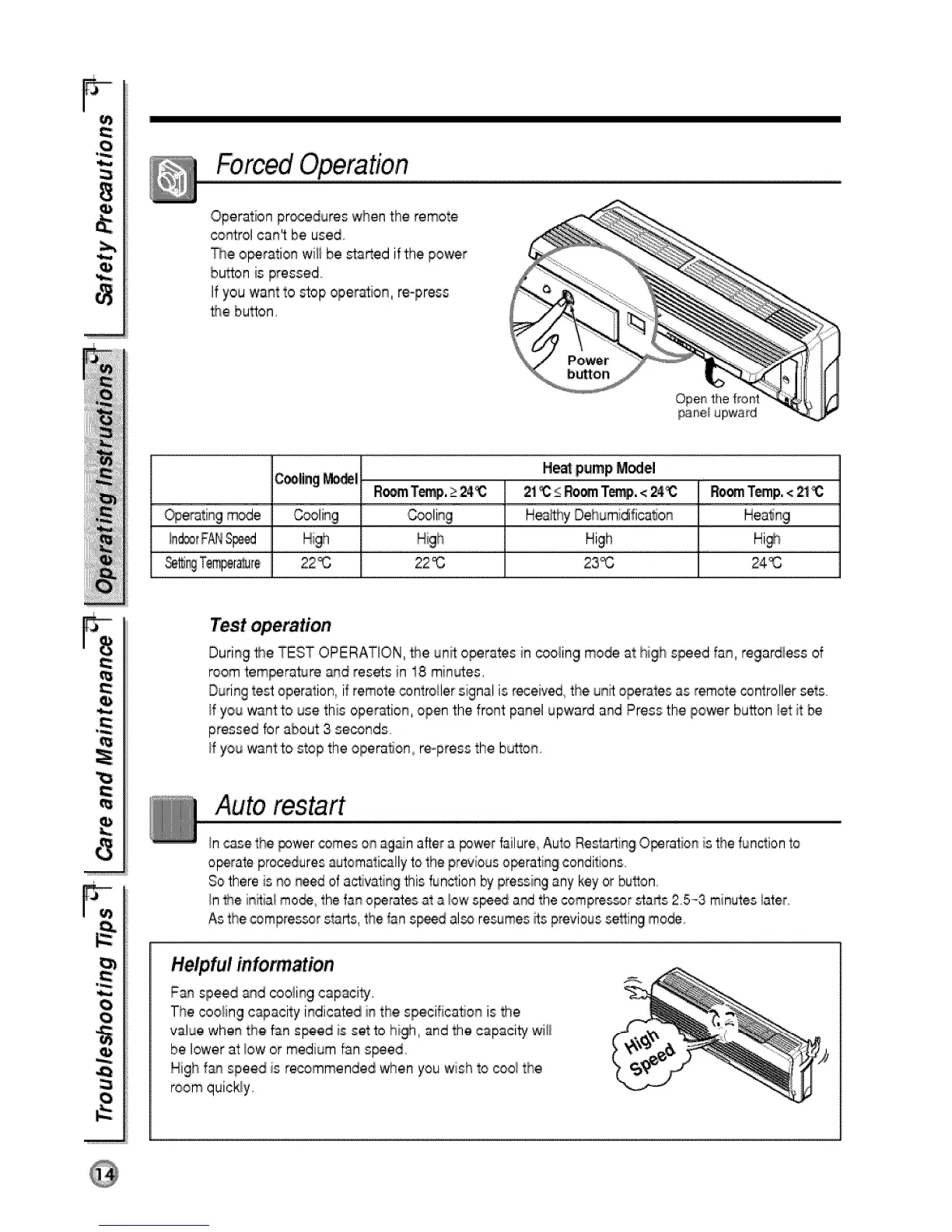
,Operationpr_edures when the remote
co_rol can't:be used
The o_ra_ion wiii be _arted ift:hepower
button is pressed°
Ifyou want to _op ope_ion, re-press
_3ebutton,
Open the front
pane_upward
C_,ling_! He_ pump M_el
2i _ s RO_ T_. <24_ RoomTomp.<_ _:
_erating mode H_y' Dehumidifica_on
High Hi_
22_ 22_3 23_ 24_
.J
0
During#_eTEST OPERATION, _e unit operates in c_ling too@ at high speed fan, regardless of
roomtemperature and resets n 18 min_es,
Duringtest operation, il remotec_ntroilersignal is #_eived the unRoperatesas remote controllersets.
If you wantto use this operation, open the front panel upward and Press the power button _etit be
pressed for about 3 se_nds
/f you want to stop the operation, re-press the button
Auto msta,rt
Incasethe power oomeson againafter a _wer failure Auto RestartingO_ration is the functionto
o_rate proceduresautomaticallyto the pr_ious o_rating conditions.
Sothere is no need of activatng this fun,c_ionby pressingany keyor bu#on.
_n_heinitial mo_ the fan o_rates at a _,owspeed a_ the compressorsta_s 25.-3 minuteslater
Asthe compressors_rts, the _ans_d also resumes_s previous_ing mo_.
Helpfulinformation
Fan speed a_d _oiing capacity,
The cooling capacity indicated in the specifica#on is the
value whe_ the fan speed is set to high, and the capacity wi_i
be lower at:_owor medium fan s_ed
Nigh fan speed is reoommended when you wish _ocoo/the
room quickly


 To Next Page
 Loading...