Getting Started8
Getting Started
1
Remote control
Battery Installation
Remove the battery cover on the rear of the
Remote Control, and insert two R03 (size AAA)
battery with and matched correctly.
• • • • • • • • • •
a
• • • • • • • • •
1
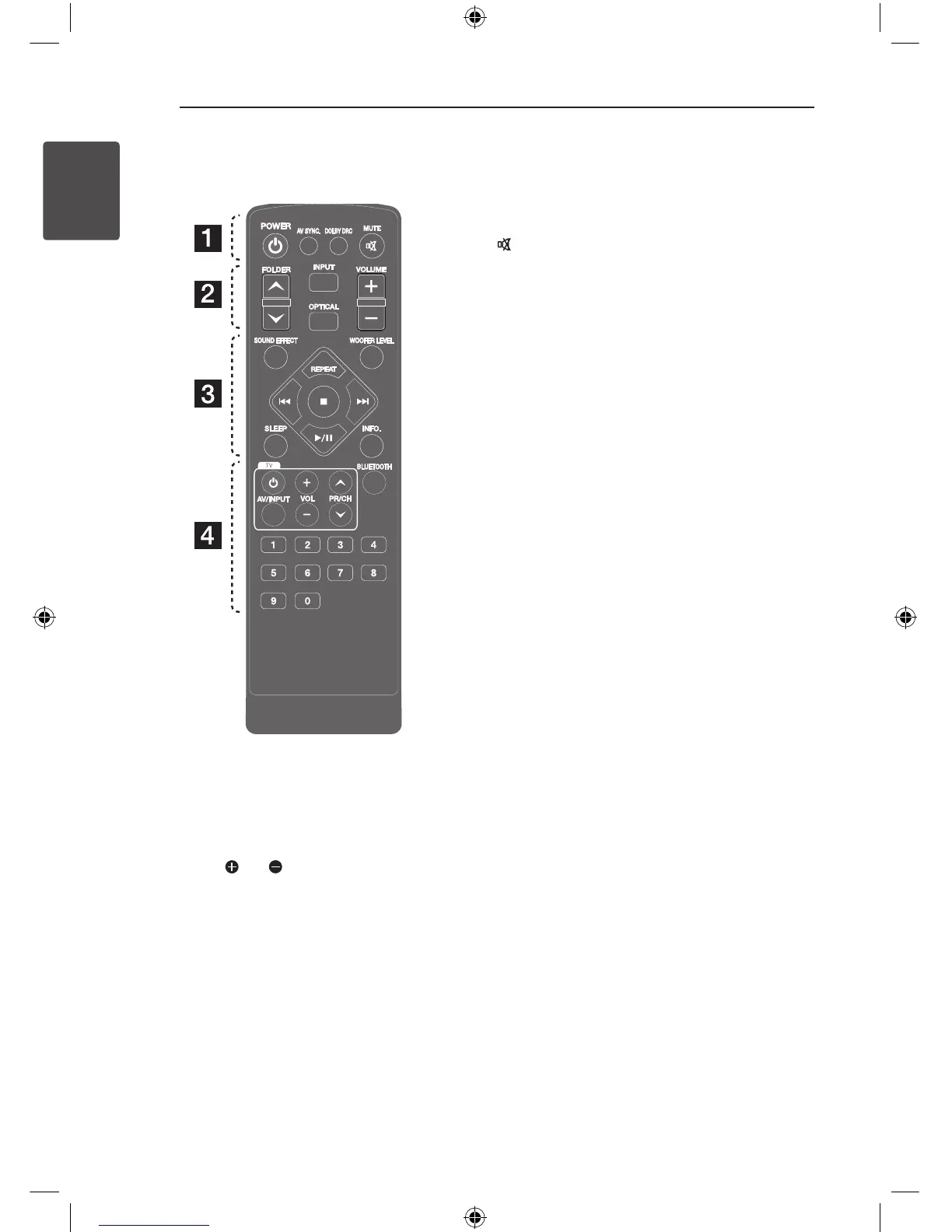
POWER: Switches the unit ON or OFF.
AV SYNC: Synchronizes the audio and video.
DOLBY DRC: Sets the Dobly DRC.
MUTE: Mutes the sound.
• • • • • • • • • •
b
• • • • • • • • •
FOLDER: Searches for a folder of MP3/ WMA les.
When a USB containing MP3/ WMA les in several
folders is being played, press FOLDER to select the
folder you want to play.
INPUT: Changes input sources.
OPTICAL: Changes input source to optical directly.
VOLUME: Adjusts speaker volume.
• • • • • • • • • •
c
• • • • • • • • •
SOUND EFFECT: Selects a sound eect mode.
WOOFER LEVEL: Sets the sound level of woofer.
REPEAT: Listens to your les repeatedly or
randomly.
C/V
: Goes to next or previous le.
Z
: Stops playback.
d/M
: Starts playback. / Pauses playback.
SLEEP: Sets the system to turn o automatically at
a specied time.
INFO.: Displays the le or input source information.
• • • • • • • • • •
d
• • • • • • • • •
TV Control buttons: See page 21
BLUETOOTH: Pairing, connecting and
disconnecting your unit and Bluetooth device in
function other than the Bluetooth.
0 to 9 numerical buttons: Selects numbered
numbered les. Enters the PIN code.
*.590$A&75#..-A'0)AKPFF


 To Next Page