EasyManua.ls Logo

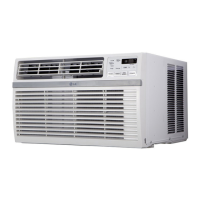
LG LW2516ER - User Manual

LG LW2516ER
32 pages
Print Icon
To Next Page IconTo Next Page
Loading...
LW1516ER
LW1816ER
LW2516ER
LW1521ERSM
LW1821ERSM
LW2521ERSM
EN ENGLISH
SP ESPAÑOL
TYPE : WINDOW
www.lg.com
Copyright © 2017 - 2020 LG Electronics Inc. All Rights Reserved.
OWNER’S MANUAL
AIR CONDITIONER
Read this owner’s manual thoroughly before operating the
appliance and keep it handy for reference at all times.
*MFL70960606*
MFL70960606
Rev.04_082820

Questions and Answers

  • S
    Savannah DeanAug 15, 2025
    How to troubleshoot LG LW2516ER that won't start?
    • T
      teresa44Aug 15, 2025
      If your LG Air Conditioner isn't starting, ensure it's fully plugged into the outlet. Check your house's fuse or circuit breaker and replace the fuse or reset the breaker if needed. If there was a power failure, turn the mode control to off and wait 3 minutes after power is restored before restarting the unit. Also, check the current interrupter device by pressing the RESET button on the power cord plug. If the reset button won't stay engaged, stop using the air conditioner and contact a service technician.
  • P
    phillip30Aug 18, 2025
    What to do if LG LW2516ER does not cool enough?
    • K
      Kendra RiosAug 18, 2025
      If your LG Air Conditioner isn't cooling properly, make sure curtains, blinds, or furniture aren't blocking the front of the unit. Adjust the temperature setting to be lower than the current room temperature. Allow time for the room to cool down after turning the unit on. Ensure cold air isn't escaping through open registers and cold air returns. If the cooling coils are iced up, refer to the 'Air conditioner freezing up' information.
  • H
    Hannah SawyerAug 25, 2025
    Why is my LG LW2516ER dripping water indoors?
    • M
      Marie RobertsAug 26, 2025
      If water is dripping indoors from your LG Air Conditioner, make sure the unit slants slightly from the front to the rear. This ensures proper water disposal to the outside.
  • H
    holly06Aug 28, 2025
    Why is my LG LW2516ER making noise when cooling?
    • D
      Debra LiAug 28, 2025
      If your LG Air Conditioner is making noise when cooling, it's likely due to normal air movement sounds. If the noise is too loud, try setting the FAN to a lower setting. Window vibration could also be the cause due to poor installation; refer to the installation instructions or check with the installer.
  • K
    kellykevinAug 31, 2025
    What to do if LG LW2516ER is not connecting to the Wi-Fi?
    • A
      Amber Jackson PhDAug 31, 2025
      If your LG Air Conditioner isn't connecting to Wi-Fi, try moving the router closer to the air conditioner or install a Wi-Fi repeater (signal booster). Also, ensure you're selecting the correct wireless router and that it's set to 2.4 GHz.
  • M
    Michael JonesSep 4, 2025
    Why can't I connect the LG ThinQ App to my LG LW2516ER Air Conditioner?
    • R
      Rachael ThompsonSep 4, 2025
      To resolve issues connecting the LG ThinQ App to your LG air conditioner, first ensure the air conditioner is turned on. Also, check that your wireless router is turned on.
  • A
    Amanda DanielsSep 7, 2025
    Why is remote sensing deactivating prematurely on my LG Air Conditioner?
    • M
      Melody SchroederSep 7, 2025
      If your LG Air Conditioner remote sensing is deactivating prematurely, ensure the remote control is within a 20 feet range and 120° radius of the front of the unit and that there are no obstructions blocking the remote control signal.
  • M
    Marie OlsonSep 12, 2025
    Why does water collect in base pan of LG Air Conditioner?
    • H
      Hector RamosSep 12, 2025
      If water collects in the base pan of your LG Air Conditioner, it's typically due to moisture removed from the air. This is normal for a short period in areas with low humidity and normal for a longer period in very humid areas.
  • D
    Danielle ParksNov 20, 2025
    Why I am having trouble connecting LG Air Conditioner to Wi-Fi network?
    • T
      Tiffany DurhamNov 20, 2025
      If you're having trouble connecting your LG Air Conditioner and smartphone to a Wi-Fi network, try these steps: * Delete your home Wi-Fi network and begin the registration process again. * Turn off the Mobile data on your smartphone before registering the appliance. * The wireless network name (SSID) should be a combination of English letters and numbers. (Do not use special characters.) * Only a 2.4 GHz router frequency is supported. Set the wireless router to 2.4 GHz and connect the appliance to the wireless router. To check the router frequency, check with your Internet service provider or the router manufacturer. * If the appliance is too far from the router, the signal may be weak and the connection may not be router closer to the appliance or purchase and install a Wi-Fi ...

Summary

Safety Instructions

Important Safety Instructions

Key safety warnings and precautions for installation and operation.

Grounding Instructions

Proper grounding procedures and precautions for electrical safety.

Refrigerant Safety

Safety precautions concerning the refrigerant used in the unit.

Installation

Electrical Data

Specifications for power supply, voltage, and circuit breaker requirements.

How to Install the Unit

Step-by-step instructions for physically installing the air conditioner unit.

Cabinet Installation

Detailed instructions on how to secure the cabinet within the window frame.

Troubleshooting

Before Calling for Service

Initial checks to perform before contacting customer service for issues.

Warranty

Warranty Exclusions

List of conditions and damages not covered by the limited warranty.

Dispute Resolution Procedure

Details on the arbitration process for resolving disputes related to the product.

LG LW2516ER Specifications

General IconGeneral
TypeWindow Air Conditioner
Cooling Capacity25, 000 BTU
Voltage230V
Amperage11.5 A
Fan Speeds (Cool/Fan)3/3
Remote ControlYes
Filter TypeWashable
RefrigerantR-410A
Area to Cool1600 sq. ft.
Operating Temperature (Cooling)64°F - 90°F

Related product manuals