EasyManua.ls Logo

LG M2380D - Audio Reset

LG M2380D
156 pages
Print Icon
To Next Page IconTo Next Page
To Previous Page IconTo Previous Page
Loading...
90
SOUND CONTROL
SOUND CONTROL
1
2
3
MENU
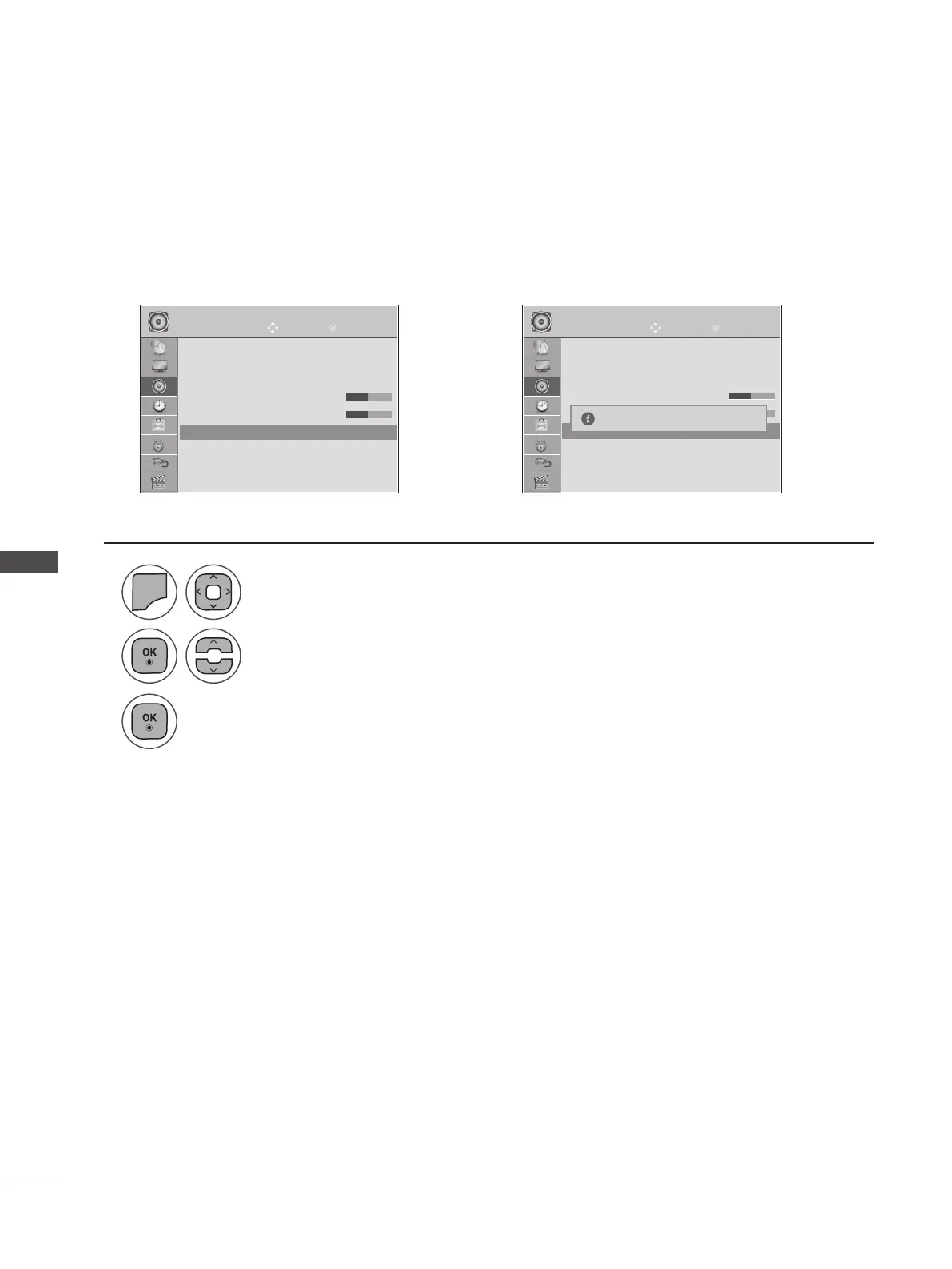
Select Reset.
Initialize the adjusted value.
Select AUDIO.
• Press the MENU or EXIT button to close the menu window.
• Press the BACK button to move to the previous menu screen.
AUDIO RESET
Move Move
OK OK
AUDIO AUDIO
▲
Sound Mode : Music
• Surround X : Off
• Treble 50
• Bass 50
• Reset
Digital Audio Out : PCM
TV Speaker : On
DTV Audio Setting : Auto
▲
Sound Mode : Music
• Surround X : Off
• Treble 50
• Bass 50
• Reset
Digital Audio Out : PCM
TV Speaker : On
DTV Audio Setting : Auto
• Reset ꔉ
• Reset ꔉ
➩
Settings of the selected Sound Mode return to the default factory settings.
Resetting sound mode configuration...

Table of Contents