ENGLISH
4
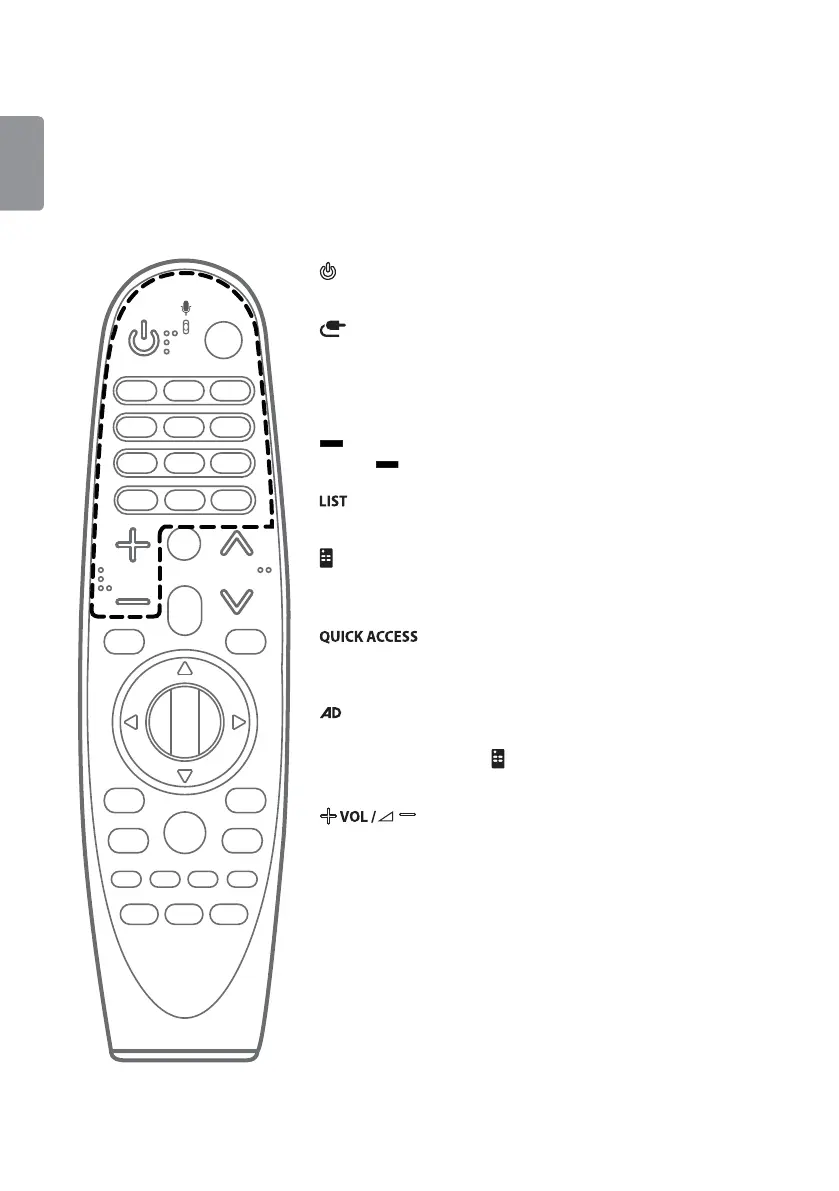
Remote Description
Ţ The remote control image shown may differ from the actual product.
Ţ The order of description may differ from the actual product.
Ţ Some buttons and services may not be provided depending on models or regions.
* To use the button, press and hold for more than 3 seconds.
(Power)
Turns the TV on or off.
(Input)
Changes the input source.
Number buttons
Enters numbers.
(Dash)
Inserts a
(Dash) between numbers such as 2-1 and 2-2.
Accesses the saved channels or programmes list.
(Screen Remote)
Displays the Screen Remote.
Accesses the Universal Control Menu in some regions.
*
You can access the application or Live TV channel by using the number
buttons as registered. (Depending on country)
*
Audio descriptions function will be enabled.
* Pressing and holding the
(Screen Remote) button displays the SAP
(Secondary Audio Programme) feature. (Applicable to North America)
Adjusts the volume level.



 To Next Page