EasyManua.ls Logo

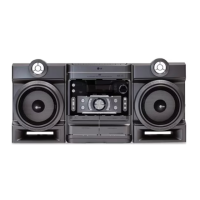
LG MDS712 - User Manual

LG MDS712
31 pages
Print Icon
To Next Page IconTo Next Page
Loading...
Before connecting, operating or adjusting this product,
please read this instruction booklet carefully and com-
pletely.
SA_MDS712(ENG)_MFL37206708
R
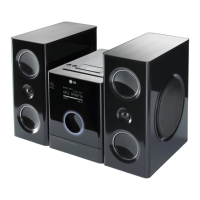
KARAOKE MINI HOME THEATER
OWNER’S MANUAL
MODEL : MDS712
MDS712-A5U/D5U/X5U
MDS712V, MDS712S, MDS712C, MDS712W
USB
SA_MDS712_A5U_ENG_6708_070403 4/3/07 6:55 AM Page 1

Questions and Answers

  • C
    Clayton GregoryAug 2, 2025
    What to do if the LG Home Cinema speakers remote control does not work properly?
    • E
      Erin HoltAug 2, 2025
      If the remote control for your LG Home Cinema speakers isn't working, make sure you're pointing it directly at the unit's remote sensor. Also, ensure you are within a 23 ft (7 m) range. Remove any obstacles between the remote and the unit. If it still fails, try replacing the batteries with new ones.
  • M
    Michael ValentineAug 7, 2025
    Why is there no picture from my LG Home Cinema speakers?
    • J
      Jeff MoralesAug 7, 2025
      If you're not getting any picture on your TV from your LG Home Cinema speakers, first, ensure that your TV is set to the correct video input mode to receive the signal. Next, check that the video cable is securely connected to the jacks. Also, verify that your TV is turned on.
  • R
    Ryan SandersAug 12, 2025
    What to do if there is no sound from LG Home Cinema speakers?
    • J
      Jeffrey WallAug 12, 2025
      If you are experiencing no sound or very low sound from your LG Home Cinema speakers, ensure that the equipment connected with the audio cable is set to receive the DVD signal output. Also, check that the audio cables are securely connected. Make sure the connected equipment is powered on. If the issue persists, the audio connecting cord may be damaged, and you should replace it.
  • C
    Crystal EdwardsAug 17, 2025
    How to fix LG Home Cinema speakers when radio stations cannot be tuned in?
    • R
      Richard BeckerAug 17, 2025
      If your LG Home Cinema speakers aren't tuning into radio stations, ensure the antenna is securely connected and properly positioned. Try adjusting the antennas, and if needed, connect an external antenna. If tuning with automatic tuning, the signal strength might be too weak, so try tuning in the station manually. If tuning by scanning preset stations, preset the stations.
  • T
    Timothy JohnstonAug 21, 2025
    What to do if LG Home Cinema speakers unit does not start playback?
    • P
      Paul WrightAug 21, 2025
      If your LG Home Cinema speakers unit isn't starting playback, first, make sure a disc is inserted, and that the DVD or audio CD indicator is lit. If a disc is inserted, ensure it's a playable disc, checking the disc type, color system, and regional code. Make sure the disc is placed correctly, with the playback side down and within the guide. Clean the disc if it's dirty. Also, press the SETUP button to turn off any menu on the TV screen. Finally, cancel the Rating function or change the rating level if it is set.
  • M
    Manuel HarrisonAug 27, 2025
    How to eliminate severe hum or noise from LG Home Cinema speakers?
    • L
      lindseyparksAug 27, 2025
      To address severe hum or noise from your LG Home Cinema speakers, start by wiping the plugs and jacks with a cloth slightly moistened with alcohol. Clean the disc. Ensure the speakers and components are securely connected. Also, move your TV away from the audio components.

Summary

Safety Precautions

General Safety Warnings

General warnings and precautions for safe operation and product care.

Power Cord Safety

Guidelines for safe use and maintenance of the power cord.

Before Use: Disc Information and Settings

Front Panel and Rear Panel Overview

Connections

Connecting to a TV

Instructions for connecting the unit to a television via various methods.

USB and Optical Connections

How to connect USB storage devices and optional equipment via optical output.

Speaker System Connection

Guide for connecting the speaker system for surround sound.

Before Operation: Adjusting Sound

Before Operation: Disc Information and Settings

Before Operation: Display and Audio Settings

Before Operation: Speaker and Parental Controls

5.1 Speaker Setup

Configuring the built-in 5.1 channel surround sound decoder.

Lock and Parental Control Settings

Setting up parental controls, rating limits, and passwords.

Operation with DVD and Video CD

Operation with Audio CD and MP3;WMA Disc

Playback and File Information

How to play CDs/MP3s and view ID3 tag information.

Operation with JPEG Disc

Viewing and Navigating JPEG Files

How to view JPEG files, use slideshow, rotate, and zoom.

Operation with DivX Disc

Operation with RADIO

Operation with RADIO: RDS Features

Operation with TAPE

Recording and Dubbing Tapes

Instructions for recording from sources and dubbing tapes.

Operation with KARAOKE

Karaoke Basic and Advanced Playback

Guides for basic playback, mic adjustment, key control, and echo.

Operation with KARAOKE: Menu Navigation

Troubleshooting

Troubleshooting Guide

A guide to diagnose and resolve common operational problems with the unit.

Specifications

General and Tuner;Amplifier Specifications

Technical details for power, weight, dimensions, and tuner/amplifier performance.

Disc Player and Speaker Specifications

Technical details for disc playback and speaker system performance.

LG MDS712 Specifications

General IconGeneral
BrandLG
ModelMDS712
CategoryHome Cinema speakers
LanguageEnglish

Related product manuals