8
KARAOKE Mini Hi-Fi System ] USER GUIDE
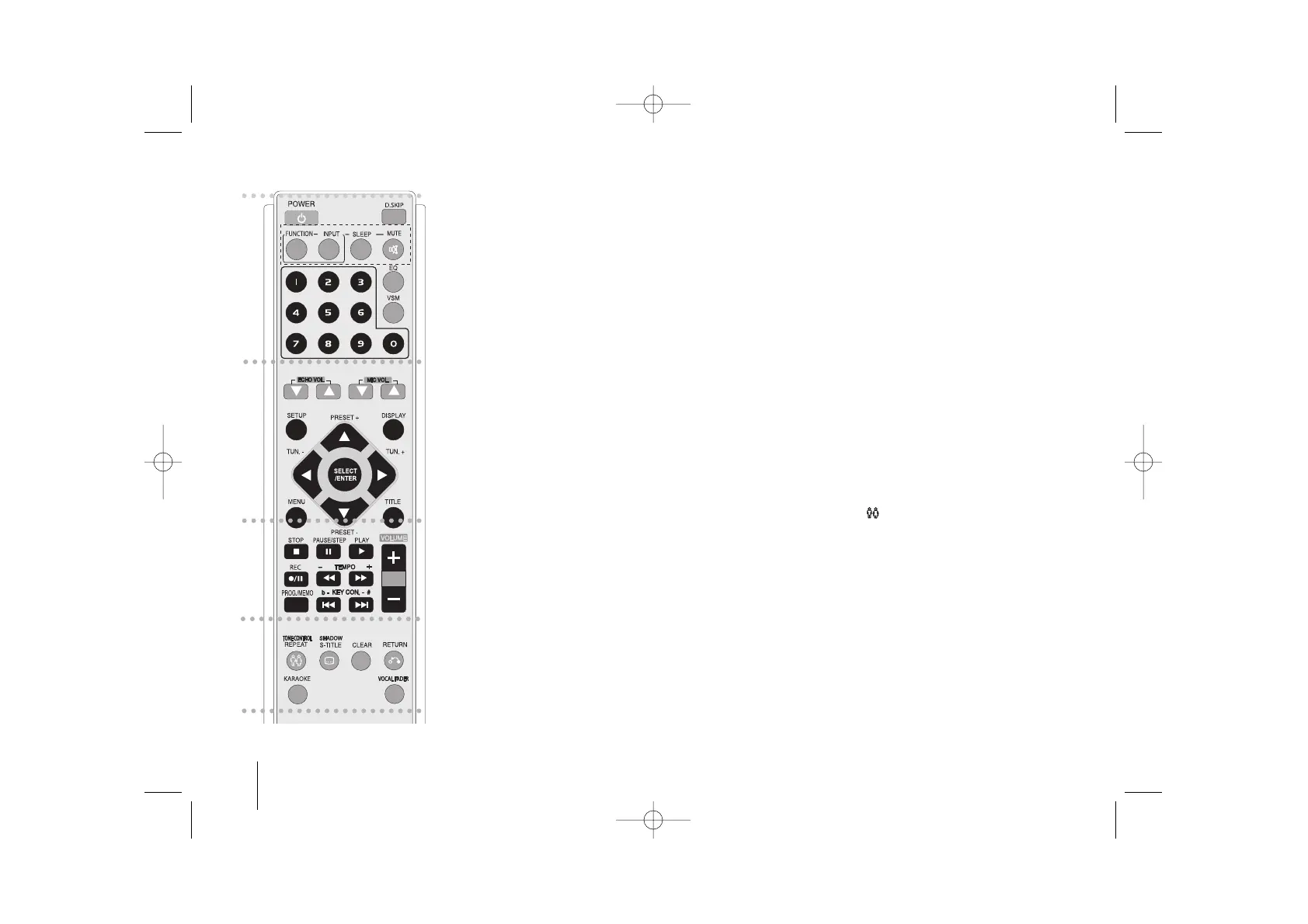
Remote control
a
POWER: Switches the unit ON or OFF.
DISC SKIP Choose a desired disc.
MUTE : Press MUTE to mute your unit. You can mute your
unit in order, for example, to answer the telephone.
FUNCTION : (DVD/CD
→
TAPE
→
FM
→
AM)
I
NPUT : Changes the input source (USB
→
AUX
→
PORTABLE )
SLEEP : You can set the unit to turn off automatically at a speci-
fied time.
- DIMMER Dims the LED (Light-emitting diode) of front
panel by half in power-on status.
EQ (
EQUALIZER Effect) : You can choose 9 fixed sound
impressions.(page 12)
VSM : Press VSM to set the VIRTUAL sound.(page 12)
0-9 numerical buttons: Selects numbered options in a menu.
b
ECHO VOL.(V /v ) :Adjusts echo volume
MIC VOL.(V /v ): Adjusts microphone volume
SETUP : Accesses or removes setup menu
MENU : Accesses the menu on a DVD disc.
DISPLAY: Accesses On-Screen Display.
TITLE : If the current DVD title has a menu, the title menu
appears on the screen. Otherwise, the disc menu may
appear.
b / B / v / V (left/right/up/down):Used to navigate on-
screen displays.
SELECT/ENTER : Acknowledges menu selection.
PRESET (-/+) (V/v) : Selects programme of Radio.
TUN.(-/+) (b/B): Tunes in the desired radio station.
c
PLAY (N): Starts playback.
- Tape reverse playback press (N) once again.
- 1.5 speed playback
The 1.5 speed allows you to watch the pictures and listen
to the sound quicker than playing at a normal speed on the
disc.- (page 13)
- MONO/STEREO FM mode state,selects MONO or
STEREO by pressing PLAY (N) button
STOP (x): Stops playback or recording.
PAUSE/STEP(X): Pause playback.
REC (z/[]) : USB DIRECT RECORDING /TAPE RECORD
You can record one desired file or all of the music files in
AUDIO CD to USB -(page 19).or Records from a CD or
radio to cassette.- (page17)
TEMPO (-/+)
:
This function enable you to fast paly or slow
the music speed in KARAOKE mode.
- SCAN(bb/BB) : Search backward or forward.
KEY CON.( b/ #
):
This function can change the key to suit
your vocal range.
- SKIP (
..
/
>>
): Go to next or previous chapter/
track/Title.
PROG./MEMO. : Accesses or removes Program menu.
VOLUME (+/-) : Adjusts speaker volume.
d
TONE CONTROL( ) :Adjusts man’s or woman’s key in
the karaoke mode.(page 20 )
- REPEAT : Repeats a Chapter/ Track/ Title all.
S-TITLE: During playback,S - TITLE repeatedly to select a
desired subtitle language .
- SHADOW : If KARAOKE Disc caption and the song’s sub-
title are mixed up, the song’s subtitle may be invisible. In
this case, to highlight the song’s subtitle, press SHADOW.
- It will be highlighted by background shadow image.
CLEAR: Removes a track number on the Program List.
RETURN (O): Press to move back wards in the menu.
KARAOKE : To use the KARAOKE function press the
Karaoke button .
VOCAL FADER : You can enjoy the function as karaoke,
by reducing singer vocal of music in the various source.
MP3/WMA/CD/ DD etc.(Page12)
a
b
c
d


 To Next Page