GB
Convection
Cooking
9
The convection oven has a temperature
range of 40°C and 100°C~250°C
The oven has a ferment function at the
oven temperature of 40°C. You should
wait until the oven is cool because you
cannot use a ferment function if the oven
temperature is over 40°C.
It is available to extend the cooking time
up to 9 hours in the condition of 40°C at
convection function for the operating mwo.
Your oven will take a few minutes to reach
the selected temperature.
Once it has reached correct temperature,
your oven will BEEP to let you know that it
has reached the correct temperature.
Then place your food in your oven: then
tell your oven to start cooking.
Temperature Conversion: When baking
the kinds of dishes below, decrease
convection temperature by 30-40°C from
your own recipe temperature.
- Bakery (Cakes, Breads, Pies, Cookies
etc.), Casseroles (Pasta, Rice etc.)
The low rack is
recommended for
convection cooking.
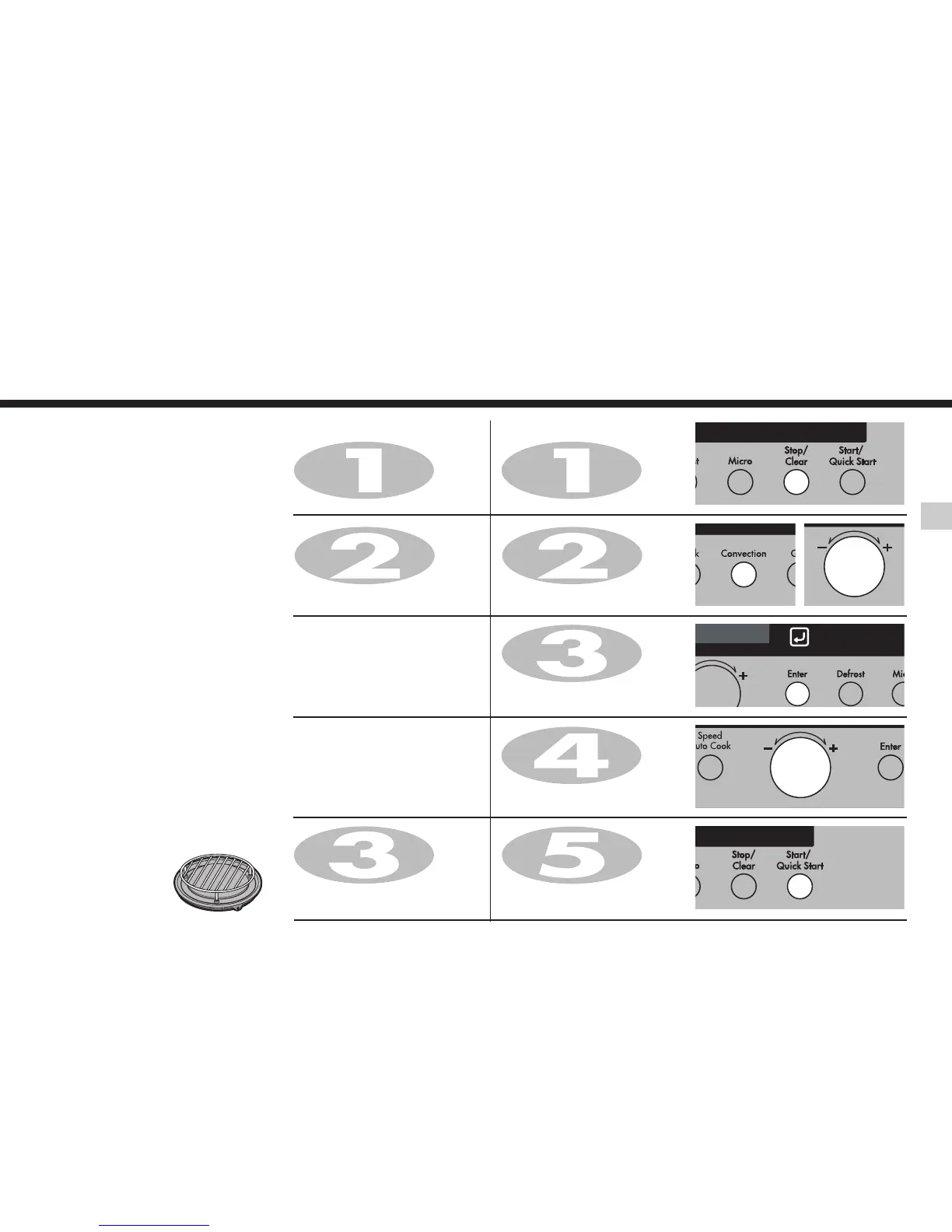
1. To Preheat
Press Stop/Clear.
2. To Cook
Press Stop/Clear.
Press Convection to select
convection mode.
Turn
Dial knob until display shows
“220°C”.
Press
Enter for temp. confirmation.
Turn Dial knob until display shows
“50:00”.
Press Start.
After cooking you must wear
gloves and container to take
metal tray out oven, because
metal tray is very hot.
Press Convection to select
convection mode.
Turn
Dial knob until display shows
“220°C”.
Press
Start.
Display shows “Pr-H”.
In the following example I will show you how to use the convection to cook some food for 50 minutes for 220°C
temp.


 To Next Page