13
Operating Instructions
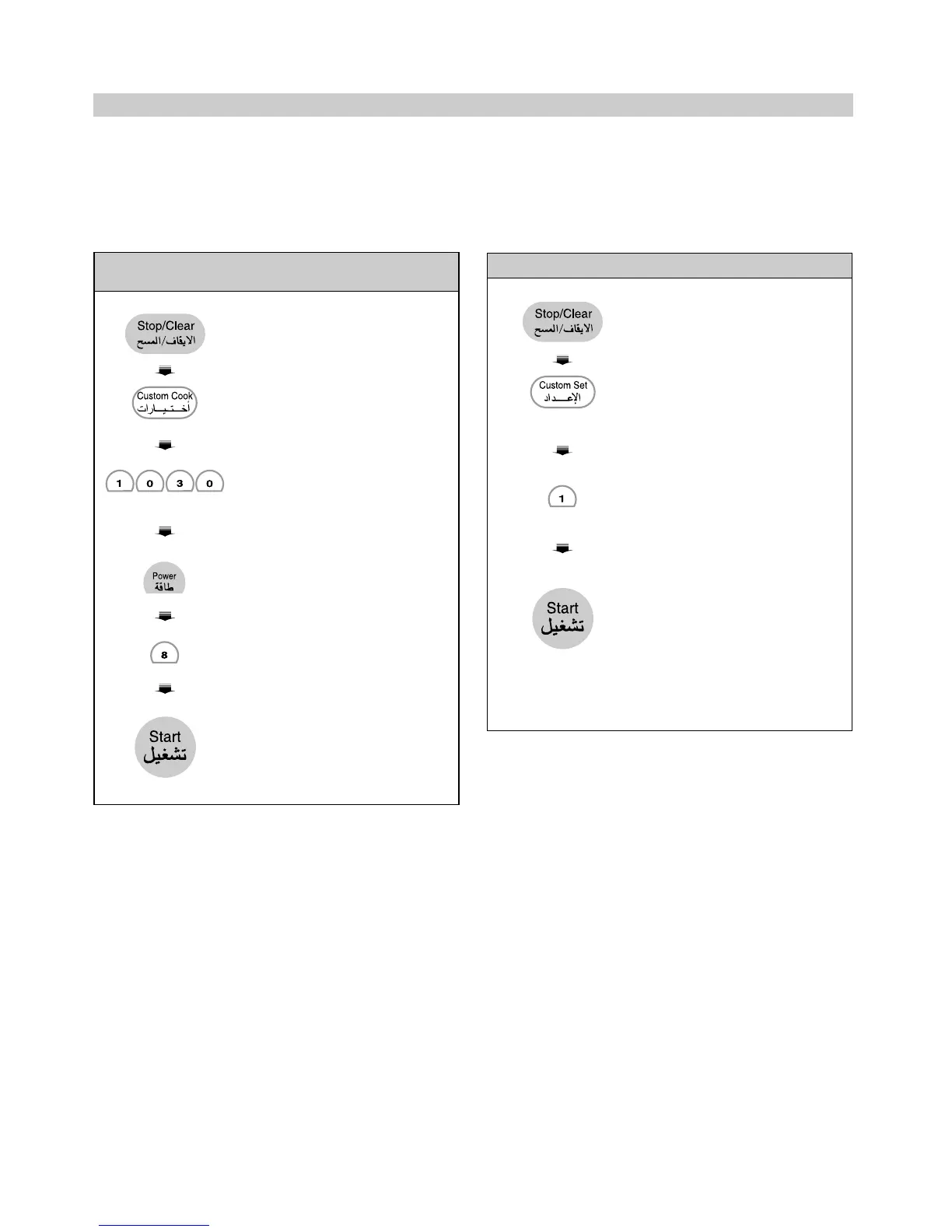
CUSTOM COOK
This feature allows you to set and execute a frequently
used single stage program. Once the cooking program
is set, you can use it by pressing the CUSTOM COOK.
Three cooking programs can be set.
NOTE:
• If you do not select the power level, the oven will
operate at power HIGH. To set HI-POWER cooking,
skip steps 4 & 5.
CUSTOM SET
You can select on/off of beeper, automatic start or
manual start of one touch cook, and food weight
measurement unit, pounds or kilograms.
1. Touch STOP/CLEAR.
2.Touch CUSTOM COOK.
1 0 0 shows in the display.
3. Enter 10 minutes. 30
seconds by touching
[1], [0], [3], and [0].
4. Touch POWER.
5. Touch 8.
P-80 shows in the display.
6. Touch START.
Example: To set cooking program, 10 minutes
30 seconds at power level 80%.
1. Touch STOP/CLEAR.
2.Touch CUSTOM SET.
NUMBR shows in the
display.
3. Touch 1.
SOUND OFF shows in
the display.
4. Touch START.
• SET and the current time
will be displayed.
Note: To turn beep sound
back on, repeat steps 1- 4.
Example 1: To turn off sound of beeper



 To Next Page