14
Operating Instructions
MORE/LESS
By using the MORE or LESS keys, all of the AUTO
COOK and TIMED COOK program can be adjusted to
cook food for a longer or shorter time. Pressing MORE
will add 10 seconds to the cooking time each time you
press it. Pressing LESS will subtract 10 seconds of
cooking time each time you press it.
Touch STOP/CLEAR.
Touch PIZZA.
Touch START.
Touch MORE.
NOTE: Press the MORE or
LESS pad during time
countdown.
To adjust the one touch cook(PIZZA)
cooking time for a longer time
1. Touch STOP/CLEAR.
2.Touch CUSTOM SET.
NUMBR shows in the
display.
3. Touch 2.
AUTO OFF shows in the
display.
4. Touch START.
• SET and the current time
will be displayed.
• It will now be necessary to
press START to activate
the One Touch Cook.
NOTE: To turn automatic Start
back on, repeat steps 1 - 4.
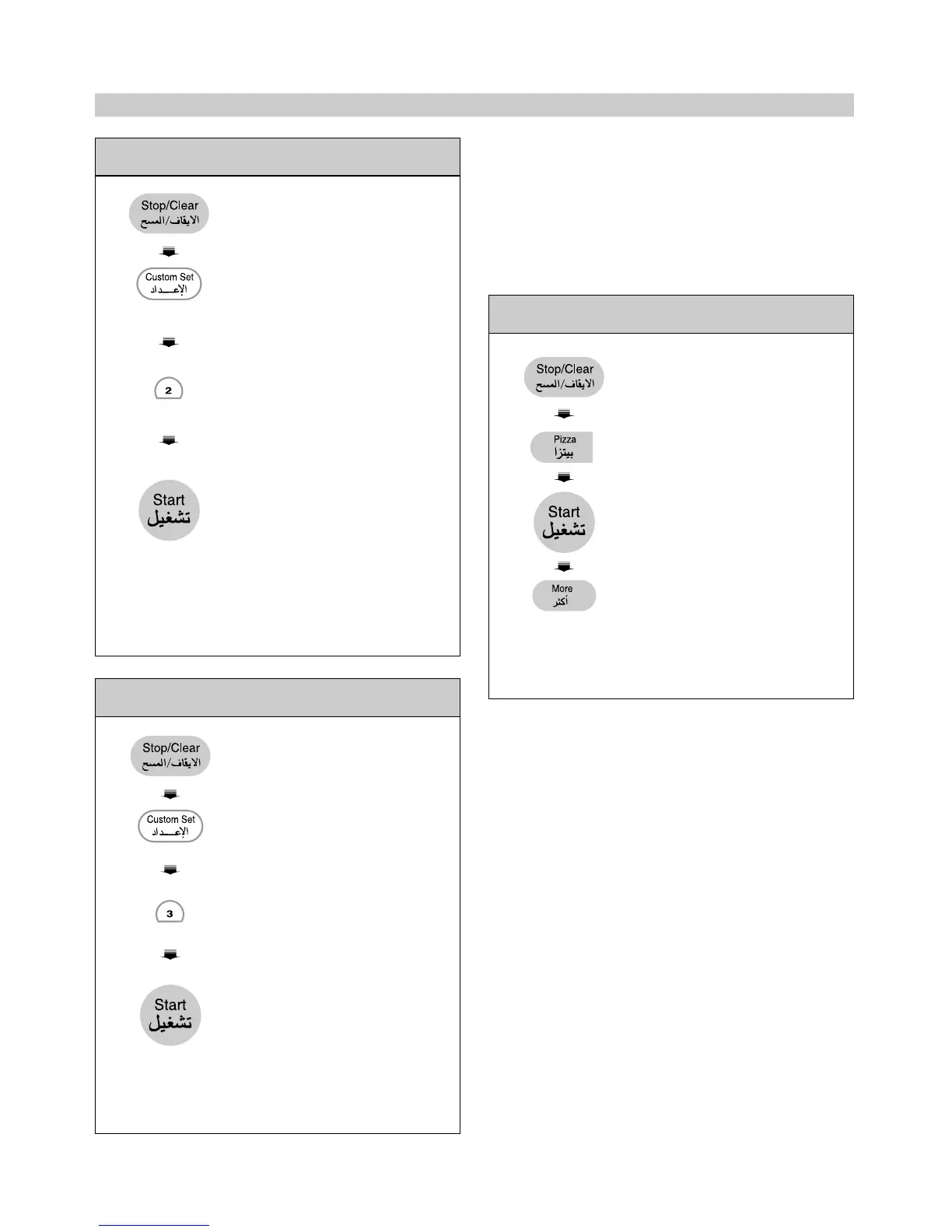
Example 2: To turn off automatic start of one
touch cook
1. Touch STOP/CLEAR.
2.Touch CUSTOM SET.
NUMBR shows in the display.
3. Touch 3.
Kg ON shows in the display.
4. Touch START.
• SET and the current time
will be displayed.
NOTE: To change weight
measurement back to pounds,
repeat steps 1 - 4.
Example 3: To change weight measurement
to kilograms



 To Next Page