Getting Started 7
Getting Started
1
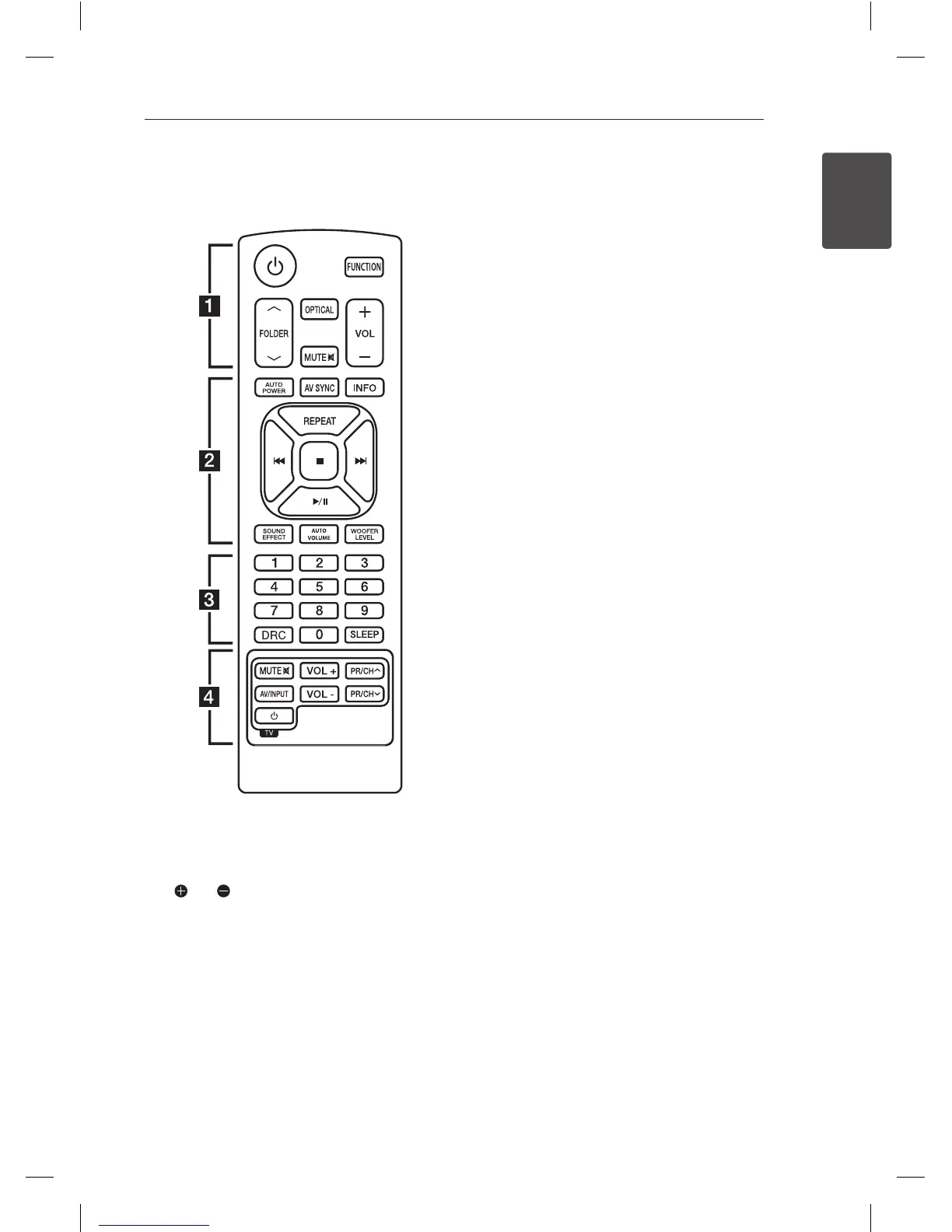
Remote control
Battery Installation
Remove the battery cover on the rear of the
Remote Control, and insert two (size AAA) battery
with and matched correctly.
• • • • • • • • • •
a
• • • • • • • • •
1
(Power) : Switches the unit ON or OFF.
FUNCTION : Selects the function and the input
source.
W/S
FOLDER : Searches for a folder of MP3/
WMA les. When a USB containing MP3/WMA les
in several folders is being played,
press
W/S
FOLDER to select the folder you want
to play.
OPTICAL : Changes input source to OPTICAL
directly.
MUTE
@
: Mutes the sound.
VOL +/- : Adjusts speaker volume.
• • • • • • • • • •
b
• • • • • • • • •
AUTO POWER : This function is automatically
turned on the unit. (Refer to the page 20)
AV SYNC : Synchronizes the audio and video.
INFO : Displays the information of a le or an input
source.
REPEAT : Listens to your les repeatedly or
randomly.
C/V
(Skip/Search) :
- Skips Fast backward or Forward.
- Searches for a section within a le.
Z
(Stop) : Stops playback.
d/M
(Play/Pause) : Starts playback. / Pauses
playback.
SOUND EFFECT : Selects a sound eect mode.
AUTO VOLUME : Turns on and o the AUTO
VOLUME mode.
WOOFER LEVEL : Sets the sound level of woofer.
• • • • • • • • • •
c
• • • • • • • • •
0 to 9 numerical buttons : Selects a le directly.
DRC : Sets the DRC.
SLEEP : Sets the system to turn o automatically at
a specied time.
• • • • • • • • • •
d
• • • • • • • • •
TV Control buttons : See page 25.


 To Next Page