EasyManua.ls Logo

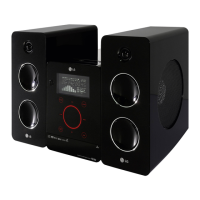
LG FB162 - User Manual

LG FB162
27 pages
Print Icon
To Next Page IconTo Next Page
Loading...
Mini Home Theater
OWNER’S MANUAL
MODEL: FB162
FB162-A0U/D0U/X0U
FBS162V
Before connecting, operating or adjusting this product,
please read this instruction booklet carefully and completely.
FB162-A0U_ENG_MFL35424790

Questions and Answers

  • A
    Andrew DeleonAug 16, 2025
    Why is there no picture on my LG Home Theater System?
    • A
      Aaron WillisAug 16, 2025
      If there's no picture from your LG Home Theater System, it could be due to several reasons: First, ensure your TV is set to the correct input mode to receive the DVD signal. Second, check that the video cable is securely connected to both the Home Theater System and the TV. Finally, make sure the connected TV is powered on.
  • M
    mayerchristinaAug 19, 2025
    What to do if my LG FB162 remote control does not work properly?
    • E
      emily18Aug 19, 2025
      If the remote control for your LG Home Theater System isn't working, try these steps: Aim the remote directly at the remote sensor on the unit. Ensure you're within 23 ft (7 m) of the unit. Remove any obstacles between the remote and the unit. Finally, replace the batteries in the remote with new ones.
  • Z
    zscottAug 22, 2025
    Why is there no sound coming from my LG Home Theater System, or the sound is very low?
    • J
      John TurnerAug 22, 2025
      If you're experiencing no sound or very low sound from your LG Home Theater System, check the following: First, ensure the equipment connected with the audio cable is set to receive the DVD audio signal output by selecting the correct input mode on the receiver. Second, verify that the audio cables are securely connected. Third, confirm that the equipment connected with the audio cable is turned on. Lastly, inspect the audio connecting cable for damage and replace it if necessary.
  • A
    adamscarolineAug 26, 2025
    What to do if my LG Home Theater System does not start playback?
    • R
      richard10Aug 26, 2025
      If your LG Home Theater System isn't starting playback, consider these possibilities: Ensure a disc is inserted, checking that the DVD or audio CD indicator is lit. Verify that the inserted disc is playable, considering the disc type, color system, and regional code. Make sure the disc is placed correctly with the playback side down and within the guide on the disc tray. Clean the disc if it's dirty. If a menu is on the TV screen, press the SETUP button to turn it off. Also, check if the Rating level is set and cancel the Rating function or change the rating level if needed.
  • D
    donald60Aug 28, 2025
    How to fix loud hum or noise from LG Home Theater System?
    • J
      Jill GreeneAug 28, 2025
      To address loud humming or noise from your LG Home Theater System, first, try cleaning the disc. Second, ensure that the speakers and components are securely connected. Finally, move the TV away from the audio components, as the unit may be located too close to the TV.
  • W
    williamslauraAug 31, 2025
    Why my LG FB162 Home Theater System has no power?
    • M
      mcguirejamesAug 31, 2025
      If your LG Home Theater System has no power, the power cord may be disconnected. Plug the power cord securely into the wall outlet.
  • M
    Mario WarrenSep 3, 2025
    Why is the playback picture poor on my LG FB162?
    • J
      Julie HartSep 3, 2025
      If the playback picture quality is poor on your LG Home Theater System, the disc may be dirty. Clean the disc to resolve this issue.
  • L
    larry12Sep 6, 2025
    Why won't my LG FB162 tune into radio stations?
    • M
      Michelle RomeroSep 6, 2025
      If your LG Home Theater System isn't tuning into radio stations, check the antenna connection and position to ensure it's securely connected. If tuning with automatic tuning, the signal strength may be too weak, so try tuning in the station manually. If tuning by scanning preset stations, preset the stations first.
  • L
    Lauren MooneySep 9, 2025
    Why the power is on, but my LG FB162 does not work?
    • K
      Kim SmithSep 9, 2025
      If the power is on but your LG Home Theater System isn't working, it might be because no disc is inserted. Insert a disc and check that the DVD or audio CD indicator in the DVD display is lit.
  • L
    Leroy FletcherSep 12, 2025
    Why is the front panel display too dim on my LG FB162 Home Theater System?
    • C
      Charles CookSep 12, 2025
      If the front panel display on your LG Home Theater System is too dim, press the DIMMER button.

Summary

Safety Precautions and Warnings

Electrical Shock and Fire Hazards

Warnings about electric shock, fire, moisture, and ventilation.

Power Cord Safety Guidelines

Advice on handling and protecting the power cord.

Laser System Safety Instructions

Precautions to prevent hazardous laser radiation exposure.

Unit Hardware Overview

Front Panel Controls and Ports

Identification and function of front panel buttons and connections.

Rear Panel Connection Terminals

Description of input and output ports on the back.

Remote Control Guide

Remote Control Button Functions

Detailed explanation of each button on the remote.

Connecting Your Home Theater System

TV Connection Options

Connecting the unit to a TV using video or component cables.

Connecting External Audio Sources

Microphone and Echo Volume Settings

Connecting microphones and adjusting echo for karaoke.

Connecting Media and Speakers

Speaker System Wiring

Proper connection of speaker cables to the unit terminals.

Audio Features and Parental Controls

DVD Parental Lock Setup

Configuring rating limits, password, and area code for DVDs.

Playing DivX Movies with Subtitles

DivX Compatibility and Subtitle Handling

File format support, codecs, and subtitle display options.

Troubleshooting Common Issues

Resolving Power and Picture Problems

Solutions for units not powering on or displaying images.

Fixing Audio, Playback, and Picture Quality

Addressing sound, playback, and picture quality issues.

Troubleshooting Radio and Remote

Radio Tuning and Reception Issues

Troubleshooting problems with tuning in radio stations.

Remote Control and Display Malfunctions

Solutions for remote control not working or dim display.

Detailed Technical Specifications

General, CD;DVD, and Video Specs

Power, dimensions, laser, signal system, and video output details.

Tuner, Amplifier, and Speaker Specifications

Tuning ranges, power output, impedance, and speaker details.

LG FB162 Specifications

General IconGeneral
RMS rated power160 W
TypeHome audio micro system
Cassette deckNo
Product colorBlack
Optical disc playerYes
Number of optical discs1 discs
Headphone connectivity3.5 mm
USB 2.0 ports quantity1
Audio formats supportedMP3, WMA
Dimensions (WxDxH)170 x 260 x 228 mm

Related product manuals