Need help?
Do you have a question about the LG ND5520 and is the answer not in the manual?
Reduce shock risk by not removing cover; refer servicing to qualified personnel.
Prevent fire/shock hazard by avoiding rain or moisture exposure.
Refer to the bottom label for safety marking, identification, and supply ratings.
Precautions for using the power cord, including dedicated circuits and avoiding damage.
Safe battery removal and disposal instructions.
Keep apparatus away from water and liquid-filled objects to prevent damage.
Dispose of electrical/electronic products separately via designated facilities to prevent environmental harm.
Dispose of batteries/accumulators separately via designated facilities to prevent environmental harm.
Declares compliance with EU directives and provides RF exposure information.
Details power supply requirements and wiring instructions for the unit.
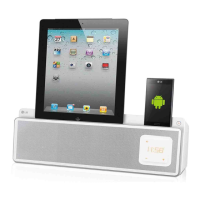
Highlights include iPod/iPhone/iPad support, USB playback, and Bluetooth.
Supports music playback from compatible iPod, iPhone, and iPad devices.
Listen to music from portable devices via the AUX input.
Enjoy music files directly from USB storage devices.
Set and manage alarms with customizable sound sources and times.
Listen to FM radio broadcasts with station tuning and presets.
Syncs the unit's clock automatically via iPod/iPhone/iPad or Bluetooth app.
Control the unit remotely using a smartphone via Bluetooth.
Identifies all accessories provided with the docking speaker.
Defines icons and symbols used for notes, cautions, and important features.
Specifies sampling frequency, bit rate, and file limits for MP3/WMA playback.
Outlines requirements for USB devices, including file systems and device types.
Details functions of power, sleep, input source, volume, playback, and navigation.
Controls for turning the unit on/off and setting the sleep timer.
Selects input sources and adjusts speaker volume levels.
Buttons for play/pause, skip, search, and mute functions.
Controls for selecting radio presets and navigating folders/files.
Store and delete radio station presets using the MEMORY button.
Step-by-step guide for opening compartment, inserting, and closing battery.
Identifies the remote sensor, power button, control panel, and speaker.
Explains alarm, clock, FM antenna, audio input, USB, and power connections.
Identifies docks for iPod/iPhone/iPad and Android phones.
Tap or swipe to select input sources like IPOD, BT, PORT, FM, or USB.
Tap center to play music or pause playback.
Skip forward/backward or search within files.
Use '+' and '-' to adjust speaker volume.
Navigate folders or select radio presets.
Connect power cord to adapter, adapter to unit, and adapter to outlet.
Sync clock via iPod/iPhone/iPad or LG Bluetooth Remote app.
Connect device to dock for automatic clock synchronization.
Use LG Bluetooth Remote app to sync the clock automatically.
Guide to manually set hour, minute, and 12/24 hour format.
Connect and operate iPod, iPhone, or iPad for music playback.
Lists supported iPod, iPhone, and iPad models.
How to play, pause, skip, and step back through tracks.
How to search for specific points within a music file.
Connect USB device and select USB mode.
Playback, pause, skip, and search functions for USB files.
Steps to safely disconnect a USB device.
Explains how USB folders and files are recognized and displayed.
Connect external devices via PORT.IN for music playback.
Guide to opening, winding cable, and closing the ferrite core.
Connect antenna, tune to stations using auto or manual methods.
Connect the FM wire antenna to the unit.
How to tune to stations using auto or manual methods.
Steps to store favorite radio stations into memory.
Instructions to delete all saved radio presets.
Setting tuner to mono can improve FM signal reception.
Explains Bluetooth as a short-range wireless technology.
Lists compatible Bluetooth profiles, like A2DP.
Steps to pair the unit with a Bluetooth-enabled device.
Specifies the PIN code (0000) for Bluetooth pairing.
Overview of the LG Bluetooth Remote app and how to install it via QR code.
Instructions to scan QR codes for Android/iOS app installation.
Automatic download link appears when connecting Apple device to dock.
Steps to search and download the app from app stores.
Use the app to connect the unit and access settings.
Setting up the unit to function as an alarm clock.
How to turn the alarm timer on or off.
How to silence the alarm when it rings.
Temporarily pause and reset the alarm.
How to resume music playback from the last stopped point.
Options for playing files repeatedly or in random order.
Adjust the control panel brightness.
Set a delay timer for the unit to power off automatically.
Select sound modes like POP, CLASSIC, JAZZ, ROCK, or BYPASS.
Temporarily silence the sound output.
Connect Android phones to the dock to charge the battery.
Steps to resolve power and sound issues.
Solutions for radio reception and Apple device connectivity problems.
Fixes for clock display and control panel brightness.
Troubleshooting steps for a non-functional remote control.
Details regarding 'Made for iPod/iPhone/iPad' and Bluetooth trademarks.
Guidance on saving and using original packaging for shipping.
Advice on cleaning the unit's exterior and avoiding damage.
Details AC adapter, power, dimensions, weight, temperature, and humidity.
Lists PORT.IN, FM tuning range, and output power.
Details THD, impedance, and power ratings.
Details of free component replacement and labor reimbursement for 12 months.
Instructions for making claims, dealer restrictions, and exclusions.
Essential requirements to keep the warranty valid, like retaining receipt.
Information on product registration and customer support contact details.
 General
| Impedance | 8 Ω |
|---|---|
| Frequency range | - Hz |
| RMS rated power | 30 W |
| Audio output channels | 2.0 channels |
| Bluetooth | Yes |
| Headphone connectivity | 3.5 mm |
| USB 2.0 ports quantity | 1 |
| Supported radio bands | FM, PLL |
| Preset stations quantity | 10 |
| Equalizer modes | Classic, Jazz, Pop, Rock |
| Apple docking compatibility | iPad, iPhone, iPod |
| AC input voltage | 110 - 240 V |
| Built-in charger | No |
| Power source type | AC |
| AC input frequency | 50 - 60 Hz |
| Power consumption (typical) | 48 W |
| Product color | White |
| Volume control | Digital |
| Dimensions (WxDxH) | 436 x 115 x 152 mm |
 Weight and Dimensions
| Weight | 2300 g |
|---|

 To Next Page