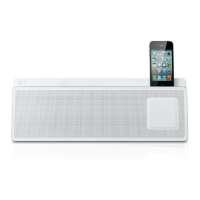
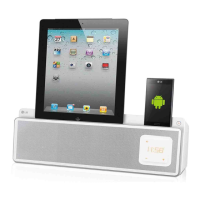
This document is the owner's manual for the LG PD36 (PD36) Docking Speaker, a portable audio device designed to play music from various sources including iPod/iPhone, USB devices, and external portable devices, as well as offering radio functionality and alarm features.
Function Description
The LG PD36 Docking Speaker is a versatile audio system that serves as a docking station for iPod/iPhone, a USB media player, an FM radio, and an alarm clock. It allows users to enjoy music from their portable devices with simple connections and offers various sound adjustments.
Important Technical Specifications
- General:
- Power supply: Refer to the main label.
- Power consumption: Refer to the main label.
- Net Weight: 0.65 kg.
- External dimensions (W x H x D): 200 x 112 x 176 mm.
- Operating conditions Temperature: 5 °C to 35 °C (41 °F to 95 °F).
- Operation status: Horizontal.
- Operating humidity: 5% to 85%.
- Tuner:
- FM Tuning Range: 87.5 to 108.0 MHz or 87.50 to 108.00 MHz.
- Amplifier:
- Output Power: 1.5 W + 1.5 W.
- T.H.D (Total Harmonic Distortion): Less than 1%.
- USB:
- USB Version: USB 2.0 or USB 1.1.
- Bus Power Supply: USB: DC 5V 500 mA, iPod/iPhone: DC 5V 1A.
- Speakers:
- Type: 1 Way 2 Speaker.
- Impedance: 4 Ω.
- Rated Input Power: 1.5 W.
- Max. Input Power: 2 W.
- Battery (for backup purpose only):
- Requires 3V micro lithium cells such as CR2032 or equivalent.
- The battery is not for power supply but for backup.
Usage Features
- Portable In: Listen to music from your portable device by connecting it to the PORT. IN connector. A portable cable is not supplied.
- Alarm Timer: Set alarms to go off at desired times, with options for iPod/iPhone, USB, BUZZER, or TUNER. Alarm periods can be set for 7 Days (Everyday), 5 Days (Weekday), or 2 Days (Weekend).
- Made for iPod/iPhone: Enjoy music from iPod/iPhone with a simple connection to the docking station. The unit supports various iPod nano, classic, 5G, touch, and iPhone models. When docked, the iPod/iPhone is automatically turned on and recharges.
- USB Playback: Enjoy music from USB flash drives (USB2.0 or USB1.1 compatible).
- Playable File Requirement: Supports MP3 (32-320 kbps, 32-48 kHz sampling frequency) and WMA (40-320 kbps, 32-48 kHz sampling frequency) files. Maximum 999 files.
- USB Device Requirement: Does not support devices requiring additional program installation, external HDDs, card readers, locked devices, or hard type USB devices. NTFS file system is not supported (only FAT16/32). Total number of files should not exceed 1000. The USB port cannot be connected to a PC or used as a storage device.
- Programmed Playback: Create a playlist of up to 20 files from a USB device.
- Resume Playback: The unit memorizes the stopped point for USB playback.
- Folder Selection: Select and play files within specific folders on a USB device.
- Radio: Listen to FM radio stations.
- Auto Tuning: Automatically scan for stations.
- Manual Tuning: Manually tune to desired frequencies.
- Presetting Stations: Preset up to 6 FM stations for quick access.
- Improving Poor FM Reception: Switch the tuner from stereo to mono to improve reception.
- Clock Setting: Set the clock to 12-hour (AM/PM display) or 24-hour format.
- Sleep Timer: Set the system to turn off automatically after a specified time (10 to 180 minutes).
- SNOOZE Function: Wakes you up every 5 minutes if pressed during an alarm. If an alarm is set, the unit turns on automatically and rings. Pressing SNOOZE stops the alarm and powers off the unit, with the alarm ringing again in 5 minutes.
- Sound Adjustment (EQ): Choose from pre-set sound modes like POP, CLASSIC, ROCK, JAZZ, BASS, or BYPASS (no equalizer effect) to enhance the audio experience.
Maintenance Features
- Handling the Unit:
- Retain original shipping carton and packing materials for protection during transport.
- Avoid using volatile liquids (e.g., insecticide spray) near the unit.
- Do not wipe with strong pressure to prevent surface damage.
- Avoid prolonged contact with rubber or plastic products.
- Cleaning the Unit:
- Use a soft, dry cloth for cleaning.
- For extremely dirty surfaces, use a soft cloth lightly moistened with a mild detergent solution.
- Do not use strong solvents such as alcohol, benzine, or thinner, as these may damage the surface.
- Battery Replacement:
- Replace the unit's battery with a 3V micro lithium cell (CR2032 or equivalent).
- Ensure correct battery orientation (+ facing +).
- Dispose of used batteries safely according to local laws; do not dispose of in fire.
- Warning: Battery misuse (recharging, disassembling, incinerating, heating above 100 °C) can cause fire or chemical burn hazards. Use only specified replacement batteries. Keep batteries away from children.

 Need help?
 General

 To Next Page