ENGLISH
INSTALLATION
INSTALLATION
1
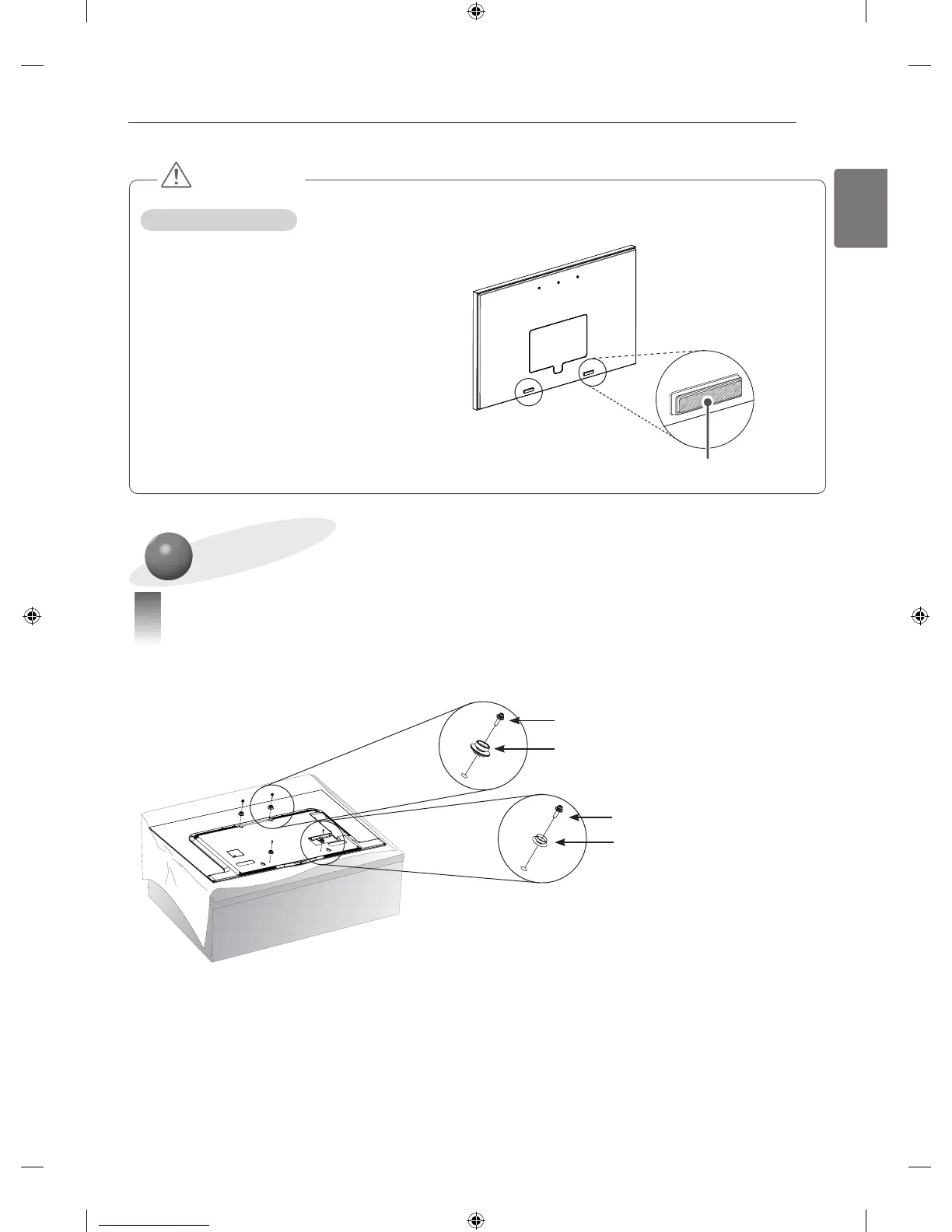
Attaching the Guide Spacer on the TV
• If the screws cannot be fully tightened when fixing the guide spacer with them, check the fixing depth of
the screws again and refer to the technical service manual.
Guide Spacer (Bottom)
Guide Spacer (Top)
Guide Spacer (Bottom) Fixing screw
Guide Spacer (Top) Fixing Screw
<Procedures>
1 If any screws are installed into the mounting holes, please remove the screws.
2 Fix the guide spacers and the guide spacer fixing screws in the order shown in the figure.
- Place the product facing down on a table. To prevent scratches on the screen, place the product on a
cushion or a soft clothes on a flat surface.
- Tighten the screw until the set, guide spacers and screws are joined together securely and stop tightening.
- Use a Phillips driver (manual or electric) to tighten the screws.
CAUTION
How to use the Rubber
• It is recommanded to install the bracket on a concreate wall.
• The product should be installed by a professional
installer designated by the retailer.
Attach the rubber here.



 To Next Page