8
ENG
ENGLISH
INSTALLATION
2
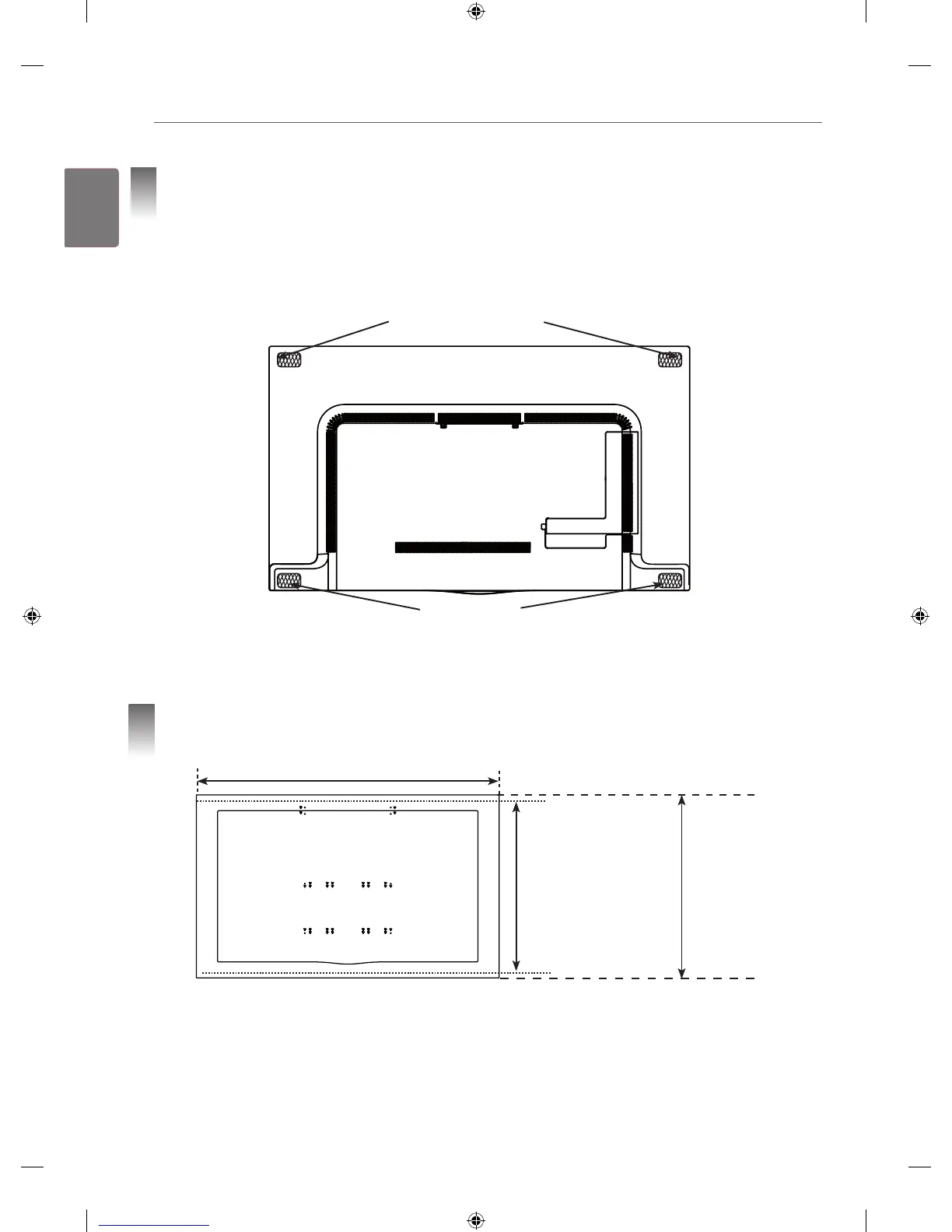
Attaching Set Protection Cushion
• Attach the set protection cushion to mitigate the impact between the TV and the Canvas Speaker in case
of bumping against each other when adjusting the angle.
• Attach the protection cushion to the four corners of the back of the set as shown in the figure.
Set Protection Cushion (Upper)
2 EA (thickness: 11 mm)
Set Protection Cushion (Bottom)
2 EA (thickness: 1.5 mm)
3
Checking the Spots for Fixing Screws on the Wall Using
VESA Guide Sheet
1430 mm
840 mm
(VESA guide sheet size)
865 mm
(Actual product size)
1 Check the VESA standard for the TV.
2 Mark the wall mounting location on the wall using the VESA guide sheet provided as an accessory.
3 Remove the VESA guide sheet after checking the spots for fixing screws on the wall.
* Please note that the VESA guide sheet is shorter than actual product by 12.4 mm on the top and bottom sides
respectively, when installing the product.



 To Next Page