Selecting a folder and
an MP3/WMA file
On the unit
1. Press PRESET/FOLDER A/D repeatedly until a
desired folder appears.
2. Press
T
to play it. The first file of folder wil be
played.
On the remote control
1. Press PRESET/FOLDER W/S repeatedly until a
desired folder appears.
2. Press
N
to play it. The first file of folder wil be
played.
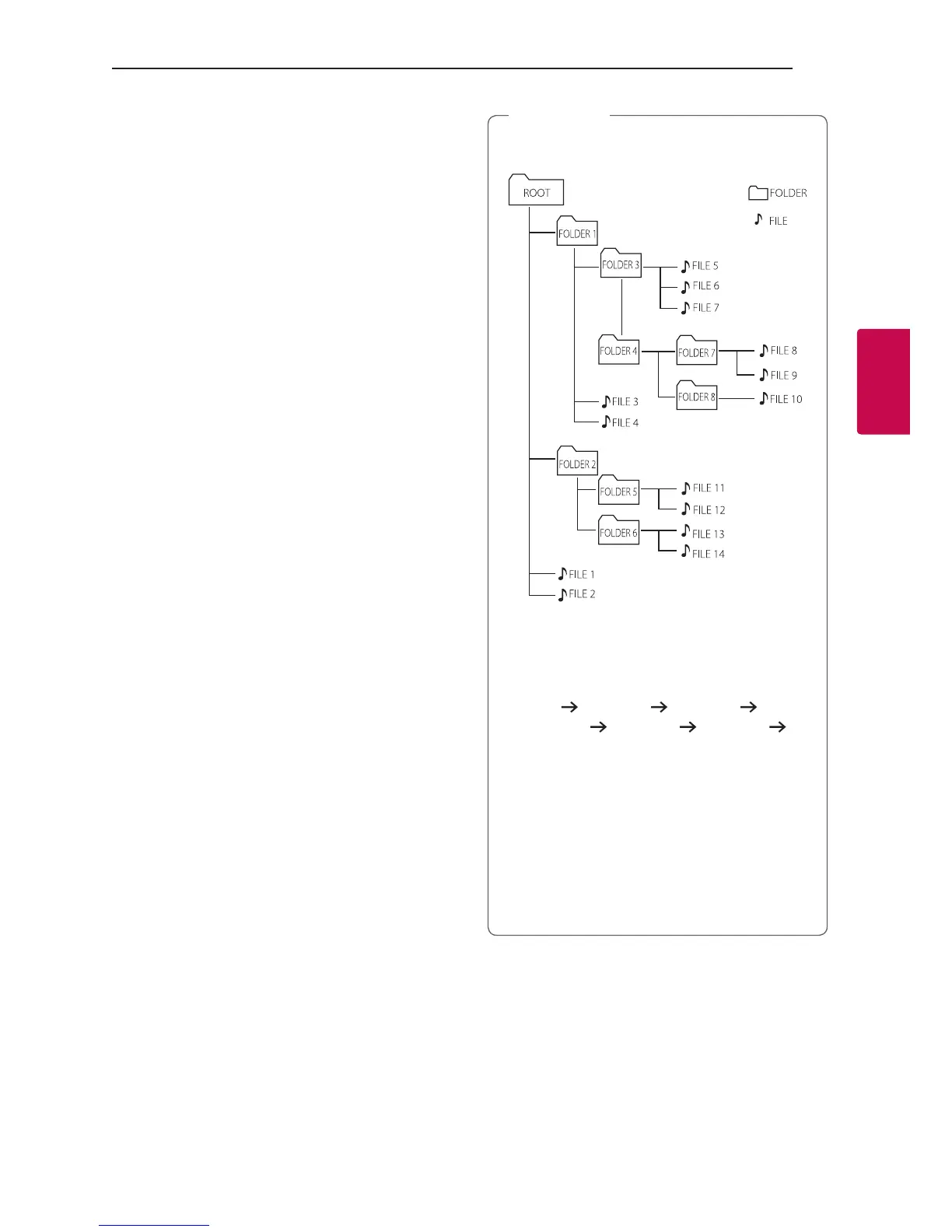
y CD / USB Folders/Files are recognized as
below.
*
y If there is no le in a folder, the folder will not
appear.
y Folders will be presented as the following
order;
ROOT
FOLDER 1 FOLDER 3
FOLDER 7 FOLDER 8 FOLDER 5
FOLDER 6
y File will be played from $ le No.1 to $ le
No.14 one by one.
y *ROOT : The rst screen you can see when a
computer recognize the CD/USB is “ROOT”.
y Files and folders will be presented in order
recorded and may be presented differently
according to the record circumstances.
,
Note



 To Next Page