Getting Started 11
Getting Started
1
a 1 (Standby)
Turns the power on or off.
F (Function)
- Selects the function and input source.
- Press and hold to adjust delay time when using
PARTY LINK with AUX.
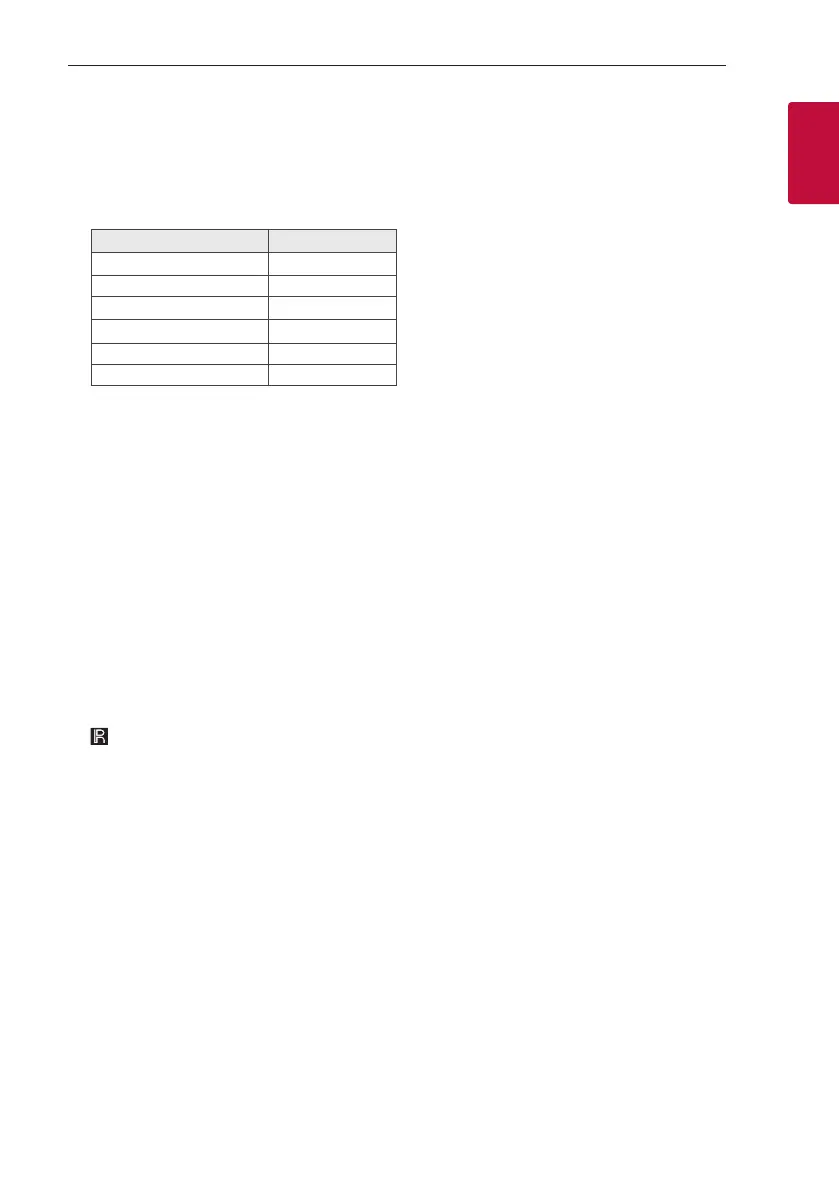
Input source / Function Display
Disc CD
USB USB
AUX input AUX
Bluetooth BT
LG Sound Sync (Wireless) LG TV
Radio FM
VOL (Volume) -/+
Adjusts speaker volume.
b MIC (Microphone) ECHO / DEMO
- Selects ECHO mode.
- In power off status, if you press
MIC ECHO / DEMO, show demo mode.
VOCAL EFFECTS
Selects various vocal effects mode.
LIGHTING
Selects the lighting mode.
c USB Port
You can play sound les by connecting the USB
device.
d Display window
e Disc tray
f
(Remote sensor)
g N (Play/Pause)
Starts or pauses playback.
C/V (Skip/Search)
- Skips backward or forward.
- Searches for a section within a track/file.
- Selects the radio stations.
Z (Stop) / RDS
- Stops playback or cancels DELETE function.
- Radio Data System
h B (Open/Close)
Opens and closes the disc tray.
MIC VOL (Microphone volume) -/+
Adjust microphone volume.
3TWIN
Connects two speakers for TWIN mode in WIRELESS
PARTY LINK.



 To Next Page