Troubleshooting40
Troubleshooting
4
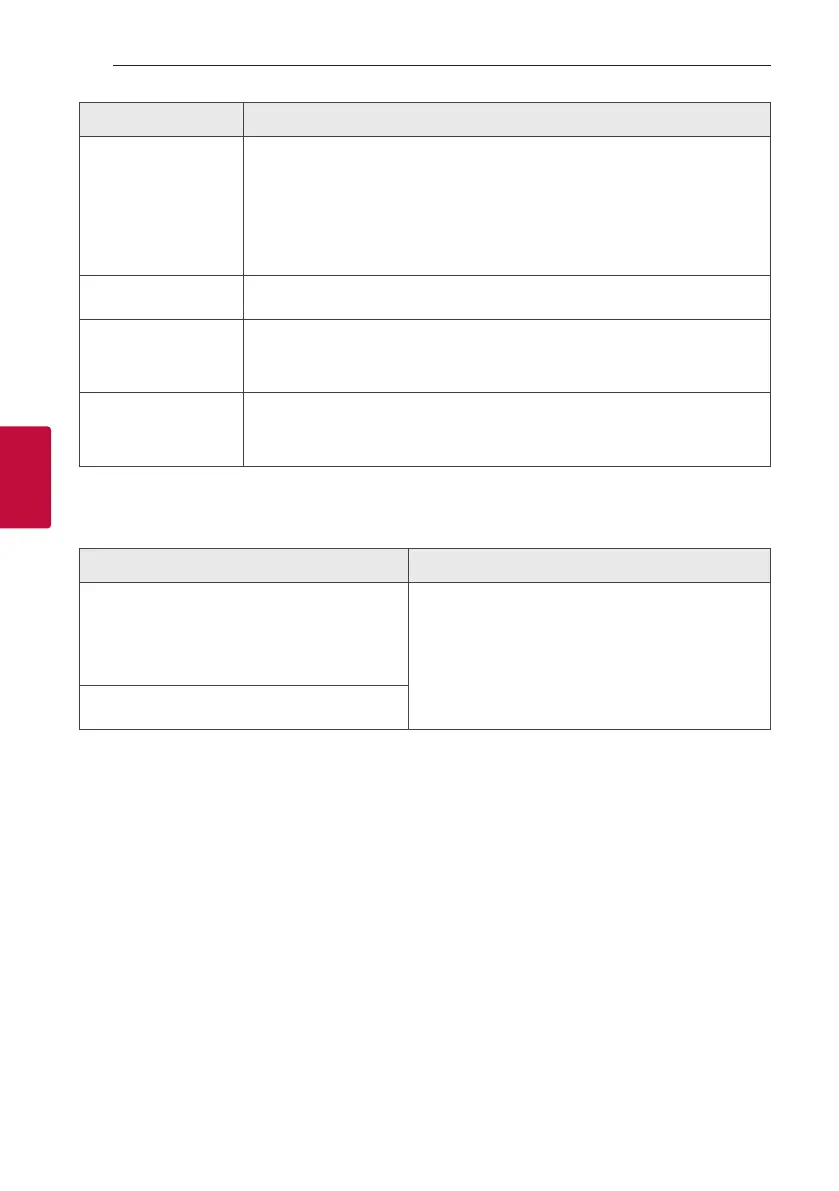
Problem Cause & Solution
The remote control does
not work properly.
y The remote control is too far from the unit.
Operate the remote control within about 7 m (23 feet).
y There is an obstacle in the path of the remote control and the unit.
Remove the obstacle.
y The batteries in the remote control are exhausted.
Replace the batteries with new ones.
No speaker light.
y Check the light effects by pressing LIGHTING (Page 33).
LG Sound Sync does not
work.
y Check whether your LG TV supports LG Sound Sync.
y Check connection of LG Sound Sync.
y Check sound setting of your TV and this unit.
The AUTO POWER
function does not work.
y Check connection of the external device such as TV or Bluetooth device.
y Depending on the connected device, this function may not operate.
NOTES to release Demo mode
Problem Cause & Solution
Can not change input source with ‘F’ key such as
BT(Bluetooth), USB etc. and only DEMO mode is
showing in the display.
y Press ‘DEMO’ Key on the unit for 15 seconds.
Remote Control does not work properly.



 To Next Page