Getting Started14
Getting Started
1
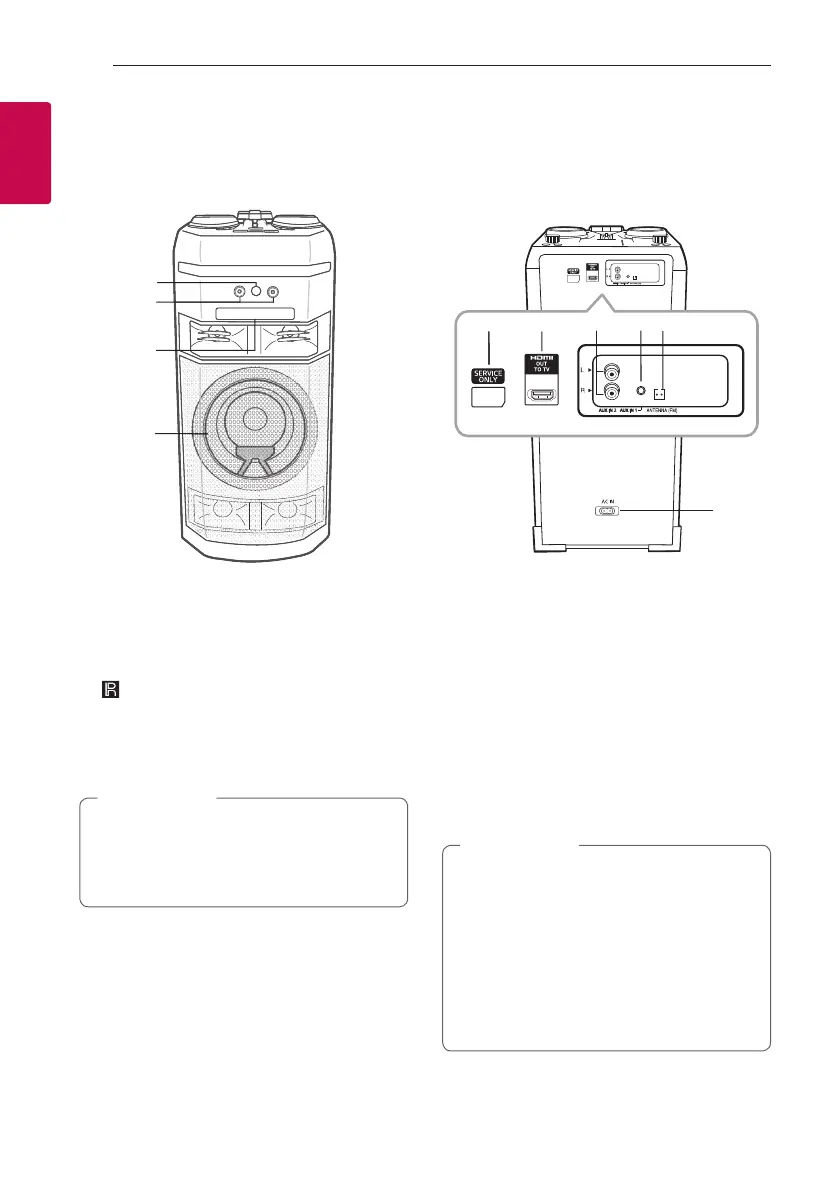
Front panel / Rear panel
a (Remote sensor)
b MIC (Microphone) 1/2 jack
c Disc tray
d Lighting
Place the speaker at a safe distance from the
child’s reach. Otherwise it may result in the
speaker falling down and causing personal injury
and/or property damage.
>
Caution
e SERVICE ONLY: S/W download connector
f HDMI OUT TO TV: Connect to TV
g AUX IN 2 (L/R): Connect an auxiliary device.
h AUX IN 1: Connect a portable device.
i ANTENNA (FM)
j AC IN socket
y Connect the power cord to wall outlet
directly if possible. Or when you use an
extension cable, it is highly recommended
to use an extension cable of 110 V / 15 A
or 230 V / 15 A, otherwise the unit may
not operate properly because of the lack of
power supply.
y Do not overload the extension cord with
excessive electrical load.
>
Caution
a
b
c
d
j
h
i
g
e
e f



 To Next Page