Operating 35
Operating
4
Playback Effect
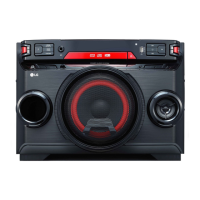
The unit supports various sound and playback
effects: DJ EFFECT, DJ SCRATCHER, DJ PAD, AUTO
DJ, DJ LOOP, PARTY ACCELERATOR, PARTY KICK
STARTER.
DJ EFFECT
It allows you to enjoy DJ EFFECT such as FLANGER/
PHASER/ WAH/ DELAY sound effect.
1. Press DJ EFFECT on the unit to select a desired
DJ EFFECT (FLANGER, PHASER, WAH, DELAY,
OFF).
2. Turn DJ SCRATCHER / LEVEL CONTROL on the
unit clockwise or counterclockwise to adjust the
DJ EFFECT level between 0 to 15.
y The DJ EFFECT mode is displayed for 3
seconds when a DJ EFFECT key on the unit
is inputted.
y The current gage level is displayed when
adjusting gage.
y If the function changed or the unit is turned
off and on, DJ EFFECT mode with DJ EFFECT
is turned off.
,
Note
DJ SCRATCHER
You can output and mix the sound effects of the
DJ SCRATCHER.
Rotating DJ SCRATCHER / SEARCH & MULTI or
DJ SCRATCHER / LEVEL CONTROL on the unit to
mix the scratch sound.
- You can hear effect of scratch sound depending
on the direction in which you rotate
DJ SCRATCHER / SEARCH & MULTI or
DJ SCRATCHER / LEVEL CONTROL on the unit.
AUTO DJ
Auto DJ blends the end of one song into the
beginning of another for seamless playback.
It equalizes volume across tracks/les for
uninterrupted playback.
Press AUTO DJ on the remote control repeatedly, the
display changes as followings.
RANDOM (SHUFFLE)
SEQUENTIAL OFF
On Display Description
OFF -
RANDOM
(SHUFFLE)
The music is played randomly on
this mode.
SEQUENTIAL
The music is played repeatedly on
this mode.
y AUTO DJ mode does not support searching
for a section within a track/le or to play
repeatedly or randomly.
y If you move to other functions or stop the
music using Z on AUTO DJ mode, AUTO DJ
will be disabled.
y AUTO DJ is not supported in the music le
whose length is less than 60 seconds.
y Only SEQUENTIAL is selected when played
JUKE BOX list.
y In USB function, SHUFFLE displays instead of
RANDOM.
,
Note



 To Next Page