Getting Started8
Getting Started
1
Remote control
Replacement of battery
Remove the battery cover on the rear of the remote
control, and insert the battery with 4 and 5
matched correctly.
Risk of fire or explosion if the battery is replaced by
an incorrect type.
• • • • • • • • • • • • • • a • • • • • • • • • • • • •
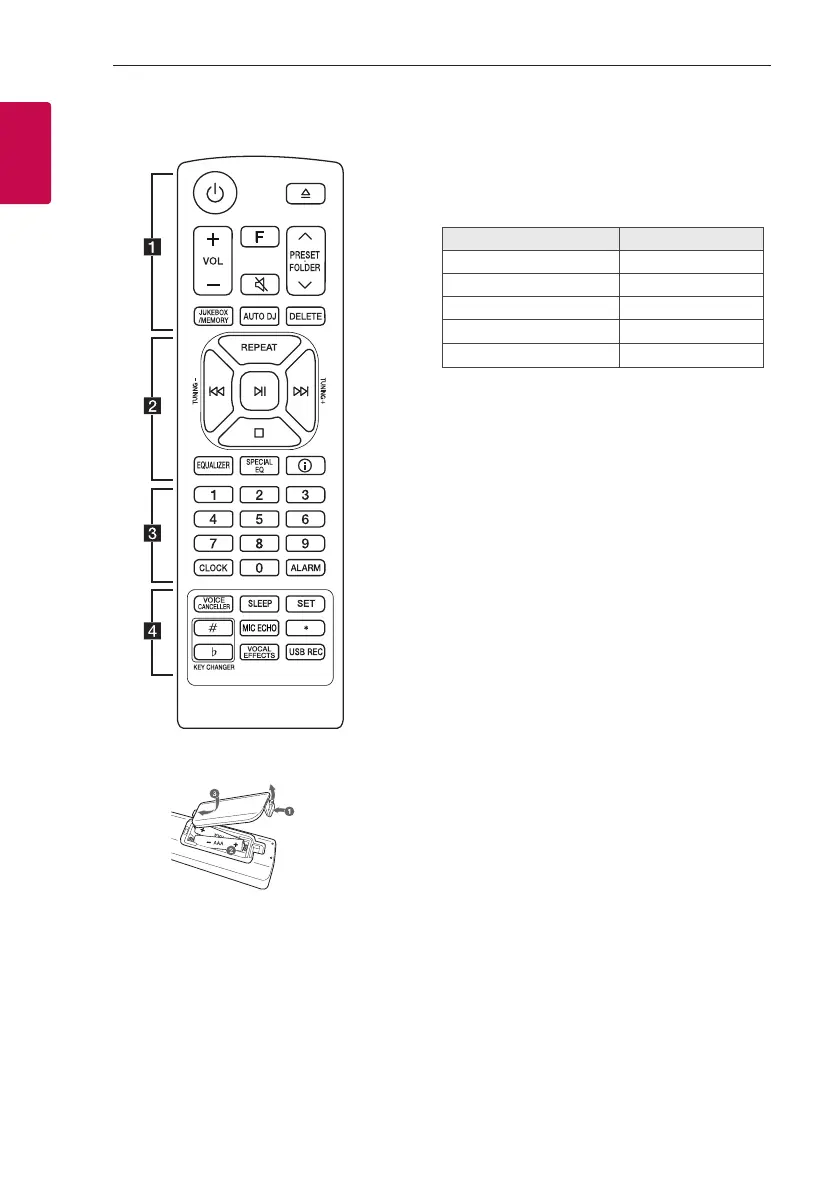
1 (Standby): Turns the power on or off.
B (Open/Close): Opens and closes the disc tray.
VOL (Volume) +/-: Adjusts speaker volume.
F (Function): Selects the function and input source.
Input source / Function Display
Disc CD
USB USB1 / USB2
Bluetooth BT
LG Sound Sync (Wireless) LG TV
Radio FM
[ (Mute): Mutes the sound.
PRESET·FOLDER W/S:
- Chooses a preset number for a radio station.
(Page 25)
- Searches for a folder of MP3/WMA les. When
a CD/USB containing MP3/WMA les in several
folders is being played, press PRESET·FOLDER
W/S to select the folder you want to play.
JUKEBOX/MEMORY:
- Stores radio stations. (Page 25)
- Selects JUKEBOX mode. (Page 29)
- Makes JUKEBOX list.
AUTO DJ: Selects the AUTO DJ mode. (Page 19)
DELETE:
- Deletes MP3/WMA les. (USB only). (Page 18)
- Deletes a song on the JUKEBOX list.
- Deletes all the saved stations.



 To Next Page