Installation manual 1110 Dry contact for thermostat
ENGLISH
Setting and using method
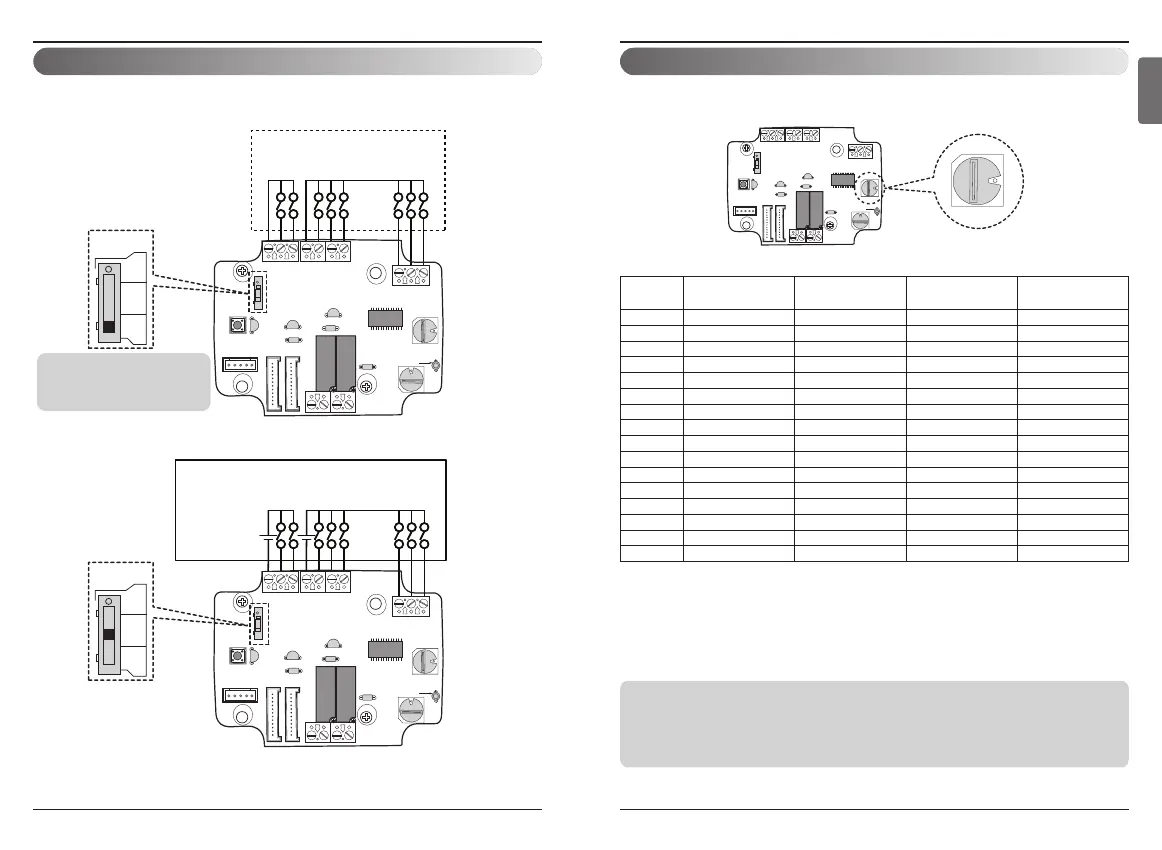
3. Setting of ‘SETTING_SW’
n Using ‘SETTING_SW’ , select the Option of control Function
as described below
Notes
• Information of ‘SETTING_SW’ is sensed only initial step by Dry contact module therefore , once the
configuration changed , Reset of Dry contact module is required.
• After power input or unit’s reset , wait 25~30 sec(Display LED 10 times blinking) for unit stabilization
then Dry contact module will operate normally.
1) Enable CN_WIND signal – Amount of wind flow (Low, Middle, High) signal enable
2) Enable Thermo ON/OFF input signal
- Desired Temperature 18 ℃ in cooling mode
- Desired Temperature 30 ℃ in heating mode
- No function in FAN mode
3) Enable CN_MODE signal – Operation mode (Cool, Heat, Fan) signal enable
4) Enable Thermostat priority control mode – Indoor’s remote-controller signal will be disregarded
No.
WIND Signal
en/disable
Thermal
en/disable
Oper Mode
en/disable
Dry Contact Control
Priority
0 Disable Disable Disable Disable
1 Disable Disable Disable Enable
4)
2 Disable Disable Enable
3)
Disable
3 Disable Disable Enable Enable
4 Disable Enable
2)
Disable Disable
5 Disable Enable Disable Enable
6 Disable Enable Enable Disable
7 Disable Enable Enable Enable
8 Enable
1)
Disable Disable Disable
9 Enable Disable Disable Enable
A Enable Disable Enable Disable
B Enable Disable Enable Enable
C Enable Enable Disable Disable
D Enable Enable Disable Enable
E Enable Enable Enable Disable
F Enable Enable Enable Enable
<SETTING_SW Function>
Setting and using method
2. Setting of Contact Signal Input
n For input contact closure only(No power input)
n For input contact voltage : DC 12 V, 24 V~


 To Next Page