Installation manual 1716 Dry contact for thermostat
ENGLISH
Setting and using method
Installation of thermostat
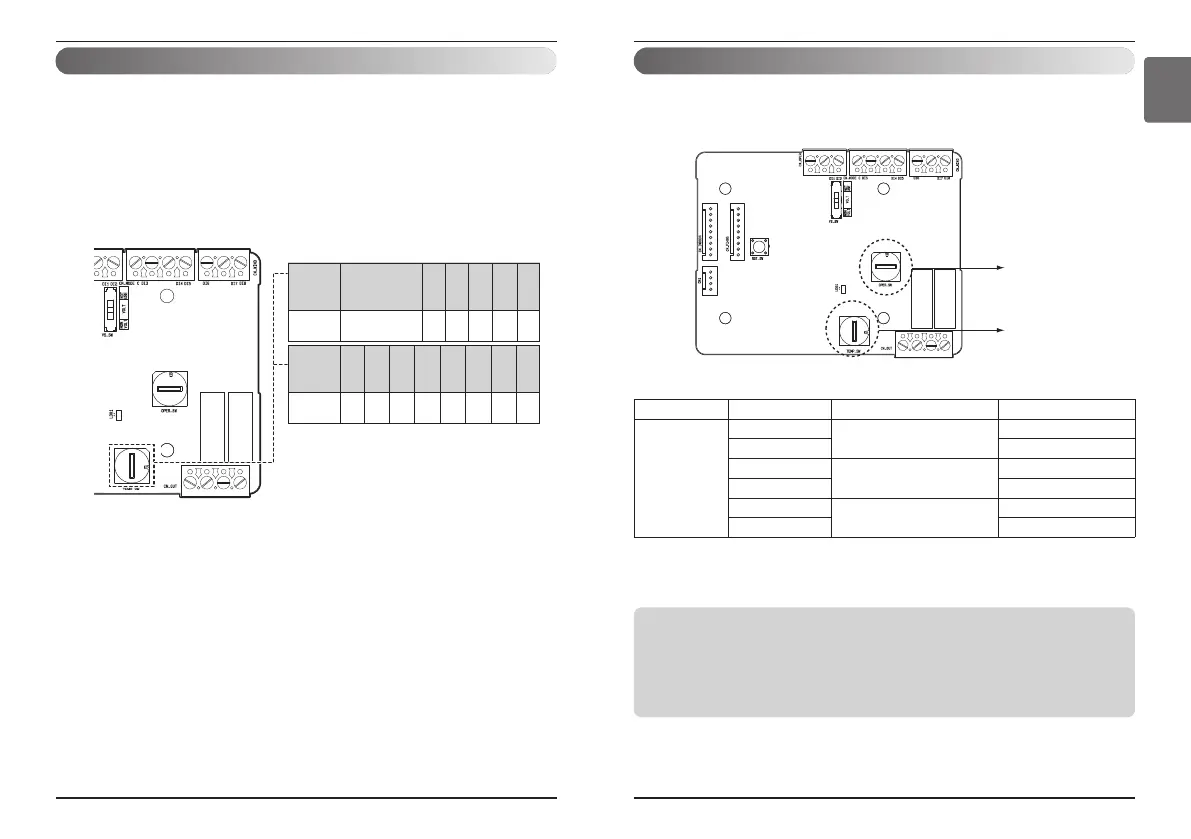
n When interlocking with thermostat, select the option of
control function as described below.
OPER_SW
TEMP_SW
<Switch Function>
TEMP_SW OPER_SW Thermostat mode WIND Signal en/disable
F
8, 9, E, F
Conventional AC Unit Thermostat
Disable
0, 1, 6, 7 Enable
A, B
Heat Pump Thermostat_O
Terminal
Disable
2, 3 Enable
C, D
Heat Pump Thermostat_B
Terminal
Disable
4, 5 Enable
1) When interlocking with thermostat, set TEMP_SW to F.
2) Enable CN_WIND signal – Amount of wind flow(Low, Middle, High) signal enable
Notes
• Information of ‘OPER_SW’ is sensed only initial step by Dry contact module therefore , once the
configuration changed , Reset of Dry contact module is required.
• After power input or unit’s reset , wait 25~30 seconds(Display LED 10 times blinking) for unit
stabilization then Dry contact module will operate normally.
• Do not use desired temperature setting function when interlocking with thermostat.
Setting and using method
Setting of ‘TEMP_SW’
n When setting the desired temperature of the Dry contact
Module
: When operating the indoor unit using Dry contact module’s desired temperature, set the desired
temperature according to the ‘TEMP_SW’ setting.
If Thermostat priority control mode is disabled, the desired temperature can be reset by other controller
- Use the ‘TEMP_SW’ to set the temperature as shown below.
TEMP
(°C)
'TEMP SW'
setting
Not use Dry Contact
module's Desired
temp function
0
18 19 20 21 22
12345
TEMP
(°C)
'TEMP SW'
setting
23 24 25 26 27 28 29 30
6789ABCD
*. E, F : Reserved


 To Next Page