Installation manual 1514 Dry contact for thermostat
ENGLISH
Setting and using method
n Function table for the selection of ‘OPER_SW’ and the input
signal
Notes
1) Thermal On : This input will change automatically desired temperature
Desired Temperature 18 °C In cooling mode
Desired Temperature 30 °C In heating mode
No function In FAN mode
COMM
Themal
Operation
COMM
FAN
HEAT
COOL
LOW
MIDDLE
HIGH
OPER_SW
OPER_SW
CN_MODE input
Function
FAN HEAT COOL
2,3,6,7,A,B,E,F
0 0 0 NA
0 0 1 COOL
0 1 0 HEAT
0 1 1 NA
1 0 0 FAN
1 0 1 NA
1 1 0 NA
1 1 1 NA
Others - - - NA
OPER_SW
CN_WIND input Function
Low Middle High
8,9,A,B,C,D,E,F
0 0 0 NA
0 0 1 High
0 1 0 Middle
0 1 1 NA
1 0 0 Low
1 0 1 NA
1 1 0 NA
1 1 1 NA
Others - - - NA
OPER_SW
CN_OPER Function
Thermal Operation
4,5,6,7,C,D,E,F
0 0 Thermal Off + Stop
0 1 Thermal Off + Run
1 0 Thermal On + Stop
1 1 Thermal On + Run
Others - - NA
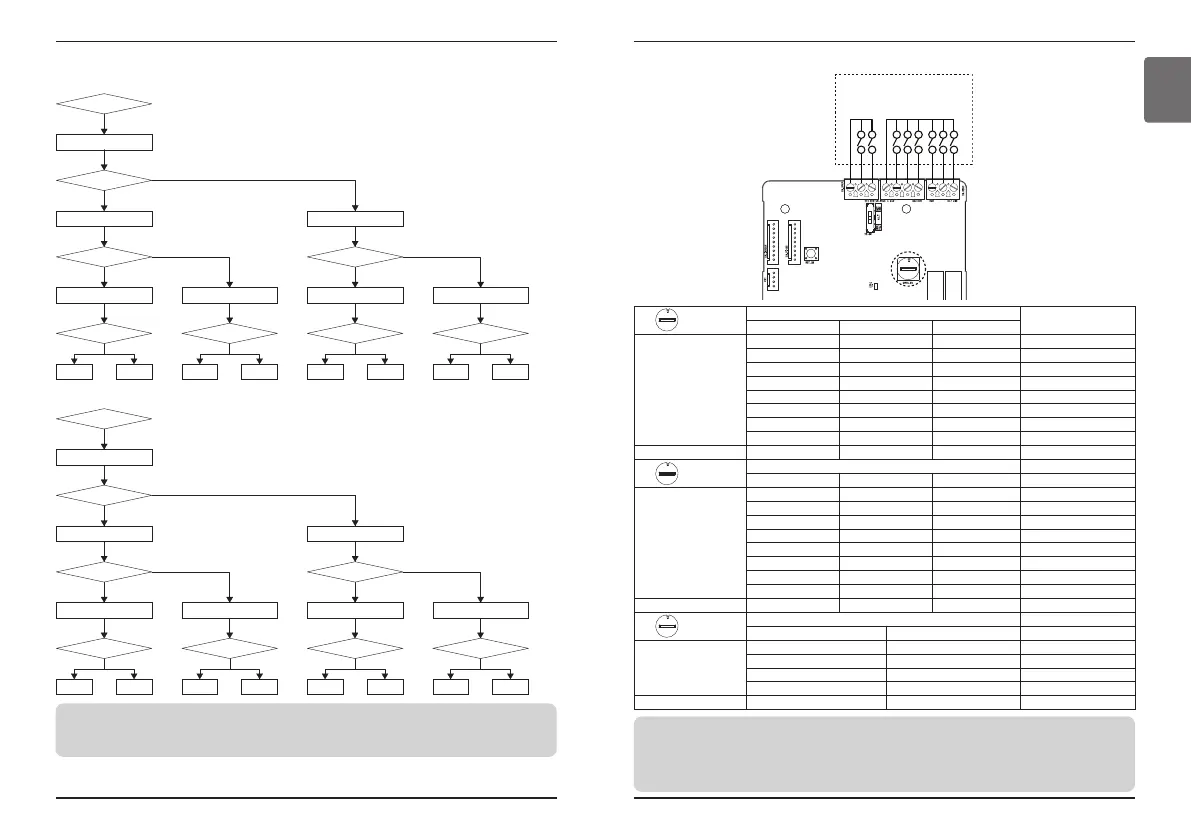
Setting and using method
Use WIND Signal?
Set the switch ‘0 ~ 7’
Use Thermal function?
Use Operation mode?
Switch 0
Set the switch ‘0 ~ 3’
Set the switch ‘0 ~ 1’ Set the switch ‘2 ~ 3’
Switch 1 Switch 2 Switch 3 Switch 4 Switch 5 Switch 6 Switch 7
Set the switch ‘4 ~ 7’
Use Operation mode?
YES
NO
NO
YES
NO
NO YESNO YESNO YESNO
NO
YES
YES
Use Dry Contact
Control Priority?
Use Dry Contact
Control Priority?
Use Dry Contact
Control Priority?
Use Dry Contact
Control Priority?
Use WIND Signal?
Set the switch ‘8 ~ F’
Use Thermal function?
Use Operation mode?
Switch 8
Set the switch ‘8 ~ B’
Set the switch ‘8 ~ 9’ Set the switch ‘A ~ B’ Set the switch ‘C ~ D’ Set the switch ‘E ~ F’
Switch 9 Switch A Switch B Switch C Switch D Switch E Switch F
Set the switch ‘C ~ F’
Use Operation mode?
YES
YES
NO
YES
NO
NO YESNO YESNO YESNO
NO
YES
YES
Use Dry Contact
Control Priority?
Use Dry Contact
Control Priority?
Use Dry Contact
Control Priority?
Use Dry Contact
Control Priority?
Set the switch ‘4 ~ 5’ Set the switch ‘6 ~ 7’
-. When not using WIND signal
-. When using WIND signal
n Flow Chart for ‘OPER_SW’
Notes
• When you change a function with remote control without setting Dry_contact control priority the display
condition between remote control and controller can be different.


 To Next Page