Installation manual 1716 Dry contact for thermostat
ENGLISH
Setting and using method
Notes
• IDU Fan logic, depending on model selected, may delay IDU fan operation momentarily during a cold
start heat call. This function allows IDU coil to warm up prior to operating fan in some IDU models.
• Thermostats that use resistive anticipation are not supported at this time.
• Verify documentation of desired thermostat so that the logic is same as shown in the table above.
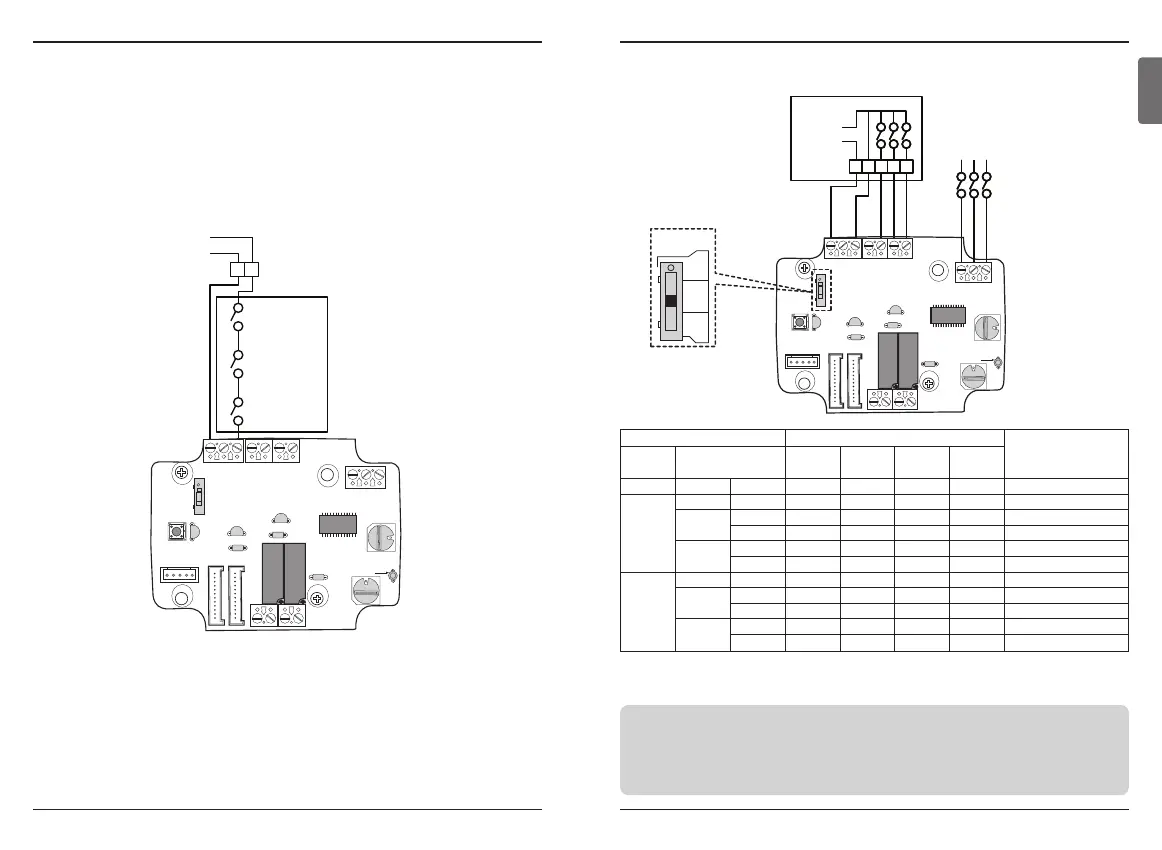
n For conventional thermostat signal input
Thermostat Fan & System Switch Input
IDU Response
[Mode / Thermal / Fan]
FAN
[Auto / On]
MODE
[Cool / Heat / Off]
Operation
FAN
[G]
HEAT
[W]
COOL
[Y]
- - - 0 - - - Disable Operation
Auto
OFF - 1 0 0 0 Off
Cool
RT > SP 1 1 0 1 Cool / On / On
RT < SP 1 0 0 0 Enable
Heat
RT < SP 1 1 1 0 Heat/ On/On
RT > SP 1 0 0 0 Off
ON
FAN - 1 1 0 0 Fan/ Off/ On
Cool
RT > SP 1 1 0 1 Cool/ On/ On
RT < SP 1 1 0 0 Fan/ Off/ On
Heat
RT < SP 1 1 1 0 Heat/ On/ On
RT > SP 1 1 0 0 Fan/ Off/ On
Setting and using method
n Details of Installation for thermostat
1) In case of Occupancy sensor,
- When motion is detected by the sensor, Indoor unit is enabled.
- Otherwise, Indoor unit is disabled.
2) In case of Emergency Stop or Security option.
- When emergency condition occurs, Indoor unit is disabled.
- Otherwise, Indoor unit is enabled.


 To Next Page