1
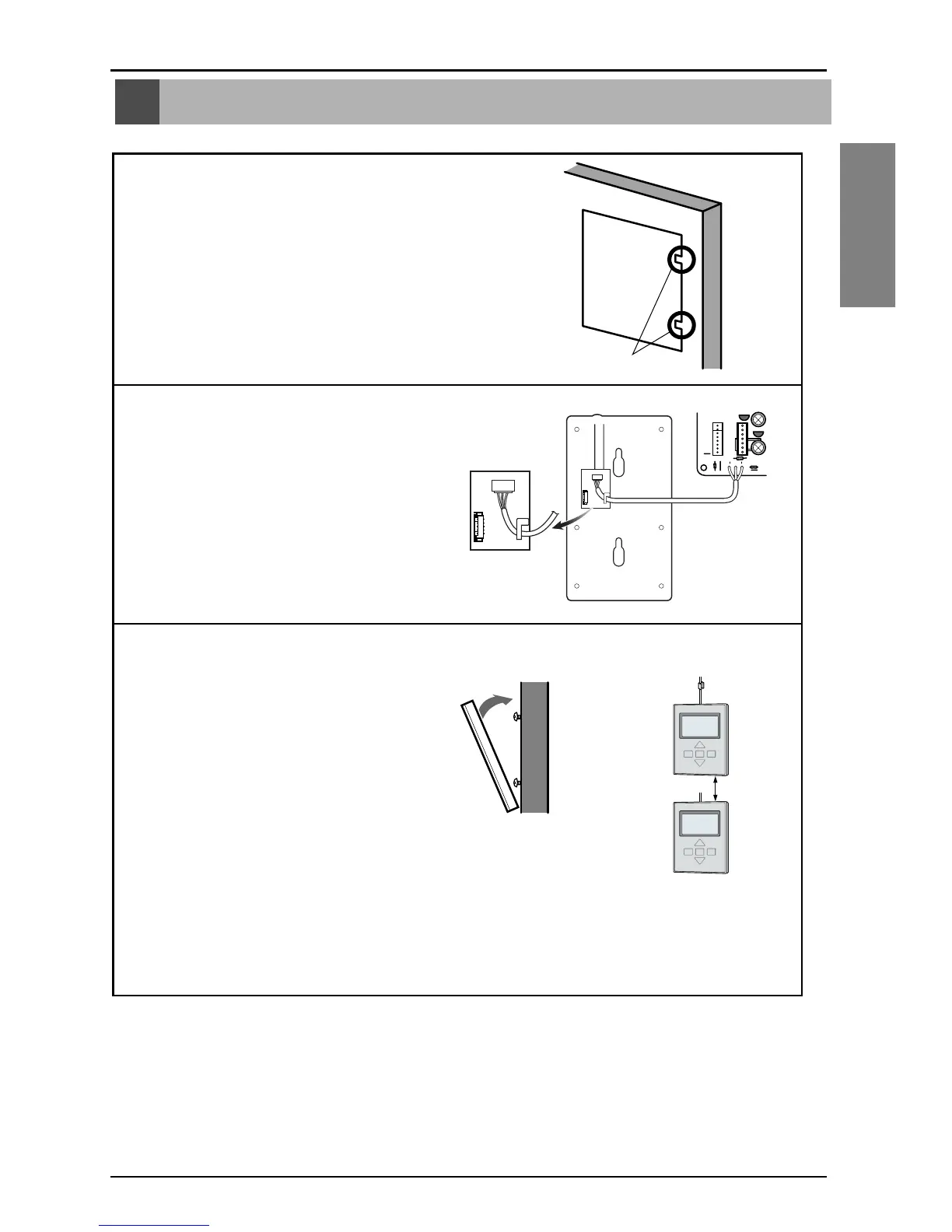
Put the installation paper on the place and determine the
position and height of the fixing screws of the wired remote
controller.
• Refer to the printed side of the installation paper.
2
Plug the connecting cable into the indoor unit.
• The product is being shipped with the cable
connected only to the remote controller.
Fix the connecting cable with the cable rack.
3
Remove the installation paper before installing
the remote controller so that it can fit at the right
place.
* Do not embed the remote controller into the wall. (It may cause the breakdown of the temperature
sensor.)
* If you want to install a number of remote controller at the same place in a vertical line, install them at
regular intervals of 5cm. (It may cause the breakdown of the temperature sensor.)
❐ Supply the power after connecting wired remote controller.
When you need to change wired remote controller, switch off the main power and change it.
If the wired remote controller is changed before switching off the main power, the option function of
the indoor unit can't be used. (option function like "slo" fan speed selection)
Installation Method



 To Next Page