19
OPERATION
ENGLISH
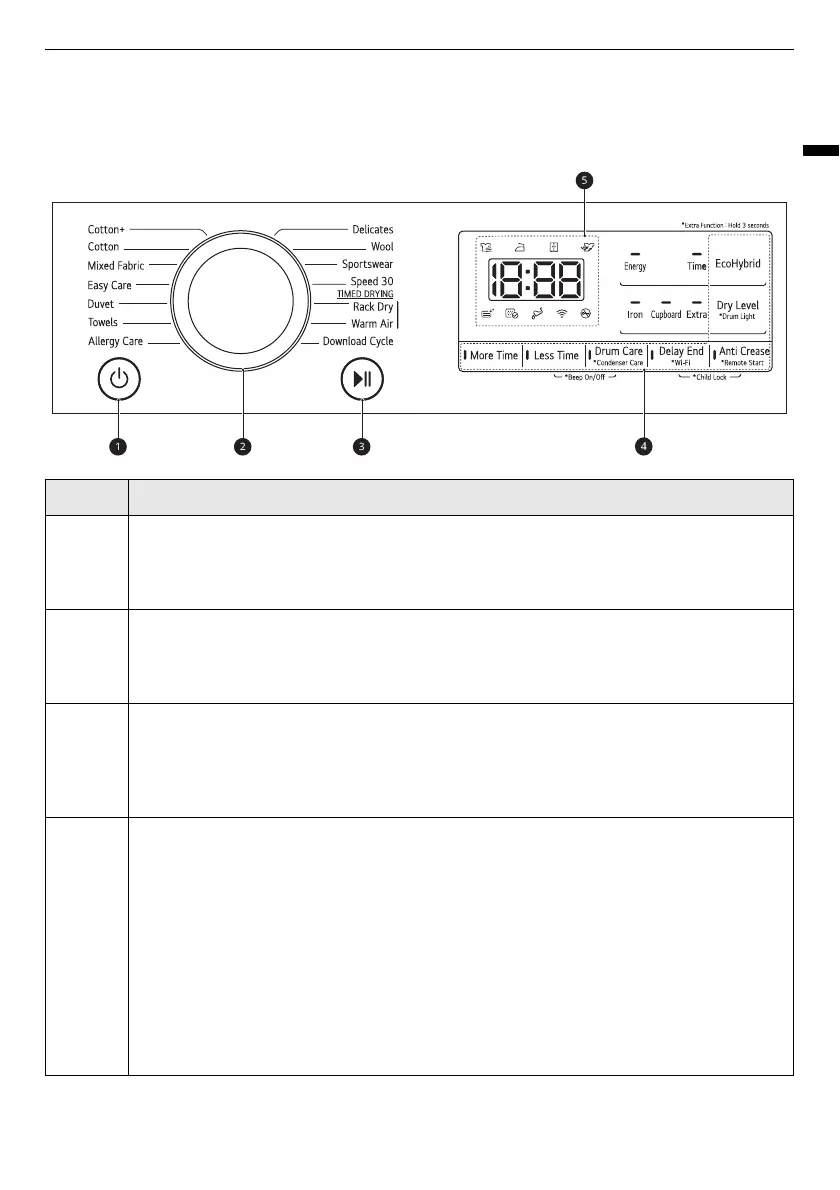
Control Panel
Control Panel Features
Description
a
Power On/Off button
• Press the
Power
button to turn power on and off.
• Press the
Power
button to cancel the
Delay End
function.
b
Programme Selector
• Programmes are available according to the clothing type.
• The lamp will light up to indicate the selected programme.
c
Start/Pause Button
• This
Start/Pause
button is used to start or pause a dry cycle.
• When in pause, the power is turned off automatically after a certain time for safety
reasons.
d
Extra Options and Functions / Additional Programme Buttons
• Use these buttons to select the desired options for the selected programme. Not all
options are available in each programme.
Remote Start
• With the
LG ThinQ
app, you can use a smartphone to control your appliance remotely.
• In order to use the Remote Start function, refer to
SMART FUNCTIONS
.
Wi-Fi
• Press and hold
Delay End
button for 3 seconds to initiate the connection of the appliance
to the
LG ThinQ
application.


 To Next Page