EasyManua.ls Logo

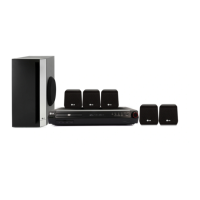
LG SH33SD-S - User Manual

LG SH33SD-S
16 pages
Print Icon
To Next Page IconTo Next Page
Loading...
HT353SDW-D0_ENG_ES_MFL56762605
R
P/N: MFL56762605
HT353SDW
HT353SDW-D0, SH33SD-S/W
W93-T,W93-R
DVD/CD WIRELESS RECEIVER SYSTEM
Read the manual carefully before using the unit
ENGLISH
∞™Àƒª∞Δ√ ™À™Δ∏ª∞ ¢∂∫Δ∏ DVD/CD
¶ÚÈÓ ¯ÚËÛÈÌÔÔÈ‹ÛÂÙ ÙËÓ Û˘Û΢‹, ‰È·‚¿ÛÙ Ì ÚÔÛÔ¯‹ ÙÔ ÂÁ¯ÂÈÚ›‰ÈÔ ¯Ú‹Û˘.
GREEK
SISTEMA DI RICEVITORE DVD/CD WIRELESS
Leggere attentamente questo manuale prima di usare l'unità.
ITALIAN
SISTEMA DE RECETOR INALÁMBRICO DE DVD/CD
Lea atentamente este manual antes de iniciar el uso de la unidad.
Lea detenidamente el contenido de esta tarjeta de Garantia.
SPANISH
LEITOR DE DVD/CD SEM FIOS
Leia cuidadosamente este manual antes de utilizar a unidade
PORTUGUESE

Other manuals for LG SH33SD-S

Questions and Answers

  • L
    Linda WigginsSep 4, 2025
    Why can't I tune into radio stations on my LG Receiver?
    • J
      Jason VargasSep 4, 2025
      If you cannot tune into radio stations on your LG Receiver, ensure the antenna is securely connected and positioned correctly. If the signal strength is weak, try tuning in the station manually. Note that you may need to preset the stations.
  • S
    Scott GloverSep 18, 2025
    How to fix dim front panel display on LG Receiver?
    • C
      Christopher WardSep 18, 2025
      To brighten a dim front panel display on your LG Receiver, press SLEEP(Dimmer) on the remote control.
  • M
    Mitchell BakerSep 16, 2025
    Why is the DVD/CD Receiver audio CD indicator not working on my LG device?
    • C
      Christian HobbsSep 16, 2025
      If the power is on but the DVD/CD Receiver audio CD indicator does not work on your LG device, it could be because no disc is inserted. Insert a disc and check that the DVD or audio CD indicator in the DVD display is lit.
  • R
    Robyn ReedSep 14, 2025
    Why is the playback picture poor on my LG SH33SD-S?
    • M
      Melissa WarrenSep 15, 2025
      If the playback picture quality is poor on your LG Receiver, the disc might be dirty. Try cleaning the disc.
  • K
    Kimberly CarrilloSep 12, 2025
    Why is my LG SH33SD-S Receiver making a loud hum or noise?
    • B
      bartoncaitlynSep 13, 2025
      If you hear a loud hum or noise from your LG Receiver, it could be due to: * A dirty disc. Clean the disc. * Poorly connected speakers and components. Connect the speakers and components securely. * The DVD/CD Receiver being too close to the TV. Move your TV away from the audio components.
  • J
    Julia RamirezSep 12, 2025
    What to do if my LG DVD/CD Receiver does not start playback?
    • C
      cbryanSep 12, 2025
      If your LG DVD/CD Receiver does not start playback, here are some possible reasons and solutions: * No disc is inserted. Insert a disc and check that the DVD or audio CD indicator in the DVD display is lit. * An unplayable disc is inserted. Insert a playable disc, checking the disc type, colour system, and Regional code. * The disc is placed upside down. Place the disc with the playback side down. * The disc is not placed within the guide. Place the disc correctly on the disc tray inside the guide. * The disc is dirty. Clean the disc. * A menu is on the TV screen. Press the SETUP button to turn off the menu screen. * The Rating level is set. Cancel the Rating function or change the rating level.
  • W
    wilsonvincentSep 9, 2025
    What to do if my LG SH33SD-S has no power?
    • J
      Jeremy BrownSep 9, 2025
      If your LG Receiver has no power, the power cord might be disconnected. Ensure the power cord is securely plugged into the wall outlet.
  • M
    Ms. Ruth GoodmanSep 7, 2025
    Why is there no picture on my LG SH33SD-S Receiver?
    • M
      Mark McdowellSep 7, 2025
      If there is no picture on your LG Receiver, it may be due to several reasons: * The TV might not be set to receive the DVD signal. To fix this, set the TV to the appropriate input for the DVD/CD Receiver. * The video cable may not be securely connected. Ensure the video cable is properly connected to the jacks. * The connected TV might be turned off. Make sure to turn on the TV.
  • D
    davidwilliamsSep 5, 2025
    How to fix the dim front panel display on my LG Receiver?
    • J
      jhartSep 6, 2025
      To brighten a dim front panel display on your LG Receiver, press SLEEP(Dimmer) on the remote control.
  • J
    Joshua DennisAug 21, 2025
    Why does my LG SH33SD-S Receiver remote control not work properly?
    • Q
      quinnkyleAug 21, 2025
      If your LG Receiver remote control isn't working correctly, ensure you're pointing it directly at the receiver's remote sensor. Try using the remote within 23 ft (7 m). Remove any obstacles between the remote and the receiver. If it still doesn't work, replace the batteries with new ones.

Summary

Quick Setup Guide

Speaker System Connection

How to connect speakers, subwoofer, receiver, and transmitter for optimal setup.

5.1 Speaker Setup

Guide to configuring the 5.1 channel surround sound system settings.

Speaker Selection

Choose and adjust individual speakers for optimal audio output.

Introduction and Overview

Before Use

Initial steps and important information before operating the unit.

Installation Guide

Guidance on connecting and setting up the audio system components.

Operation Modes

Instructions on how to use the various functions of the unit.

Setup and Preferences

Details on initial settings for picture, sound, language, and other preferences.

Media Playback Guide

Guide to playing audio CDs, MP3, WMA, JPEG, and DivX files.

Troubleshooting Common Issues

Solutions for common problems encountered with the unit.

Compliance and Notices

Information on European Union directives and representative details.

System Installation

Ferrite Core Attachment

Instructions on attaching a ferrite core to speaker cables for noise reduction.

Connection Procedures

TV Connection Options

How to connect the DVD/CD Receiver to a television using various methods.

Antenna and Optional Equipment

Connecting FM antenna and external devices like a VCR.

Speaker System Wiring

Detailed steps for connecting speakers, subwoofer, and wireless components.

Wireless System Setup

Instructions for configuring the wireless transmitter and receiver.

Wireless Transmitter ID Setup

Setting Wireless Transmitter ID

How to set or reset the identification code for wireless communication.

Unit Operation

Front Panel Controls

Detailed explanation of buttons and functions on the unit's front panel.

Remote Control Functions

Comprehensive guide to using the remote control for all operations.

Setup and Configuration

Initial Settings Guide

Guide to configuring basic preferences like language, display, and audio.

General Operation Settings

Adjusting picture, sound, and other general operational parameters.

Progressive Scan Setup

Enabling high-quality progressive scan video output.

Audio Output Options

Selecting audio output modes and configuring surround sound.

Parental Controls and Region

Setting up rating locks, passwords, and area codes for disc playback.

DivX VOD Registration

Obtaining a registration code for DivX Video On Demand services.

Media Playback and Radio

Presetting Radio Stations

How to store and tune into FM radio stations for easy access.

Playing Digital Files and CDs

Guide to playing audio CDs, MP3, WMA, JPEG, and DivX files.

Programmed Playback

Creating custom playback sequences for tracks from discs.

JPEG Viewing and Slide Shows

Displaying JPEG images, including slideshow functionality.

Advanced Operations

RDS Operation

Utilizing Radio Data System for station information and program type search.

Additional Features

Accessing advanced functions like time search, screen saver, and memory recall.

Time Search Functionality

Starting playback from a specific point in a DVD or DivX movie.

System Select Modes

Configuring the unit for different TV display systems (PAL, NTSC, AUTO).

Reference Information

Language Codes

Codes for setting disc audio, subtitle, and menu languages.

Area Codes

Codes for specifying the region of DVD video discs.

Troubleshooting

Power and Operation Issues

Solutions for problems related to unit power and basic operation.

Picture and Sound Problems

Guidance for resolving issues with video display and audio output.

Disc Playback Issues

Troubleshooting steps for poor picture quality or playback errors.

Tuning and Remote Control

Fixes for radio tuning problems and remote control malfunctions.

Specifications and Compatibility

File Format Compatibility

Details on supported formats for MP3, WMA, JPEG, and DivX files.

USB Recording Limitations

Notes and limitations regarding recording audio to a USB device.

Unit Specifications

Technical details including power, dimensions, weight, and output.

Speaker Specifications

Technical details for the main speakers, subwoofer, and wireless components.

LG SH33SD-S Specifications

General IconGeneral
HDMI Output1
BluetoothYes
Audio Formats SupportedDolby Digital, DTS
Total Harmonic Distortion0.08 %
Input Sensitivity200 mV
TypeReceiver
Response Bandwidth20Hz-20kHz
Input Impedance47 kOhm
Tuner BandsAM/FM
Height168mm

Related product manuals