EasyManua.ls Logo

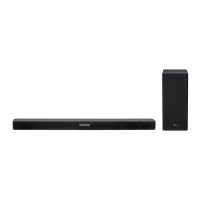
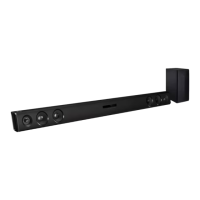
LG SKC9 - User Manual

LG SKC9
85 pages
Print Icon
To Next Page IconTo Next Page
Loading...
SERVICE MANUAL
SERVICE MANUAL
CAUTION
BEFORE SERVICING THE UNIT, READ THE “SAFETY PRECAUTIONS”
IN THIS MANUAL.
CONFIDENTIAL
MODEL: SKC9 (SKC9, SPK8-W)
P/NO : AFN78474410 MAY, 2018
MODEL: SKC9
(SKC9, SPK8-W)
Copyright © 2018 LG Electronics Inc. All rights reserved.
Only for training and service purposes.
LG Wi-Fi Sound Bar
“Any reproduction, duplication, distribution (including by way of email, facsimile or other
electronic means), publication, modification, copying or transmission of this Service Manual is
STRICTLY PROHIBITED unless you have obtained the prior written consent of the LG Electronics
entity from which you received this Service Manual. The material covered by this prohibition includes,
without limitation, any text, graphics or logos in this Service Manual.”

Table of Contents

Questions and Answers

  • R
    Robert WoodSep 23, 2025
    How to fix LG Sound Sync when it is not working with my LG Speaker System?
    • A
      Ashley RiveraSep 23, 2025
      To troubleshoot LG Sound Sync issues with your LG Speaker System, first, check if your LG TV supports LG Sound Sync. Then, verify the connection of LG Sound Sync. Finally, check the sound settings on both your TV and the speaker system.
  • W
    Wayne WatkinsAug 23, 2025
    How to troubleshoot no woofer sound on LG SKC9 Speaker System?
    • C
      Christopher SchaeferAug 23, 2025
      If you're not getting any sound from the woofer of your LG Speaker System, ensure that the subwoofer's power cord is securely plugged into the wall outlet. If it is, check if the pairing between the unit and the subwoofer has been disconnected.
  • D
    Diana WardAug 25, 2025
    Why is the output sound of my LG SKC9 low?
    • J
      Jessica McfarlandAug 26, 2025
      If the output sound of your LG Speaker System seems low, switch the DRC function to OFF using the “LG Wi-Fi Speaker” app. If connected to a TV, change the AUDIO DIGITAL OUT setting on the TV Setup Menu from PCM to AUTO or BITSTREAM. If connected to a Player, change the AUDIO DIGITAL OUT setting on the Player Setup Menu from PCM to PRIMARY PASS-THROUGH or BITSTREAM. Also, change the Audio DRC setting on the connected device setup menu to the OFF state, and ensure Night Mode is turned OFF.
  • J
    Janice WagnerAug 27, 2025
    Why is there no sound coming from my LG Speaker System?
    • O
      Olivia ChristensenAug 27, 2025
      If your LG Speaker System isn't producing any sound, first, make sure the volume isn't set to the minimum. If it is, simply adjust the volume. Also, if you're using an external device like a set-top box or Bluetooth device, check and adjust its volume level as well. Ensure the mute function isn't activated by pressing the mute button or adjusting the volume. Finally, verify that you've selected the correct input source for your device.
  • L
    Lauren CopelandAug 27, 2025
    What to do if the remote control for my LG SKC9 does not work?
    • C
      Chase DavidsonAug 27, 2025
      If the remote control for your LG Speaker System isn't working correctly, make sure you're operating it within a 7-meter range of the unit. Check for any obstacles between the remote and the unit and remove them. If the batteries are exhausted, replace them with new ones.
  • A
    alejandraparkerSep 18, 2025
    What to do if the AUTO POWER function does not work on my LG Speaker System?
    • R
      Robert GomezSep 18, 2025
      If the AUTO POWER function on your LG Speaker System isn't working, check the connection of the external device, such as a TV, DVD/Blu-Ray player, or Bluetooth device. Also, check the state of SIMPLINK on your LG TV and try turning off SIMPLINK. The function may not operate depending on the connected device.
  • D
    Daniel GibbsSep 15, 2025
    Why does the power not turn on for my LG SKC9 Speaker System?
    • A
      amandamckaySep 15, 2025
      If your LG Speaker System isn't turning on, ensure that the power cord is properly plugged into the outlet. If it is not, connect the power plug to the outlet.
  • P
    peterpriceSep 16, 2025
    How to troubleshoot an LG SKC9 Speaker System that does not work properly?
    • W
      williamaguilarSep 16, 2025
      If your LG Speaker System isn't working properly, try turning off the power to both the unit and any connected external devices like your TV, Woofer, DVD player, or Amplifier, and then turn them back on. If that doesn't work, disconnect the power cord of the unit and the connected external devices and then reconnect them. Note that previous settings may not be saved when the device is shut off.
  • Z
    zachary57Sep 6, 2025
    What to do if my LG Speaker System is not working properly?
    • J
      Jose WilliamsSep 6, 2025
      If your LG Speaker System isn't working properly, try turning off the power to both the unit and any connected external devices like TVs, woofers, DVD players, or amplifiers, and then turn them back on. Alternatively, disconnect the power cords of both the unit and connected devices before reconnecting them. Also, previous settings may not be saved when device power is shut off.
  • S
    Seth HawkinsSep 4, 2025
    Why doesn't the AUTO POWER function work on my LG SKC9?
    • T
      Tonya ReynoldsSep 4, 2025
      If the AUTO POWER function on your LG Speaker System isn't working, check the connection of the external device such as TV, DVD/Blu-Ray player or Bluetooth device. If you have an LG TV, check the SIMPLINK settings and try turning SIMPLINK off. Note that depending on the connected device, this function may not operate.

LG SKC9 Specifications

General IconGeneral
BrandLG
ModelSKC9
CategorySpeaker System
LanguageEnglish

Related product manuals