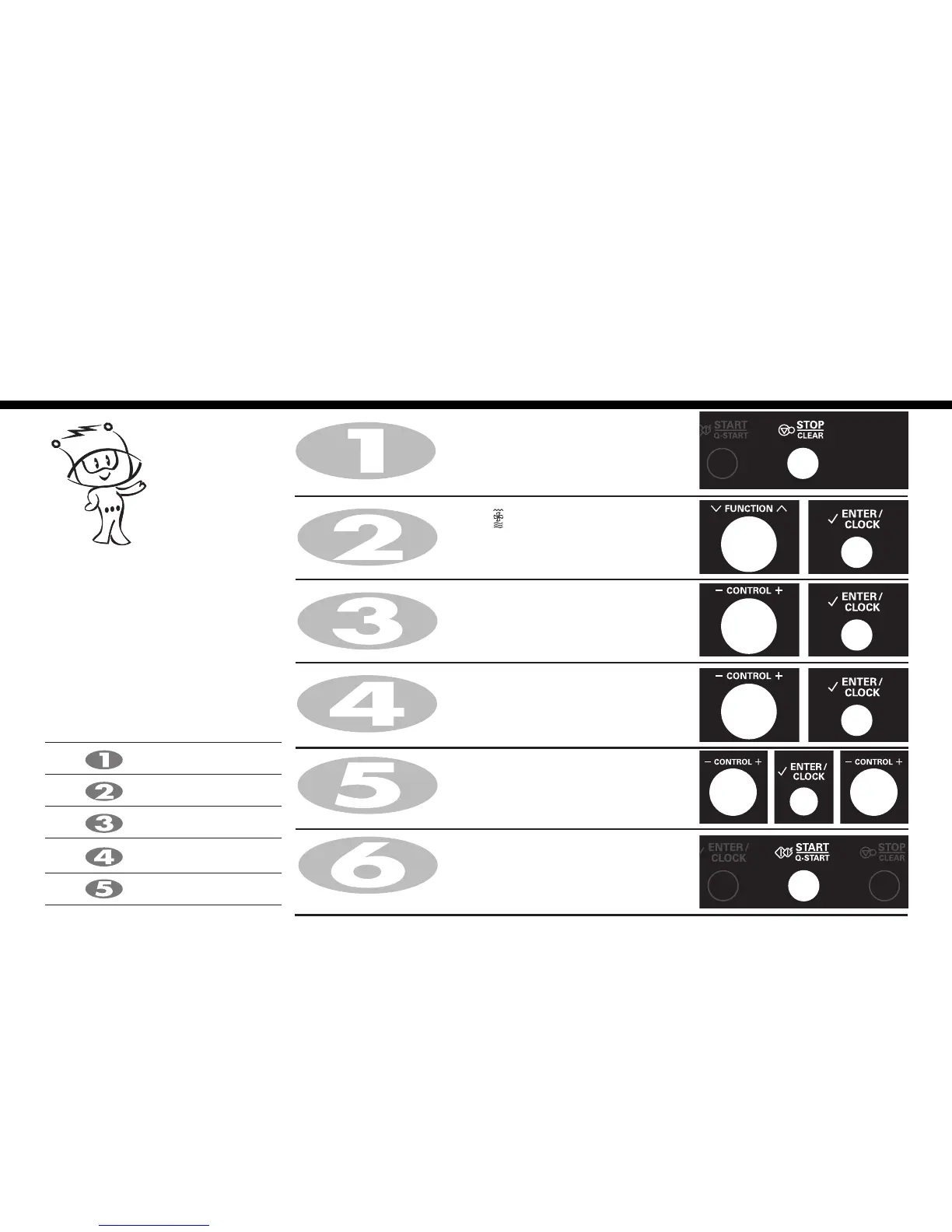
Press STOP/CLEAR.
Turn FUNCTION dial
speed combi
()to select convection
combination mode(Co-5).
Press ENTER/CLOCK for speed combi confirmation.
Turn CONTROL dial knob until display shows “200°C”.
Press ENTER/CLOCK for temp. confirmation.
Turn CONTROL dial knob until display shows “360W”.
Press ENTER/CLOCK for power confirmation.
Turn CONTROL dial knob until display shows “25:00”.
Press START/Q-START.
When cooking you can increase or decrease cooking time by turning
CONTROL dial.
After cooking you must wear gloves to take metal tray /
container out of oven since its hot.
Your oven has a combination cooking
feature which allows you to cook food with
convection temp. and microwave at the
same time or alternately. This generally
means it takes less time to cook your food.
You can set three kinds of micro power
level(180W, 360W, 600W) in speed
combi mode(Co-5).
Speed Combi
(Co-5)
* Speed Combi Category
Co-1
Co-2
Co-3
Co-4
Co-5
Grill-1 + Microwave power
Grill-2 + Microwave power
Grill-3 + Microwave power
(Upper + Lower heater)
+ Microwave power
Convection + Microwave power
Turn CONTROL dial knob until display shows “Co-5”.
Press ENTER/CLOCK for convection confirmation.





 To Next Page