EasyManua.ls Logo

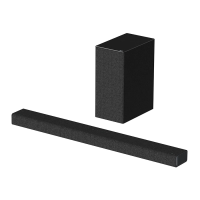
LG SoundPlate 340 - User Manual

LG SoundPlate 340
26 pages
Print Icon
To Next Page IconTo Next Page
Loading...
Please read this manual carefully before operating
your set and retain it for future reference.
SoundPlate 340
SoundPlate 341
OWNER’S MANUAL
ENGLISH
www.lg.com
SOUNDPLATE340
SOUNDPLATE341
FOR THE GUARANTEE TERMS & CONDITIONS,
PLEASE REFER TO INNER PAGE OF BACK COVER.
LAP340-NB_DGBRLLF_ENG.indd 1 2014-08-11 �� 12:26:38

Questions and Answers

  • V
    Victoria HamiltonAug 13, 2025
    What to do if there is no sound from my LG Speaker System?
    • N
      nancyhallAug 13, 2025
      If your LG Speaker System isn't producing any sound, first, ensure that the correct input source is selected. Also, check if the mute function is activated; if so, deactivate it by pressing the mute button or adjusting the volume. When using an external device, make sure the volume level on that device is also appropriately adjusted.
  • M
    Michael HebertAug 16, 2025
    What to do if the output sound of the LG SoundPlate 340 is low?
    • T
      Travis WiseAug 16, 2025
      If the output sound of your LG Speaker System seems low, and it's connected to a TV, go to the TV Setup Menu and change the AUDIO DIGITAL OUT setting from [PCM] to [AUTO] or [BITSTREAM]. If connected to a Player, adjust the AUDIO DIGITAL OUT setting on the Player Setup Menu from [PCM] to [PRIMARY PASS-THROUGH] or [BITSTREAM]. Also, change the Audio DRC setting on the Player setup menu to the [OFF] state.
  • J
    James MooreAug 20, 2025
    How to fix LG Speaker System remote control that is not working?
    • P
      Philip RodriguezAug 21, 2025
      If the remote control for your LG Speaker System isn't working, make sure you're within 7 meters of the unit and that there are no obstacles blocking the path between the remote and the unit. If it still doesn't work, try replacing the battery with a new one.
  • D
    Danielle MedinaAug 25, 2025
    Why my LG SoundPlate 340 Speaker System has no power?
    • A
      Amber BeanAug 25, 2025
      If your LG Speaker System isn't powering on, begin by ensuring the power cord is securely plugged in. If the issue persists, test other electronic devices on the same power outlet to rule out any power supply problems.
  • T
    tylerhuntAug 28, 2025
    Why is the AUTO POWER on/off function not working on my LG SoundPlate 340 Speaker System?
    • K
      Kathleen GrantAug 28, 2025
      If the AUTO POWER on/off function isn't working on your LG Speaker System, verify the connection of the external device (TV, DVD/Blu-Ray player, or Bluetooth device). Note that this function may not operate depending on the connected device. Also, check the status of the AUTO POWER ON/OFF switch on the rear panel of the unit.
  • L
    Lisa NewmanAug 31, 2025
    How to troubleshoot LG Sound Sync not working on LG SoundPlate 340 Speaker System?
    • H
      Heather CopelandSep 1, 2025
      If you're experiencing issues with LG Sound Sync on your LG Speaker System, first check that your LG TV supports LG Sound Sync. Then, verify the connection of LG Sound Sync, whether it's Optical or wireless. Finally, check the sound settings on both your TV and the speaker system.
  • L
    Lauren BartonSep 4, 2025
    What to do if my LG SoundPlate 340 does not work properly?
    • D
      Danny McculloughSep 4, 2025
      If your LG Speaker System isn't working properly, try turning off the power to both the unit and any connected external devices like TVs, woofers, DVD players, or amplifiers, and then turn them back on. If that doesn't work, disconnect the power cord of the unit and the connected external devices, and then try reconnecting them.
  • B
    bwebbSep 8, 2025
    Why is there a noise on the periphery of my LG SoundPlate 340?
    • M
      Michael GoodwinSep 8, 2025
      If you hear a noise coming from around your LG Speaker System, it might be due to the furniture it's placed on resonating with the dual subwoofers. Check if the furniture is firm and horizontal. If the noise persists, try placing a tablecloth between the unit and the surface.

Summary

Getting Started

Safety Information

Essential safety precautions and warnings for operating the unit.

Power Cord Safety

Guidelines for safe handling and connection of the power cord.

Battery and Appliance Disposal

Instructions for environmentally sound disposal of batteries and the appliance.

European Compliance and RF Exposure

Declarations of conformity with EU directives and RF radiation exposure statement.

Unique Features Overview

Highlights of special functionalities like LG Sound Sync and Bluetooth.

Included Accessories List

List and identification of accessories supplied with the product.

Panel Components Identification

Overview of the unit's front and rear panels and their components.

Remote Control Operation

Explanation of buttons and their operations on the remote control.

Battery Installation Guide

Step-by-step guide for installing the battery in the remote control.

Unit Placement and Setup

Guidelines for positioning the unit correctly relative to your TV.

Optional Ferrite Core Attachment

Instructions for attaching a ferrite core to reduce electrical interference.

Operating

Basic Operations and Connections

Fundamental operations like optical input and LG Sound Sync.

LG Sound Sync Functionality

Details on how to use LG Sound Sync for TV audio synchronization.

Connection Methods: Wired & Wireless

Instructions for connecting the unit to a TV using optical or wireless methods.

Auto Power Management

Explanation of the unit's automatic power management features.

Bluetooth Technology Usage

Introduction to Bluetooth wireless technology and its use with the unit.

Bluetooth Device Pairing Process

Step-by-step guide for pairing Bluetooth devices with the unit.

LG Bluetooth Remote App

Instructions for installing and using the companion mobile app for enhanced control.

CINEMA SOUND Effect

Explanation of the CINEMA SOUND effect for enhanced audio experience.

Troubleshooting

General Unit Operational Issues

Solutions for general operational issues with the unit.

Sound Output Problems

Troubleshooting steps for when no sound is produced by the unit.

Remote Control Functionality

Steps to resolve problems with the remote control's functionality.

Auto Power Feature Errors

Solutions for problems related to the auto power on/off feature.

LG Sound Sync Connection Issues

Guidance for resolving issues with LG Sound Sync.

Low Sound Volume Solutions

Tips for improving sound output levels when they are too low.

Furniture-Related Noise

Explanations and solutions for noise originating from furniture placement.

Appendix

Trademarks and Licensing Information

Information about Dolby Digital, DTS, and Bluetooth trademarks and licensing.

Technical Specifications

Technical details including power, dimensions, inputs, and amplifier output.

Maintenance

Unit Handling and Cleaning

Instructions for safely shipping, handling, and cleaning the product.

Warranty

LG UK Guarantee Terms and Conditions

Details of the warranty coverage, terms, and conditions provided by LG Electronics UK.

LG SoundPlate 340 Specifications

General IconGeneral
BrandLG
ModelSoundPlate 340
CategorySpeaker System
LanguageEnglish

Related product manuals