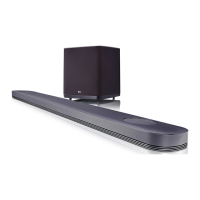
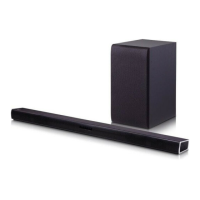
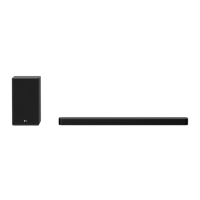
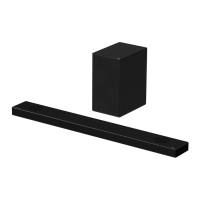
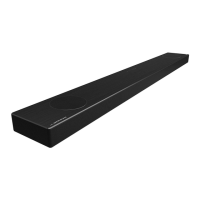
This document is the owner's manual for the LG SJ2 Wireless Sound Bar, also identified by models SJ2, SPJ2BM-W.
Function Description
The LG SJ2 Wireless Sound Bar is designed to enhance your audio experience, offering wireless connectivity and various input options for versatile use. It supports auto power down to save energy and features a portable input for connecting external devices. The sound bar also includes USB playback capabilities, allowing you to listen to music stored on a USB device. It is equipped with Bluetooth® technology for wireless audio streaming from compatible devices. The system includes a wireless subwoofer for enhanced bass, which automatically connects to the main unit.
Important Technical Specifications
General
- Power requirements: Refer to the main label.
- Power consumption: Refer to the main label; Networked standby: 0.5 W (if all network ports are activated).
- Dimensions (W x H x D): Approx. 660.0 mm x 56.0 mm x 99.0 mm with foot.
- Operating temperature: 5 °C to 35 °C.
- Operating humidity: 5 % to 90 %.
- Bus Power Supply: 5 V ⎓ 500 mA.
- Available Digital Input Audio Sampling Frequency: 32 kHz, 44.1 kHz, 48 kHz, 88.2 kHz, 96 kHz.
- Available Digital Input Audio Format: Dolby Audio, PCM.
- OPT.IN (Digital audio in): 0 dBfs, Optical jack x 1.
- PORT.IN (Portable in): 0.4 Vrms (3.5 mm stereo jack) x 1.
Amplifier (RMS Output power)
- Total: 160 W RMS.
- Front: 30 W RMS x 2 (8 Ω at 1 kHz, 10% THD).
- Subwoofer: 100 W RMS (3 Ω at 100 Hz, 10% THD).
Wireless subwoofer
- Power requirements: Refer to the main label on the subwoofer.
- Power consumption: Refer to the main label on the subwoofer.
- Type: 1 Way 1 Speaker.
- Impedance: 3 Ω.
- Rated Input Power: 100 W RMS.
- Max. Input Power: 200 W RMS.
- Dimensions (W x H x D): Approx. 185.5 mm x 303.0 mm x 205.0 mm.
Playable File (USB)
- Sampling Frequency:
- MP3: within 32 to 48 kHz.
- WMA: within 32 to 48 kHz.
- Bitrate:
- MP3: within 80 to 320 kbps.
- WMA: within 56 to 128 kbps.
- Maximum files: Under 999.
- Maximum directories: Under 99.
- Protected file by DRM (Digital rights management): Cannot be played on the unit.
- Video files: In the USB storage device can not be played.
- Performance: Depending on the performance of your USB device, playback may not work well.
Usage Features
Getting Started
- Safety Information: Includes warnings regarding electric shock, exposure to moisture, and proper ventilation. It emphasizes that the device should not be exposed to liquids and that no objects filled with liquids should be placed on the apparatus.
- Power Cord: Users are cautioned about using damaged power cords and advised to refer servicing to qualified service personnel.
- Battery Pack: Instructions are provided on how to safely remove batteries and dispose of them responsibly to prevent environmental contamination.
- Symbols: The manual defines symbols used, such as alternating current (AC), direct current (DC), Class II equipment, standby, "ON" (power), and dangerous voltage.
Remote Control
The remote control allows for various functions:
- Standby/On (⏚): Switches the unit ON or OFF.
- Function (F): Selects the function.
- OPTICAL: Selects the optical function.
- Mute (Mute): Mutes the sound.
- STANDARD: Selects standardized sound.
- BASS BLAST: Reinforces the bass and powerful sound.
- Volume (+/-): Adjusts speaker volume.
- Skip/Search (K): Skips fast backward or forward, searches for a section within a file.
- Play/Pause (DII): Starts or pauses playback.
- DRC ON/OFF: Turns on or off DRC function (Page 20).
- WOOFER LEVEL (+/-): Adjusts sound level of subwoofer.
- AUTO POWER ON/OFF: Turns on or off AUTO POWER function (Page 21).
- Bluetooth connection lock function: Turns on or off the Bluetooth connection lock function (Page 24).
- Battery Replacement: Instructions for replacing the remote control battery (AAA).
Front and Rear Panels
- Front Panel: Features a Standby LED (Red), Function LED (White), Remote sensor, and hidden buttons.
- Rear Panel: Includes volume controls (+/-), Function (F) button, Standby (⏚) button, USB port, PORT.IN (Portable) jack, and OPT.IN (Optical) jack.
LED Indicators
The manual provides a detailed table explaining the LED conditions (Optical, Bluetooth, USB, Portable) and their corresponding descriptions, such as function selected, LED on/blinking, paired with Bluetooth device, or waiting for Bluetooth connection.
Useful Functions
- TV Remote On/Off: Allows controlling the unit's volume with a TV remote.
- BT Lock On/Off: Connects to a Bluetooth device only on Bluetooth functions.
- Auto Power On/Off: Turns the unit on and off automatically by input signals (Optical or Bluetooth).
Installation
- Installing the Sound Bar: Place the unit in front of the TV and the wireless subwoofer anywhere in the room, preferably slightly toward the center to reduce wall reflections.
- Mounting the Main Unit on a Wall: Detailed instructions and diagrams are provided for wall mounting, including preparation materials (wall bracket install guide, wall brackets, screws, wall plugs) and steps for fixing the unit securely.
Connecting
- Wireless Subwoofer Connection: The subwoofer automatically pairs with the main unit. LED indicators show the connection status (Green blink for trying, Green for completed, Red for failed, Off for disconnected). Manual pairing instructions are also provided.
- Ferrite Core: Instructions on how to affix the ferrite core to the power cord to reduce electrical interference.
- Connecting to your TV:
- Using an OPTICAL cable: Connects the sound bar to the TV's optical output.
- OPT.IN connection: Connects an optical output jack of external devices to the sound bar.
- PORT.IN connection: Connects portable players or external devices using a 3.5 mm stereo cable.
- USB connection: Connects a USB memory device for music playback.
- USB Device Requirement: Details on compatible USB devices, file systems (FAT16/FAT32), and limitations (e.g., maximum files/directories, no DRM protected files, no video files).
- Playable File Structure: Explains how folders and files on the USB are recognized and played.
Operating
- USB Operation: Instructions for connecting a USB device, selecting input, and controlling playback (play, pause, skip, search).
- DRC (Dynamic Range Control): Makes the sound clear when the volume is turned down.
- Turn Off the Sound Temporarily (Mute): Mutes the unit.
- Using Your TV Remote Control: Allows controlling some functions of the unit with a TV remote.
- Auto Display Dimmer: Function LED dims after 15 seconds of inactivity.
- Auto Power Down: The unit turns itself off to save energy if no external device is connected or if no input signal is used for 15 minutes. It also turns off after six hours if the main unit has been connected to another device using the analog input.
- How to Disconnect the Wireless Network Connection or the Wireless Device: Instructions for turning off AUTO POWER ON/OFF.
- Auto Function Change: The unit recognizes input signals (Optical, Bluetooth, Portable) and changes function automatically.
- When Optical Signal Comes In: The unit changes to optical function when an optical cable is connected.
- When You Try to Connect Bluetooth Device: The unit changes to Bluetooth function when a Bluetooth device is connected.
- When 3.5 mm Stereo Cable is Connected: The unit changes to Portable function when a 3.5 mm stereo cable is connected.
- Using BLUETOOTH® Technology:
- About Bluetooth: Explains Bluetooth wireless communication technology and its use with the sound bar.
- Bluetooth Profiles: The unit is compatible with A2DP (Advanced Audio Distribution Profile).
- Pairing Your Unit and Bluetooth Device: Steps for pairing a Bluetooth device, including selecting input, performing pairing, and confirming connection.
- Bluetooth Connection Lock: Allows limiting Bluetooth connection to only Bluetooth function to prevent unintended Bluetooth connections.
Sound Adjustment
- Setting the Surround Mode: Offers "STANDARD" for optimized sound and "BASS BLAST" for reinforced bass.
- Adjust the Woofer Level Settings: Adjusts the sound level of the subwoofer.
Maintenance Features
Handling the Unit
- When Shipping the Unit: Save the original shipping carton and packing materials for maximum protection during shipment.
- Keeping the Exterior Surfaces Clean:
- Do not use volatile liquids such as insecticide spray near the unit.
- Wiping with strong pressure may damage the surface.
- Do not leave rubber or plastic products in contact with the unit for a long period of time.
- Cleaning the Unit: Use a soft, dry cloth. For extremely dirty surfaces, use a soft cloth lightly moistened with a mild detergent solution. Avoid strong solvents like alcohol, benzine, or thinner, as these may damage the surface.
Troubleshooting
The manual includes a comprehensive troubleshooting section with common problems, causes, and corrections for:
- General Issues: Unit not working properly, no power, no sound, no woofer sound, remote control not working, AUTO POWER function not work, unit not connect with Bluetooth device.
- Wireless Issues: Device having weak wireless interference, Bluetooth device malfunction or make noise.
This section provides practical solutions to common issues, such as checking power connections, input sources, mute function, volume levels, remote control batteries, and Bluetooth connections. It also advises on optimal placement for wireless devices to avoid interference.

 Need help?
 General

 To Next Page