Getting Started 7
Getting Started
1
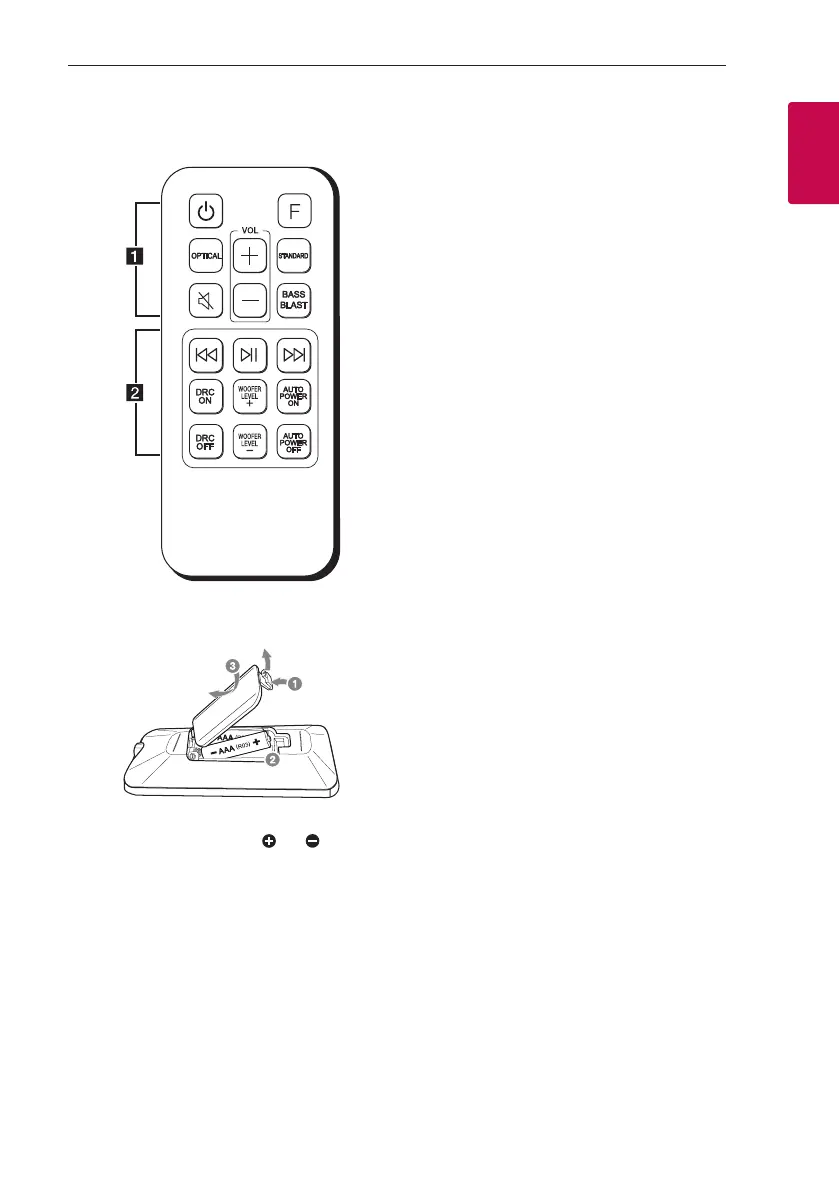
Remote control
Replacement of battery
Remove the battery cover on the rear of the remote
control, and insert battery with and matched
correctly.
• • • • • • • • • • • • • • a • • • • • • • • • • • • •
1 (Standby) : Switches the unit ON or OFF
F (Function) : Selects the function.
OPTICAL : Selects the optical function.
[(Mute) : Mutes the sound.
STANDARD : Selects standardized sound.
BASS BLAST: Reinforces the bass and powerful
sound.
VOL (Volume) o/p : Adjusts speaker volume.
• • • • • • • • • • • • • • b • • • • • • • • • • • • •
C/V (Skip/Search) :
- Skips Fast backward or Forward.
- Searches for a section within a le.
N (Play/Pause) :
- Starts playback.
- Pauses playback.
DRC ON/OFF :
- Turns on or off DRC function. (Page 20)
- Controls this unit using TV remote. (Page 20)
WOOFER LEVEL o/p : Adjusts sound level of
subwoofer.
AUTO POWER ON/OFF :
- Turns on or off AUTO POWER function.
(Page 21)
- Turns on or off the Bluetooth connection lock
function. (Page 24)



 To Next Page