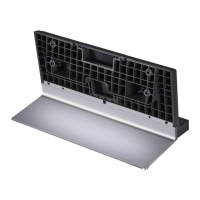
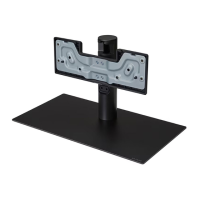
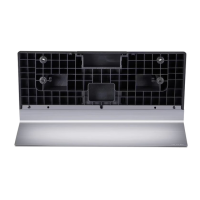
This document is the owner's manual for the LG Stand, model SQ-G2DT97, providing essential information for its assembly, safe operation, and maintenance. It emphasizes the importance of reading the manual carefully before use and retaining it for future reference.
Function Description
The LG Stand (model SQ-G2DT97) is designed to provide a stable base for compatible LG televisions, allowing them to be placed on a flat surface such as a table or cabinet. It facilitates the upright positioning of the TV and includes provisions for securing the TV to a wall to prevent accidental tipping, enhancing safety. The stand is an accessory specifically authorized for use with LG products, ensuring compatibility and structural integrity.
Important Technical Specifications
- Model Name: SQ-G2DT97
- Dimensions (Width x Depth x Height): 580 mm x 28 mm x 640 mm
- Weight: 7 kg
- Screws for Assembly: M4 x L20 (4 pieces)
- Material: The manual does not specify the material, but it is implied to be robust enough to support the weight of a television.
Usage Features
Assembly:
The stand requires assembly, which involves attaching various components using the provided screws. The manual provides step-by-step visual instructions for the assembly process.
- Preparation: Before assembly, it is crucial to place the TV screen-down on a soft, fluffy cloth on a flat surface to prevent damage.
- Two-Person Operation: Due to the heavy weight of the product, at least two people are required for lifting or moving the TV during assembly.
- Screw Tightening: All provided screws must be fully tightened to ensure stability. Over-tightening should be avoided to prevent abrasion of the screw joint, while under-tightening can lead to tilting or tipping.
- Cleanliness: Foreign substances like oil or lubricant should not be used on the screws, as this may cause damage.
- Disassembly: If a wall mount support is to be installed, the stand must be disassembled by reversing the assembly steps.
Mounting on a Table:
- Positioning: After assembly, lift and tilt the TV into its upright position on a table.
- Ventilation: Ensure a minimum space of 30 cm from the wall for proper ventilation.
- Stability: The table or cabinet used must be strong and large enough to securely support the TV. Its width should be greater than that of the TV to prevent the TV from overturning.
- Flat Surface: The TV should be placed on a flat and firm floor or surface. If the stand is not level due to an object placed underneath or an uneven surface, the product may fall, causing injury or damage.
Securing the TV to a Wall:
For enhanced safety, especially to prevent overturning, the TV can be secured to a wall using eye-bolts and wall brackets (not provided, to be obtained from a local dealer).
- Install Eye-bolts: Insert and tighten eye-bolts or TV brackets and bolts into the designated positions on the back of the TV. If existing bolts are present, remove them first.
- Mount Wall Brackets: Mount the wall brackets to the wall, matching their location with the eye-bolts on the TV's rear.
- Connect with Rope: Tightly connect the eye-bolts and wall brackets with a sturdy rope, ensuring the rope remains horizontal with the flat surface.
- Platform/Cabinet: Use a strong and large platform or cabinet to support the TV securely.
Maintenance Features
Cleaning:
- Stains/Fingerprints: If stains or fingerprints are left on the surface, wipe them off gently.
- Avoid Excessive Force: Do not use excessive force when removing stains, as this can cause scratches or discoloration on the product.
Safety Precautions (General Maintenance & Usage):
- Authorized Parts: Only use the authorized stand and wall mounting bracket specifically made for LG products. LG Electronics will not be held responsible for malfunctions, material damage, or injury caused by using unauthorized products.
- Children Safety: Do not allow children to hang on or climb onto the product, as it may fall, causing injury or death.
- Stable Installation: Do not install the product in an unstable, vibrating, or inadequately supported location (e.g., shaky shelf, tilted place). The product may fall or overturn, causing injury or malfunction.
- Product Placement: Always place the product on a flat and firm floor.
- Handling: When moving or handling the product with the stand assembled, be cautious to avoid damaging its exterior.
- Unapproved Items: Do not use any unapproved items to ensure safety and product lifespan. Any damage or injuries caused by unapproved items are not covered by the warranty.
The manual emphasizes that the images shown may differ slightly from the actual product, and the figures illustrating cable arrangement are examples, allowing users to arrange lines freely.

 Need help?
 General

 To Next Page