- 5 -
OPERATING INSTRUCTIONS
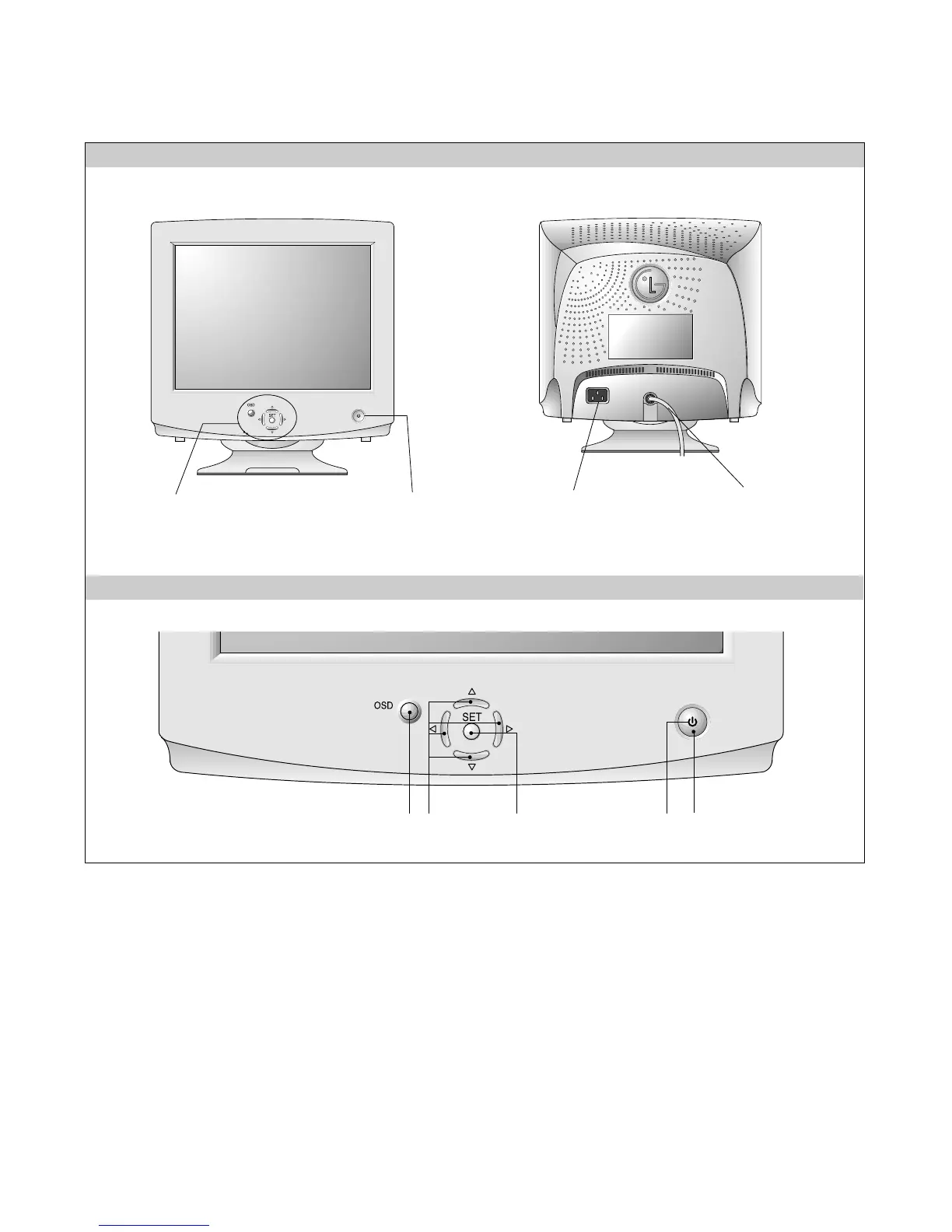
FRONT VIEW REAR VIEW
AC Power Socket
Signal Connector
Power ON/OFF Button
See Front Control Panel
Front Control Panel
1. Power ON/OFF Button
This button is used to turn the monitor ON and OFF.
2. Power Indicator
This indicator lights up green when the monitor operates
normally; in DPMS (Energy Saving) mode, -stand-by,
suspend, or power off mode -its color changes to amber,
and if abnormal or damaging circuit turns out amber blink.
3. SET Button
This button to enter a selection in the on screen display.
4. OSD Select/Adjustment
Use for selecting (highlighting) an OSD icon and
adjusting level of the selected menu.
5. OSD Button
This button to enter or exit the on screen display.








 To Next Page