
 Need help?
Do you have a question about the LG UltraGear 27GR93U-B and is the answer not in the manual?
Guidelines for safe servicing, including the use of isolation transformers and handling of components.
Procedures for performing hot and cold AC leakage current checks to ensure user safety.
Details on customer, model, chassis, and main PCB part number.
Information on screen size, native resolution, and module list.
Covers refresh rate, brightness, color gamut, contrast ratio, response time, and uniformity.
Details on gaming features like FreeSync, G-Sync, and USB port specifications.
Information regarding audio output and enhancement features.
Details on local keys, KVM functionality, and sensor inputs.
List of included accessories and types of cables supported.
Information on input voltage requirements and the product's power rating.
Data on MTBF and conditions for reliable operation and storage.
Lists supported resolutions, horizontal/vertical frequencies, and polarity for HDMI input.
Details supported resolutions, frequencies, and polarity for DisplayPort input.
Specific preset modes for HDMI video input with frequency and resolution details.
Lists required tools and outlines the steps for product disassembly and selective material removal.
Flowchart for diagnosing and resolving issues related to the product not powering on.
Flowcharts for diagnosing and resolving display issues via HDMI and DisplayPort inputs.
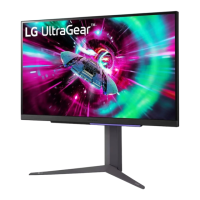
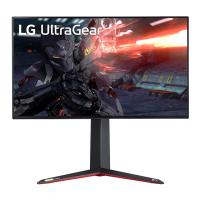
This document outlines the service procedures for an LG LED monitor, model 27GR93U, operating on chassis LM33A. It serves as a comprehensive guide for technicians, covering essential safety precautions, assembly, disassembly, and troubleshooting.
The monitor is designed for general display purposes, offering a high-resolution visual experience. Its primary function is to provide a visual output for connected devices, such as computers, through various input interfaces.
The monitor supports multiple input options, including HDMI and DisplayPort, allowing for versatile connectivity with different source devices. It is capable of displaying a wide range of resolutions and refresh rates, ensuring compatibility with various content types and user preferences. The display features a specific panel type and backlight technology, contributing to its visual performance.
For user interaction, the monitor incorporates a joystick key for navigation and control of its on-screen display (OSD) menu. It also includes an LED indicator, providing visual feedback on its operational status. The monitor's design may include features like a headphone jack, allowing users to connect external audio devices directly.
The monitor is equipped with USB support, including USB-A and USB-B ports, which can be used for peripheral connectivity and potentially for charging devices. Some models may offer advanced features such as AMD FreeSync™ and NVIDIA G-Sync® compatibility, enhancing the gaming experience by reducing screen tearing and stuttering. Other potential gaming-oriented features might include motion blur reduction and hexagonal lighting.
Additional options could include a KVM (Keyboard, Video, Mouse) switch functionality, allowing users to control multiple computers with a single set of peripherals. An auto-pivot feature might also be present, enabling automatic screen rotation based on the monitor's physical orientation.
The service manual emphasizes critical safety precautions that must be followed during any maintenance or repair work. This includes the use of an isolation transformer when servicing non-isolated chassis to prevent electrical shocks and damage to components. It also highlights the importance of replacing safety-related parts with identical components as specified in the manual to maintain the device's safety standards.
A crucial aspect of maintenance involves performing leakage current checks, both hot and cold, to ensure the device is safe for operation after servicing. These checks involve specific procedures and measurement thresholds to identify potential shock hazards.
The manual provides detailed instructions for the assembly and disassembly process, which is essential for accessing internal components for repair or replacement. This includes guidance on the tools required and a step-by-step breakdown of how to remove various parts, such as the stand base, back cover, and PCB. Specific attention is drawn to checking the insulation sheet on the module during reassembly.
Troubleshooting guides are included to assist technicians in diagnosing common issues. For instance, a "No Power" troubleshooting flow outlines steps to check voltage levels at various points (e.g., C105, IC801, IC805, IC804, IC806, IC807) and suggests replacements for components like the adapter, power cord, or specific ICs (IC801, IC805, IC804, IC806, IC807, Scaler(IC100)).
For "No Display" issues, separate troubleshooting flows are provided for HDMI and DisplayPort inputs. These guides direct technicians to check the module's backlight, LED wafer connections, LED harness, WLED_ENABLE signal, and module power supply. They also cover checks for damaged Vx1 cables and Vx1 wafers, suggesting replacements for relevant components like P1800, P1801, P602, P603, LED Harness, IC1800, IC1801, Vx1 cable, or the T-con Board/Module.
For HDMI-related display problems, the troubleshooting process involves verifying input signal support, checking for damaged or misplaced HDMI cables, inspecting I2C signals (AR104, AR103 swing), and examining connectors (JK101/102) for damage. Similarly, for DisplayPort issues, the steps include confirming input signal support, checking the DP cable, inspecting AUX signals (R116 3.3V swing), and checking the connector (JK100) for damage. In both cases, if basic checks don't resolve the issue, replacement of the cable, Scaler(IC100), connector, or the entire PCBA is suggested.
The document also includes information on the monitor's reliability, such as MTBF (Mean Time Between Failures) and environmental operating conditions (temperature and humidity ranges) for both operation and storage, which can be useful for understanding the device's expected lifespan and suitable operating environments.
 General
| Screen Size | 27 inches |
|---|---|
| Refresh Rate | 144Hz |
| Panel Type | IPS |
| Response Time | 1ms (GtG) |
| HDR | HDR10 |
| Adaptive Sync | NVIDIA G-SYNC Compatible, AMD FreeSync Premium |
| Color Gamut | DCI-P3 95% |
| Aspect Ratio | 16:9 |
| Brightness | 400 cd/m² |
| Contrast Ratio | 1000:1 |
| Viewing Angle | 178° (H) / 178° (V) |
| VESA Mount | 100 x 100 mm |
| Resolution | 3840 x 2160 |
| Ports | 2x HDMI, 1x DisplayPort |
| Stand Adjustments | Height, Tilt, Pivot |
| Weight | 13.9 lbs (with stand) |


 To Next Page