4
NOTE: For your safety, do not remove the embedded battery in the product. If you need to replace the
battery, take it to the nearest authorized LG Electronics service point or dealer for assistance.
a
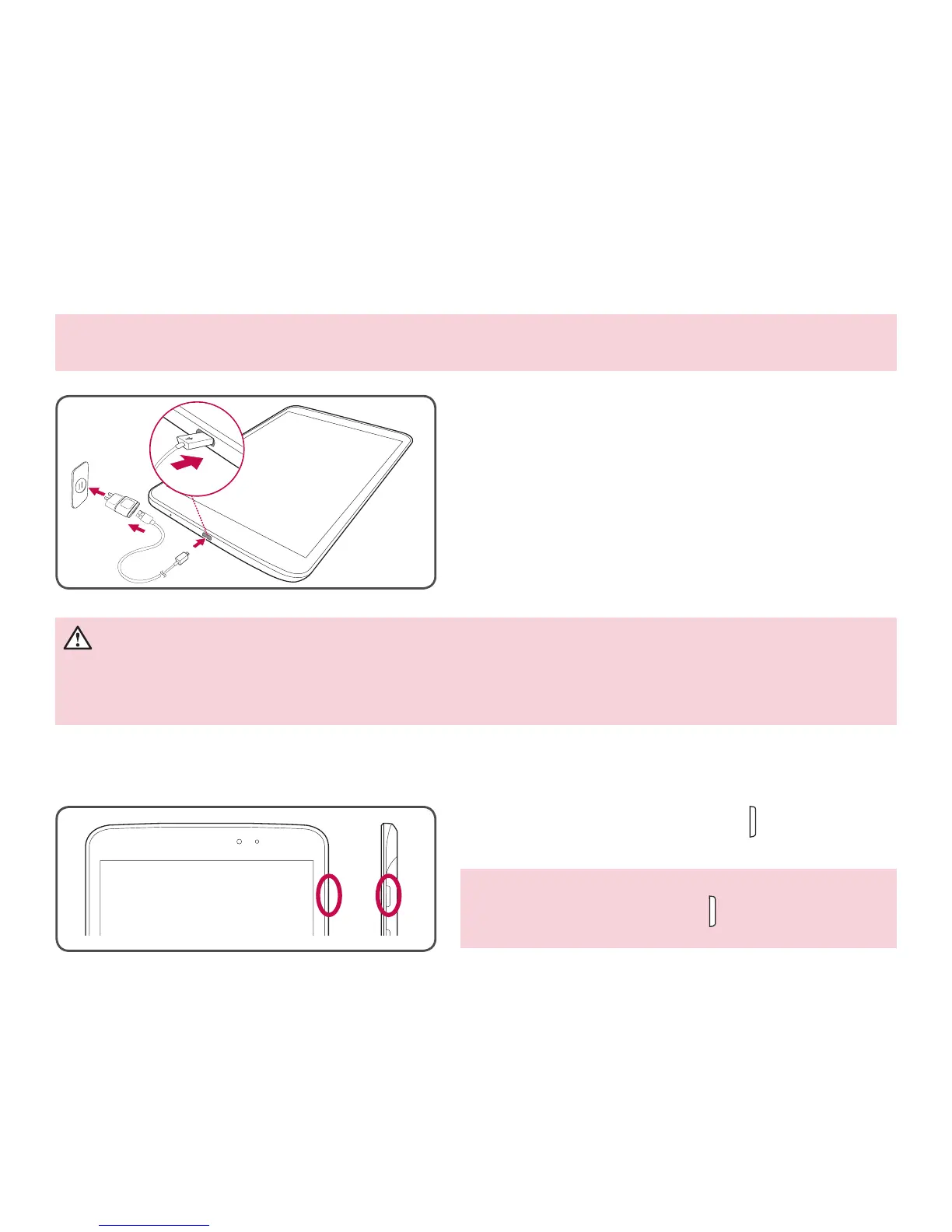
The Charger/USB Port is located at the bottom of
the tablet.
b
Insert one end of the charging cable into the tablet
and the other end into the charger adapter, then
plug the charger into an electrical socket.
• To maximize the battery lifetime, ensure that the
battery is fully charged before you use it for the first
time.
WARNING! Use only LG-approved charging accessories. When using unapproved chargers or
cables, it may cause slow battery charging or may pop up a message regarding charging delay. Or,
unapproved chargers or cables can cause the battery to explode or damage the device, which are not
covered by the warranty.
Turning on your tablet
Press and hold the Power/Lock Key for a couple of
seconds.
TIP! If the device is locked and does not work, press
and hold the Power/Lock Key
for 12 seconds to
turn it off.
Charging the tablet


 To Next Page